Activity
Mon
Wed
Fri
Sun
Feb
Mar
Apr
May
Jun
Jul
Aug
Sep
Oct
Nov
Dec
Jan
What is this?
Less
More
Memberships
UpTrainer - ESPACE MEMBRE
173 members • Free
AndyNoCode
29.1k members • Free
Skoolers
189k members • Free
ExplorIA | Communauté
6.8k members • Free
Freelance Club
53 members • Free
Max Business School™
263k members • Free
The Digital Marketing Bar
67.8k members • $17
Synthesizer
34.3k members • Free
Skool Incubator (Gratuit)
23.3k members • Free
3 contributions to AI Automation (A-Z)

6h •
📸 How I Fired My Social Media Manager (Literally) with n8n & AI 🤖
Hey builders! 👋 We all know the struggle: having ideas is easy. But creating the visual, writing the caption, finding hashtags, and posting at the right time... it's a time-suck. I got tired of spending 1 hour a day on Instagram. So I built a machine to do it for me. ⚙️ The Beast (n8n Workflow): This isn't a simple repost bot. It's a full-stack creative agency running on autopilot: 1. The Briefing 📝: I drop a raw idea into a Google Sheet (Topic, Audience, Tone). 2. The Art Director (Gemini) 🧠: It analyzes the idea and invents a unique visual concept (no stock photos!). 3. The Designer (Replicate Flux) 🎨: It generates a high-quality AI image based on that concept. 4. The Copywriter (Gemini) ✍️: It writes an engaging caption + perfect hashtags. 5. The Publisher (Instagram API) 🚀: It posts directly to my account. The Result?I fill my Sheet on Sunday night in 15 minutes, and my Instagram is fed all week with unique content. Zero manual work. 🎁 The Gift:I'm sharing the complete JSON workflow attached below. You just need to plug in your API keys (Google, Replicate, Facebook) and you're good to go. Let me know in the comments:What's your biggest pain with social media right now? Creating the visuals or staying consistent? 👇
2
0
7d •
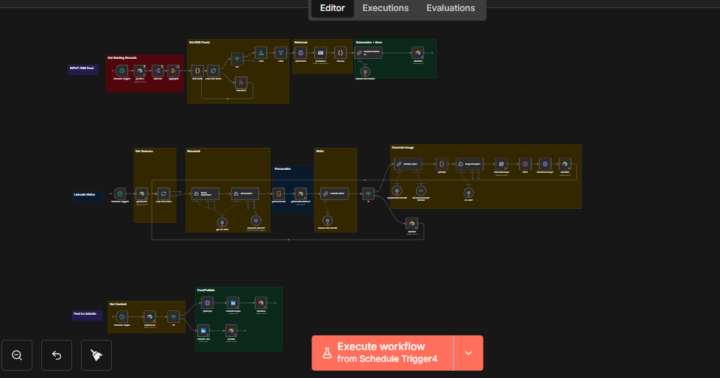
🤖 I built a "Ghostwriter" that creates and posts LinkedIn content for me daily (free template)
Hey builders! 👋 We all know consistency is the key on LinkedIn. But researching trends, writing posts, and finding visuals every single day? That's a full-time job. So I built a complete system on n8n that automatically turns trending news into engaging posts — without me lifting a finger. ⚙️ What the machine does: 🕵️ Auto Research — An AI agent scans the web for trending topics in your niche ✍️ Personalized Writing — Not generic ChatGPT. The system uses YOUR brand guidelines to write in your tone and style 🎨 Visual Generation — Creates a relevant AI image (DALL-E) to illustrate each post 🚀 Ready to Publish — Everything lands in Airtable so you keep final control before it goes live It's literally a content agency running in the background. 📊 Quick stats: - Only 1% of LinkedIn users post weekly, yet they get 9 billion impressions - Posting weekly = 5.6x more followers - AI automation can cut content creation time by 90% 🎁 The Gift: I'm sharing the complete workflow JSON below so you can import it and test it yourself. Drop a "🔥" in the comments and I'll send you the Airtable base structure too. Question for you: Do you prefer letting AI post automatically, or do you keep a human validation step? 👇
0 likes • 4d
@Farhan Baig Thanks
7d •
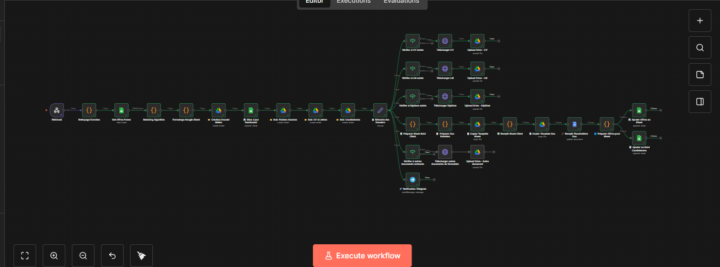
🤖 I automated candidate onboarding for a job assistance agency (from 45min to 30 seconds per file)
I recently completed an automation project for a client who runs a job search assistance service in Belgium. ❌ The problem before: For each new candidate registered via a form, she had to manually: - Create a Google Drive folder with 3 subfolders - Download and organize the CV, cover letter, diplomas - Search for matching job offers on the Forem website (Belgian public employment service) - Compare the candidate's profile with available offers - Update a Google Sheets dashboard - Send a notification for follow-up ⏱️ Estimated time: 30 to 45 minutes per candidate With 10-15 new registrations per week, that easily represented 6 to 10 hours of repetitive work every week. ✅ The solution: A 33-node n8n workflow that does everything automatically as soon as a candidate submits the form: 1. Data reception → Webhook connected to Tally form 2. Smart matching → Double-filter algorithm that compares the profile to job offers (job title, location, skills, contract type...) 3. Client folder creation → Complete structure on Google Drive 4. Document organization → CV, letters, diplomas uploaded automatically 5. Dashboard updated → All info + links to matched offers 6. Notification → Telegram alert to inform that a new candidate is ready 🏆 Results: - Before: 30-45 min/candidate → After: ~30 seconds - Before: Manual job search → After: Automatic matching with scoring - Before: Risk of forgetting/errors → After: 100% standardized process - Before: 6-10h/week → After: Time freed up for human support According to stats, automation can reduce candidate processing time by up to 50% and HR teams can save up to 15 hours per week. 🔧 Challenges encountered: 1. Tally data mapping → The form had 50+ fields with different formats (checkboxes, multi-select, files...). I had to create a "cleaning" node to normalize everything. 2. The matching algorithm → Finding the right balance between "too strict" (few results) and "too broad" (irrelevant results). I opted for a 2-level system: broad filter then precise scoring. 3. File management → Downloading files from Tally and uploading them to Google Drive with the correct naming in the correct folder.
0 likes • 6d
@Abu Abdualrhman Thanks !
0 likes • 6d
@Amanda Janet Thanks
1-3 of 3

@nafiou-tino-8089
Fullstack Dev turned AI Automation Expert ⚡️ Building advanced n8n workflows & Custom AI Agents.
Active 11m ago
Joined Jun 21, 2025
Cotonou
Powered by