Activity
Mon
Wed
Fri
Sun
Aug
Sep
Oct
Nov
Dec
Jan
Feb
Mar
Apr
May
Jun
Jul
What is this?
Less
More
Memberships
AI Automation (A-Z)
164.4k members • $7/month
AI Automation Agency Hub
328.4k members • Free
AI Automation Society
422.4k members • Free
393 contributions to AI Automation Agency Hub

21d •
Consistency Win
Hi everyone I started around 3 months ago. Gained success with gathering interested clients. Have talked to 50+ businesses. Some millionaires as well, advice I received from them was amazing. What I have recently been noticing is a lot of quiet days as I am getting interests on average getting 4 meetings a week through referral networking. Ig thats a win in my eyes. But how to deal with quiet days ?

0 likes • 21d
That is definitely a win. 4 meetings a week through referrals is a strong signal that people trust the conversations you are having. Quiet days are hard because they make progress feel invisible, but they are also part of the rhythm. Sometimes the work is still compounding even when the calendar looks empty.
21d •
What would you automate last, not first?
Most people ask the opposite question. What should I automate first? What can AI replace? Where can I save time fastest? But I think the better question is: What should I avoid automating until I understand it properly? Because some workflows are messy for a reason. The handoff is unclear. The owner is unclear. The decision rule keeps changing. The data is incomplete. The client expectation is still moving. If you automate that too early, you don’t remove the mess. You just make the mess faster. For me, the last thing I would automate is any process where people still disagree on what “done” actually means. Curious how others think about this. What would you automate last, not first?
4
0
23d •
What's the hardest part of an AI project after the contract is signed?
In my experience, it is not the build. It is getting close enough to the real workflow to understand what actually needs to be built. The contract usually gets signed around an idea: “We need an AI assistant.” “We want to automate this process.” “We need a chatbot for our clients.” “We want agents to handle this work.” But once the project starts, the real work begins. You find out the process is different depending on who does it. The knowledge is spread across Slack, emails, spreadsheets, old docs, and someone’s memory. The exceptions matter more than the standard flow. And the person who approved the project is often not the person doing the work every day. That is where AI projects either become useful or become another tool nobody trusts. The hardest part is turning the client’s original request into something operationally real. Not just what they asked for. What the business can actually use, adopt, and rely on. Curious how others see this: After the contract is signed, what part of an AI project usually becomes the hardest for you?
0 likes • 21d
@Frank Jurado Agree! The contract captures the commercial intent, but the real requirements live with the people doing the work every day. That is where the exceptions, shortcuts, workarounds, and actual pain points show up. Skipping that layer is how good technical execution still ends up solving the wrong problem.
0 likes • 21d
@Vishal Singh The better the discovery before signing, the cleaner everything gets after signing. It builds trust, reduces surprises, and helps both sides understand what is actually being committed to. I still think post-signature discovery matters too, because the real workflow usually has details that only show up once you get closer to the team doing the work.

23d •
Tried a side quest today
Made a rule for myself today: No new tools for 7 days. Harder than I expected 😭 Every time I open X or Skool, there's: - a new AI model - a new agent framework - a new "must-have" tool And somehow they all look like the thing that'll solve everything. But honestly? Most of my progress this month came from using the same stack repeatedly. Not from switching. Tiny win today: Didn't add anything new. Just cleaned up an old workflow. Boring? Yes. Useful? Also yes.
1 like • 23d
The tool-switching feels productive, but the real progress usually comes from staying with one stack long enough to actually get good with it. Cleaning up an old workflow may be boring, but it probably creates more value than adding another shiny tool.

23d •
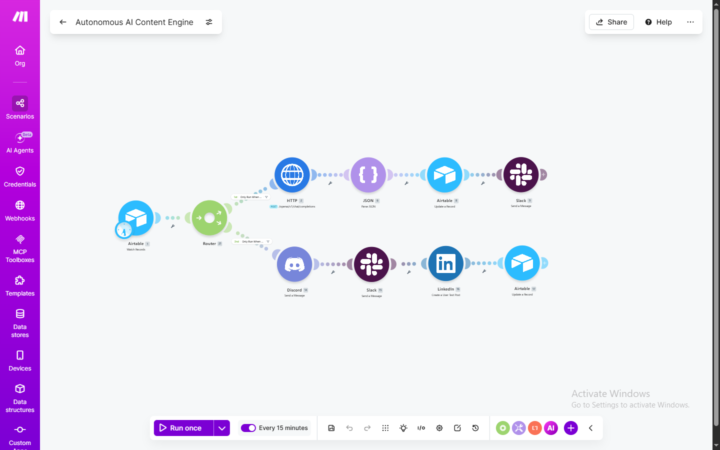
Just got this automated AI content engine running smooth on Make 🛠️
Wanted to share a quick breakdown of a 2-scenario setup I just built. It handles multi-platform content creation, review, and 1-click publishing. You can approve or regenerate AI posts using custom buttons right inside Slack, so you never have to open Airtable. How it works: - Scenario 1 (The Builder): Airtable watches for new rows. A router splits things up. If it's on "Processing," it sends data to OpenAI via HTTP, parses the JSON, and sends a styled card to Slack with interactive buttons. If it's "Approved," it skips the AI step to save token costs and automatically blasts the post to Discord, Slack, and LinkedIn. - Scenario 2 (The Listener): A standalone webhook listens for those Slack button clicks 24/7. When you click approve or regenerate, it catches it instantly and updates the status back in Airtable to trigger the next loop. The coolest fixes in this build: - No more crashing: Wrapped the OpenAI tokens in Make's native escapeJSON() function. Before this, raw quotes and newlines from the AI would break the Slack block payload and break the scenario. - Zero lag: Splitting the webhook listener into its own separate scenario stops background polling conflicts and keeps things from timing out. Are you guys building manual approval buttons into your automated pipelines, or just letting the AI publish everything straight away? Let me know!
1 like • 23d
Interesting setup. The separate listener scenario is a nice touch. Have you noticed any meaningful difference in approval rates or content quality since adding the Slack review step?
1-10 of 393

@muhammad-waqar-3495
I help SMBs reduce workflow friction with AI/automation, from audit to implementation.
Active 15h ago
Joined Mar 9, 2026
Powered by