Activity
Mon
Wed
Fri
Sun
Feb
Mar
Apr
May
Jun
Jul
Aug
Sep
Oct
Nov
Dec
Jan
What is this?
Less
More
Memberships
Google Ads Dropshipping (Free)
4.4k members • Free
Women Helping Women Mastermind
10.6k members • Free
6-Figure Affiliate Blueprint
4.3k members • Free
Super Affiliate Academy (Free)
11.8k members • Free
Brand with Sina
11.4k members • Free
DM
Digital Mavericks HQ
2k members • Free
Digital Wealth Creators
17.2k members • Free
Digital Products Academy
3.6k members • Free
Digital Boss Academy
975 members • Free
2 contributions to Digital Boss Academy
Dec '25 •
Introduction
Hi everyone I’m Bobby, excited to join this community! I love that it helps people start, brand, and grow their digital product business with free assets, tips, and tools for Etsy and websites. Big thanks to Digital Boss Zee for creating such a supportive and valuable space. Looking forward to learning and growing with you all!
1 like • Dec '25
@Luna Ortega Why are you messaging everyone in the same way just as you approached me too as well.
1 like • Dec '25
😏😏😏
Dec '25 •
Image Prompts
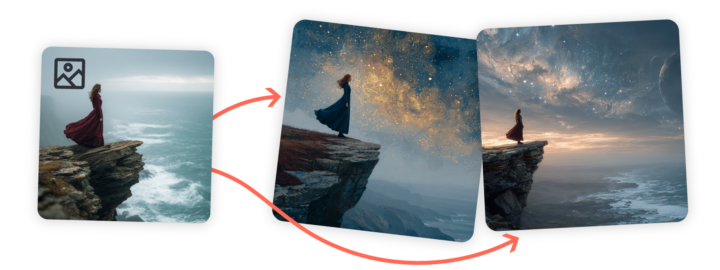
Want to influence the content, composition, and colors of your Midjourney creations? Include an image as part of your prompt! There are several ways you can use your own pictures when creating prompts with Midjourney. In this article, we'll focus on Image Prompts, but there are also Style References, Omni Reference, and moodboards using Personalization. You can even mix and match to get exactly what you want in your images! What are Image Prompts? Image Prompts let you guide Midjourney by including an image along with your text prompt. Midjourney looks at your image's core elements, and uses it as a source of inspiration for your new and unique image. Three Ways to Use Image Prompts 1. Single Image Prompt + Text PromptChoose an image similar to your vision, then add descriptive text. Your text prompt should include everything you want in the final image, rather than instructions for changing the reference image. 2. Multiple Image Prompts Without Text PromptUpload two or more images without text to blend them together—similar to using the Blend command in Discord. This is perfect if you want Midjourney to focus on visual elements. 3. Multiple Image Prompts + Text PromptCombine several images with descriptive text for more detailed guidance. Use your text prompt to specify important details not visible in your reference images. 4. Using Image Prompts To add an image to your prompt, start by clicking on the image icon in the Imagine bar. This opens the images panel, allowing you to upload new images or pick from those you've already uploaded. You can even select multiple images to use in your prompt! Click your image in the uploads library to automatically add it as an Image Prompt. You can also drag and drop your image into any of the image sections to use it in different ways. To remove your image from the Imagine bar, hover your mouse over it and click the X icon.
0 likes • Dec '25
@Jerry Brassfield Bot 😒
1-2 of 2
@monica-beyonce-3541
Mom of two kids tired of getting underpaid trying to explore more and find something new
Active 34d ago
Joined Sep 28, 2025
London