Activity
Mon
Wed
Fri
Sun
Apr
May
Jun
Jul
Aug
Sep
Oct
Nov
Dec
Jan
Feb
Mar
What is this?
Less
More
Memberships
The Sunday Strategy
39 members • Free
SBA Model (FREE)
30 members • Free
Ai Automation Business Skool
46 members • $49/month
AI Automation Agency Hub
302.5k members • Free
AI Automation (A-Z)
142.6k members • Free
The AI Advantage
76.6k members • Free
AI Automation Society
292.1k members • Free
Voice AI Accelerator
7.6k members • Free
AI Enthusiasts
10.7k members • Free
5 contributions to The AI Advantage

Nov '25 •
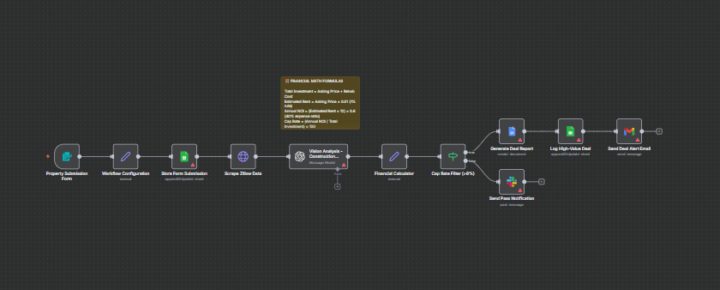
The "AI Investment Analyst" (Vision AI + ROI Calculator)
I’m dropping something special for the Real Estate pros today. The biggest bottleneck in real estate isn't finding deals—it's underwriting them. You spend hours looking at photos, guessing rehab costs, checking rental comps, and building spreadsheets. So I built an n8n workflow that does the entire analysis in 30 seconds. This isn't a scraper. It’s a full-blown financial analyst. The Workflow Logic: 1. Input: You drop a Zillow/Redfin URL into a simple form. 2. The Eyes (GPT-4o Vision): The workflow pulls the listing photos and actually looks at them. It identifies the condition of the kitchen/bathrooms (Dated? Modern? Gut reno?) and estimates a "Rehab Budget" based on the square footage. 3. The Brain (Financial Logic): It pulls area rental comps (via API), takes the asking price + the AI-estimated rehab cost, and calculates the Cap Rate and Cash-on-Cash ROI. 4. The Closer: It generates a formatted Google Doc "Investment Memo" highlighting the pros, cons, and financial projections. 5. The Alert: If the ROI is >12%, it drafts an email to your VIP investor list. Why this is revolutionary: - Visual Analysis: It doesn't just read text; it sees that the cabinets are from the 1980s and adjusts the budget accordingly. - Speed to Offer: You can analyze 50 properties a morning instead of 5. - Standardization: Every deal is underwritten with the exact same math. JSON attached below. Note: This uses OpenAI's Vision model, so it costs a few cents per run, but the time saved is worth hundreds.
2 likes • Nov '25
@Colton Jackson My pleasure!
0 likes • 4h
@Amie Francis ☺️👍
Nov '25 •
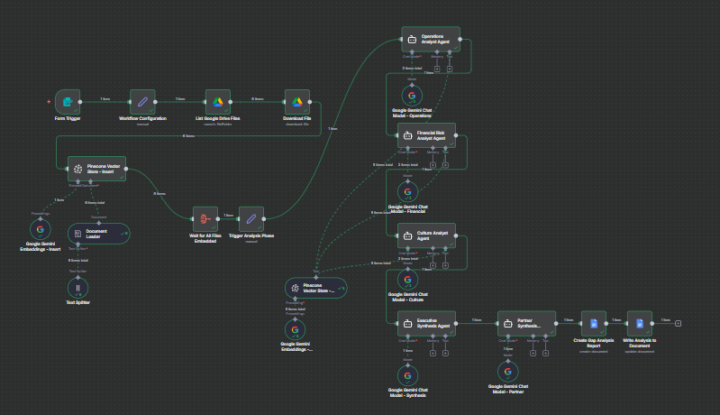
Refactoring from Parallel to Sequential Agents for better context
I recently posted V1 of my Agency Operations Engine, which used a parallel architecture where the Operations, Financial, and Culture agents ran simultaneously. After testing, I realized the final synthesis was weak because the agents weren't learning from each other. I completely rebuilt the flow to be sequential. The Logic Change: 1. Ingestion: Added a "Wait" node to ensure all files are fully embedded in Pinecone before analysis starts. 2. Sequential Chaining: Instead of running in parallel, the data now flows linearly: Operations Analyst -> Financial Risk Analyst -> Culture Analyst. 3. Partner Synthesis: In V1, I just used a Set node to combine the text. In V2, I added a specialized "Partner Synthesis Agent" that acts as a Senior Partner (McKinsey style), taking the previous outputs to generate a "Strategic Business Health Audit" before writing to Google Docs. The output quality is significantly higher when you force the LLM to build context layer by layer rather than trying to stitch three simultaneous outputs together.
0 likes • Nov '25
@Rudolf Van Loggerenberg 😁
Nov '25 •
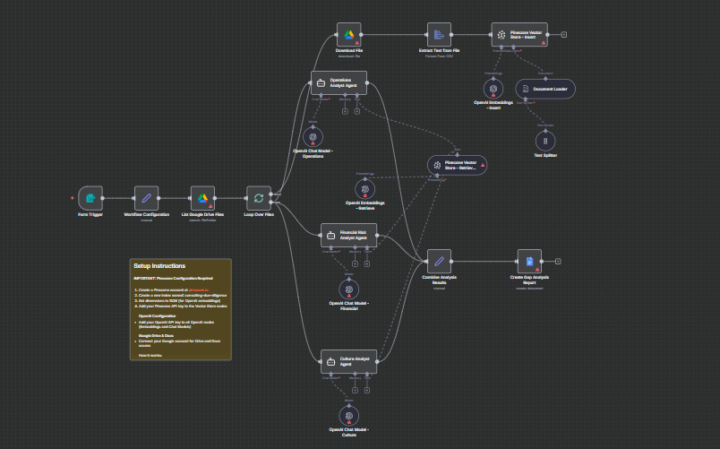
The "AI Junior Consultant" (Auto-Discovery & Gap Analysis)
I’m dropping a workflow today that solves the most expensive bottleneck in consulting: The Discovery Phase. We all know the drill. You sign a client, they dump 50 PDFs, contracts, and SOPs into a Google Drive, and you (or your junior staff) spend 2 weeks reading them just to figure out what’s broken. So I built an n8n workflow that does that 2-week "Document Review" in 5 minutes. This isn't just summarizing a PDF. It is a multi-agent RAG (Retrieval-Augmented Generation) system designed with a "Split Brain" architecture to handle heavy data loads without hallucinating. How it works: The Input: You submit a Google Drive Folder ID containing the client's "Data Room." The Brain (Vector Store): The workflow ingests binary files, runs them through a Recursive Character Text Splitter (to maintain semantic context across chunks), and upserts the vectors into Pinecone using OpenAI embeddings. The Investigation (The Secret Sauce): instead of dumping everything into one massive prompt (which degrades quality), I set up the Vector Store as a "Tool" and split the logic into 3 Parallel Agents. This allows each agent to query only the specific vectors it needs: - Operations Agent: Queries for process bottlenecks and workflow inefficiencies. - Risk Agent: Scans specifically for financial liability and contract loopholes. - Culture Agent: Retrieves data related to employee sentiment and toxic patterns. The Deliverable: It aggregates the outputs from all three branches into a structured "Gap Analysis Report" in Google Docs. The ROI: Speed: Walk into the kickoff meeting knowing their problems better than they do. Accuracy: Because I used a "retrieve-as-tool" logic, the AI cites the specific document for every finding. Scale: You can run this asynchronously for multiple clients without hitting token limits. JSON attached below. Requires an OpenAI key and a free Pinecone index.
2
0
Nov '25 •
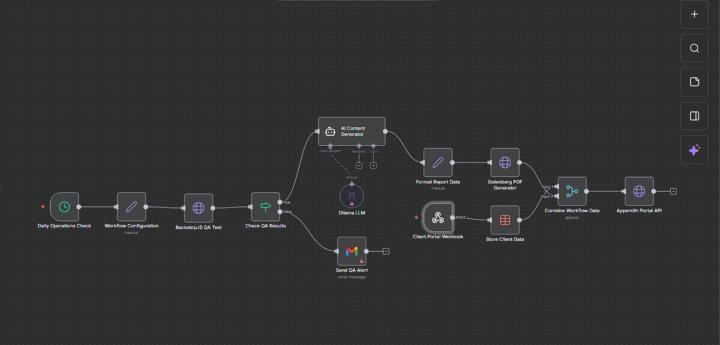
The "Agency Operations Engine" (Automated QA + Reporting)
I’m dropping the big one today. If you run an agency, you know the drill: You have to manually check client sites to see if they’re broken, then write a report, then convert it to PDF, then email it. It’s a massive time sink. So I built a robot to do it for me. This n8n workflow acts as a fully autonomous Account Manager. It runs daily, checks the tech, writes the update, and pushes it to the client portal. The "Stack" (100% Open Source Power): - BackstopJS: Runs visual regression tests on the client’s site (to catch broken layouts). - Ollama (Llama3): I’m running the AI locally. No OpenAI API bills. It analyzes the test results and writes a professional summary. - Gotenberg: Converts the HTML report into a branded PDF. - Appsmith: Pushes the final report directly to the Client Portal. - Gmail: If the QA fails, it bypasses the report and wakes me up with an emergency alert. Why this is a game-changer: 1. Zero Cost AI: Since it uses Ollama, generating these reports is free. 2. Proactive vs. Reactive: I know if a client site is down before they call me. 3. Client Experience: They get a branded PDF report in their portal every week without me lifting a finger. JSON attached below. Note: This is an advanced workflow. You will need endpoints for Backstop/Gotenberg (easy to spin up via Docker).
2
0
Nov '25 •
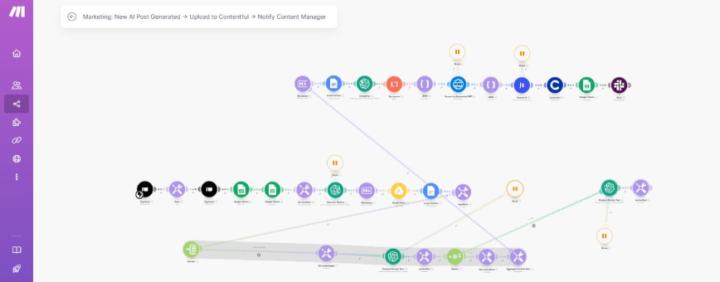
My "Infinite Content" System (Make.com)
Back with another one. Following up on the last drop, I wanted to share the system I actually use to automate long-form SEO content. We all know that if you ask ChatGPT to "write a 2,000 word blog," the output usually sucks. It gets repetitive and loses focus halfway through. So I built this scenario in Make to fix that. Instead of one big prompt, this workflow mimics a human writer: 1. It takes my brief from Typeform. 2. Generates a full outline first. 3. The cool part: It splits that outline up and writes every single section individually. This is how you get high word counts that actually make sense. 4. I even threw in a randomizer router that forces the AI to occasionally add bullet points or sub-headers, just so it doesn't look like a wall of text. Once it's done, it uploads straight to Contentful and pings me on Slack. The JSON file is attached below. You'll just need to swap the Contentful node for whatever CMS you use (WordPress, Webflow, etc.). Let me know if you guys dig this!
1
0
1-5 of 5

Active 4h ago
Joined Nov 22, 2025
Powered by