Activity
Mon
Wed
Fri
Sun
Jul
Aug
Sep
Oct
Nov
Dec
Jan
Feb
Mar
Apr
May
Jun
What is this?
Less
More
Owned by Miyanna
More laughs, less screen time—easy crafts and real family bonding moments start here
Memberships
Magnetic Memberships
3.9k members • Free
1000 True Fans
13 members • $197
Natura Materna Academy
54 members • Free
BYOB: $25K BLUEPRINT™
36 members • $1,111/month
Etsy & Digital Creators Studio
145 members • Free
Vibe Code On The Cheap
30 members • Free
GOOSIFY: Skool Made Fun
13k members • Free
THE SKOOL HUB
5.3k members • Free
The Grown Girls’ Table
86 members • Free
6 contributions to Vibe Code On The Cheap

26d •
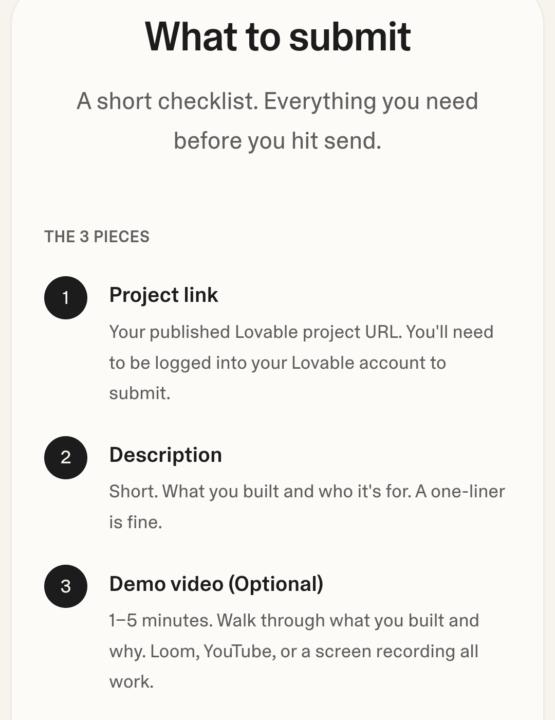
Lovable: Win 1,000 credits this weekend.
Lovable is having a 3-day sweepstakes for builders and founders. This long weekend (Memorial Day in the US, spring bank holiday in the UK), use Lovable to ship something — that side hustle, the MVP, the weekend tool you keep meaning to build. Use at least 5 credits. Submit by Monday, May 25 at 11:59pm PT. Lovable's free tier gives you enough credits to qualify and submit. Subscribers and free-plan users are equally eligible. https://lovable-builders-sweepstake.lovable.app/

🔥
0 likes • 26d
Thanks
28d •
Day 3: Publishing Your App To The World
With the setup I suggest, the whole thing takes 5 minutes! We are simply connecting Github to Vercel. Anything you update in Github automatically goes to Vercel (which is the publishing arm), and so the app is instantly updated as well. *chef's kiss*

🔥
0 likes • 28d
So sorry my little baby had an accident.
29d •
Day 2 - Live App Planning with @Angela Perry
If you've never designed an app before, watch! If you're designing an app right now, watch! You'll be able to see my approach and learn about some possibilities that you may not have realized!

🔥
0 likes • 28d
Watching so I can be caught up for today!
29d •
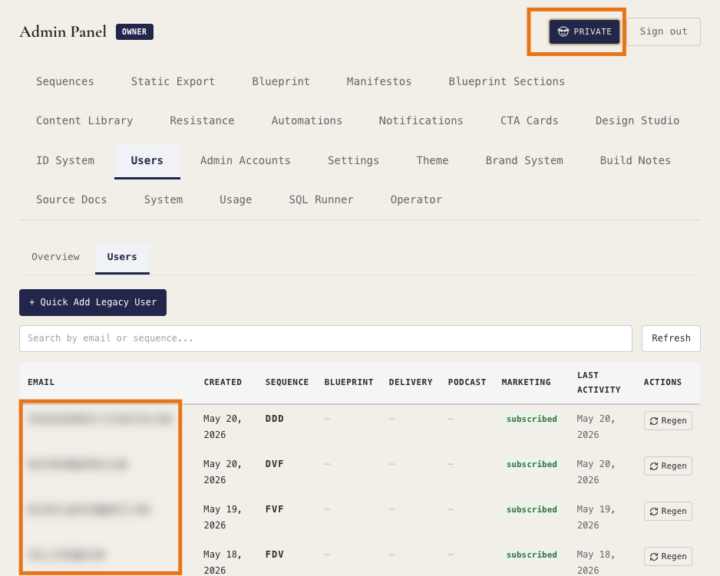
Add a BLUR feature into your app
The best part of creating your own app is being able to use it as a showcase and demo. To share safely, always add a feature to BLUR ON DEMAND so sensitive parts of your build can stay hidden. During today's live class, I was showing the backend of my Instinctual Design Lovable project and realized that there were parts I wasn't able to show in order to protect privacy. So I stopped right then and added this prompt: "I want to add a blur feature for the admin section so that when i am sharing with others, anything that is private, like email addresses or numbers or payments, etc will not be shown. It will just be blurred out .and i want to be able to toggle it on and off with a hovering button near to the sign out button. when it is live, i want the button to look like the emoji of the monkey covering its eyes so i know that is working. first, i want you to assess all areas of the admin and come back with suggestions for what should be blurred and ask me any questions" And several minutes later, this was live!
🔥
0 likes • 28d
Amazing
30d •
My Code Workspace Setup Prompt
@Lea Noreskal @Angela Perry @Miyanna Walls this is what I always paste first into my chat window (using TextExpander) and it sets it up so Claude Code/Codex makes the archived versions. Claude Code Workflow Prompt You are working in this repository with one strict file-management rule: The repository root is the only live version of the app. File Management Rules - All active app edits happen in the root folder. - Never create a second "current version" folder. - Never treat archive/ as the live app. It is frozen reference only. - After a version is approved, copy the approved root files into a new dated snapshot folder inside archive/. - Use a folder name like archive/YYYY-MM-DD-label. - Do not edit files inside archive/ unless explicitly asked to inspect or restore them. - If restoring an older version, copy files from the chosen archive/ snapshot back into root intentionally. Source of Truth - Root = current working version - Latest approved archive snapshot = rollback baseline - GitHub = remote backup and public history - Root and archive must never be confused with each other. Working Process 1. Make all code changes in root. 2. When finished, ask the user to approve the version. 3. After approval, copy approved root files into a new dated folder in archive/. 4. Leave root as the live working app. 5. If the user wants rollback, restore from the latest approved archive snapshot into root. Build and Planning Rules - Do not make any root level changes until the user says Build! - Do not prematurely act while the user is still in plan mode. - When the user gives multiple tasks, collect them all first. When Build! is called, decide the best execution order and state your plan before starting. - Once approved to build, you do not need to confirm individual changes. Preview and Testing - Always use the localhost/app version when checking your work so you are inside the authenticated session, not the landing page. - No live, browser, or server tests are run by you. The user pushes to GitHub manually.
🔥
1 like • 30d
Thank you!
1-6 of 6

Active 51m ago
Joined May 18, 2026
Myrtle Beach