Activity
Mon
Wed
Fri
Sun
Oct
Nov
Dec
Jan
Feb
Mar
Apr
May
Jun
Jul
Aug
What is this?
Less
More
E-Ink Tablet Users
1.4k members • Free
9 contributions to E-Ink Tablet Users

Jul 5 •
🚀 CalSync 1.4.4 is Now Available!
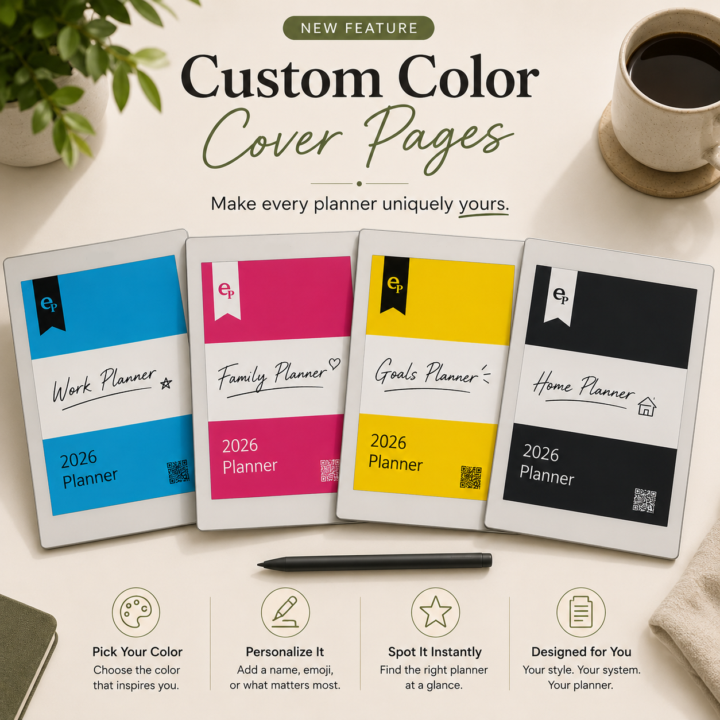
We've just released CalSync 1.4.4 with a bunch of improvements focused on reliability, customization, and making it easier to troubleshoot when something goes wrong. 🎨 Planner Cover Colors You can now give each planner its own cover color. • Pick a color in Edit Planner. • The cover artwork automatically adjusts. • Titles, dates, QR codes, and logos switch between light and dark for readability. • Planner cards and device badges now match the selected color, making multiple planners much easier to identify. 🔍 Better Sync Error Details When a sync fails, you'll now see an error icon in the Activity page. Click it to see exactly what happened instead of just "Failed," whether it's a network issue, expired cloud login, or something else. ☁️ More Reliable Cloud Connections We've improved reliability throughout the connection process. • More dependable reMarkable Cloud pairing. • Switching between Cloud, Direct, and Universal now behaves correctly. • Connection status updates instantly. • Status indicators no longer flicker during brief network interruptions. ✅ One-Click Connection Diagnostics Diagnostics now perform a true end-to-end test for both reMarkable Cloud and Supernote. A tiny test file is uploaded, verified, and automatically removed so you know everything is working without leaving anything behind. 📁 Better Folder Syncing Moving a planner to another folder—or sending a brand-new planner—now reliably appears on your reMarkable without requiring another restart. ⚙️ Stability Improvements • Daily Carousel processing is now more resilient. • Sync failures identify exactly which step failed. • USB users receive better guidance when a cable disconnects. ✨ General Improvements • Clearer "Included with your plan" wording. • Cleaner planner list layout. • Numerous bug fixes and performance improvements throughout the app. Update from inside CalSync when prompted, or download the latest version using your original download link. As always, we'd love to hear your feedback once you've had a chance to use it!

0 likes • Jul 6
I know this might be a while back when it was removed. But Can you remind me why we don't have the Event Stack available on Move? It was good option for me to have
Jun 23 •
We are considering two way calendar support but need feedback.
Meaning a way for you all to add text on available time slots on the calendar and then actually adding and modifying events on the connected calendar(s). Do you think is valuable or overkill?
7 likes • Jun 23
It will be very interesting feature. Especially for those like me who trying to plan on RM my days and don’t want to always go back to my laptop to capture
4 likes • Jun 23
@Jason Smith you will anyway need to do it as you unlikely can integrate Teams, Zooms, Webex and other platforms. That is not an issue for me as I mainly want to plan my own work blocks
Jun 10 •
🚀 CalSync v1.2.1 is Available Now!
This is one of our biggest updates yet, bringing powerful new planner customization features, cross-device planner syncing, and major improvements to reliability across the entire app. New Features Calendar Colors Now Show in Your Planner Your calendars now print using the colors you’ve assigned inside CalSync. • Each calendar keeps its own color• Automatic pastel colors are assigned if no color is selected• Color changes automatically apply the next time you generate your planner• No more random color assignments Limit Visible Hours on Time-Block Planners You can now focus your planner on only the hours that matter to you. For example, display only 9:00 AM–12:30 PM and turn the remaining page space into clean note lines. Perfect for focused schedules, students, professionals, and anyone who doesn’t need a full-day timeline. 🔄 Cross-Computer Planner Sync (Pro & Business) Your planner library now follows you. Create or edit a planner on one computer and automatically access it on your other computers. • Keep planners synchronized across devices• No exporting or importing required• Available on Pro and Business plans 🔌 Device & Connection Improvements We’ve made connecting to your tablet faster and more reliable. • Device profiles now always use the correct password• Switching between device profiles is now instant• Improved connection reliability throughout the app ↻ Auto-Sync Improvements • Auto-push settings apply immediately• Frequency changes take effect instantly• Always uses the active connected device• Universal Mode planners never auto-push by design 🗂 Improved reMarkable Compatibility Planner files now better match reMarkable’s current document format. Benefits include: • More reliable cloud synchronization• Accurate page counts• Better document consistency• Handwritten notes and annotations remain preserved when planners are regenerated 🛠 Reliability & Polish • Regenerating a planner now always preserves its layout and structure • Cleaner calendar color picker interface
0 likes • Jun 10
I have downloaded today, 5 hours ago. I'm on M2 chip
1 like • Jun 10
@Jason Smith Issue resolved. Sorry, wasn't going through the entire history here to see that it was already reported
May 30 •
CalSync v1.1.5 Released
We've just released CalSync v1.1.5, focused on making licensing, device management, and planner generation more reliable. Thank you to everyone who submitted feedback and support tickets. Several of the fixes in this release came directly from issues reported by the community. ### What's New Improved License Activation - Fixed an issue where some users couldn't activate the app even with a valid email and license key. - License activation, recovery, and account lookups are now case-insensitive, so capitalization no longer matters. New Device Replacement Flow - Reached your device limit? - You can now replace an existing authorized device directly from within the app instead of being blocked from activating a new one. Better Diagnostics - The Connection Diagnostic screen now shows your current device slot usage so you can quickly see how many devices are authorized on your plan. Vault Mode Improvements - Fixed an issue where Vault Mode users could still see locked navigation items immediately after authorizing a new device. - Corrected the Vault Mode device limit. Vault licenses now correctly allow two devices. Universal Mode Improvements - Universal Mode users can now generate planners without entering a device password. Improved Reliability - Enhanced internal synchronization so license changes, plan upgrades, and Vault Mode updates are reflected immediately without requiring an application restart. Plus - General performance improvements - Bug fixes - UI refinements ### Download v1.1.5 Apple Silicon (M1 / M2 / M3) https://www.einkpads.io/api/calsync/darwin/arm64/releases/latest Intel Mac https://www.einkpads.io/api/calsync/darwin/x64/releases/latest Windows https://www.einkpads.io/api/calsync/win32/releases/latest Linux https://www.einkpads.io/api/calsync/linux/x64/releases/latest
0 likes • May 30
@Jason Smith This image suggests a notes section on the Move, doesn't it? That is what I'm looking for.
0 likes • May 30
Well, such an option was there for Pro, not for Move, or am I missing something? The Event Stack option is not available for Move. Probably I don't see clearly the option available
May 30 •
🎉 reMarkable Pro - Giveaway Winner Announcement 🎉
First, thank you to everyone who participated, invited friends, shared the community, and helped make this group what it is today. After reviewing participation and community involvement, I’m excited to announce that the winner of the reMarkable giveaway is… 🏆 Scott Kirstein 🏆 Scott has been incredibly active in the community, consistently contributing to discussions, helping others, and referring several of his colleagues to join us. The spirit of this giveaway was always to reward someone who is genuinely engaged and helping grow this community, and Scott embodies exactly that. Congratulations, Scott! Please send me a direct message with your shipping address so I can get your prize on its way. One small favor: when it arrives, I’d love for you to record a short video of yourself receiving and opening it so we can share the excitement with the rest of the community. I also want to give a special thank you to all of our runners-up and everyone who participated. There were several community members who made this a very difficult decision, and your support, engagement, and contributions have not gone unnoticed. The good news is that this is just the beginning. We plan to do giveaways like this much more often as our community continues to grow. Thank you all for being here and for helping make this one of the best e-ink communities anywhere. Congratulations again, Scott! 🎉 @Scott Kirstein
1 like • May 30
Congratulations
1-9 of 9

Active 20h ago
Joined Mar 19, 2026
Powered by