Activity
Mon
Wed
Fri
Sun
Aug
Sep
Oct
Nov
Dec
Jan
Feb
Mar
Apr
May
Jun
Jul
What is this?
Less
More
Memberships
Neon Aliens AI
12 members • Free
3 contributions to Neon Aliens AI

Apr 15 •
AI Operations Code Names & How to Actually Use Them
We will use AI like an operating system. These code names are commands that control how AI thinks and responds. The Only Rule You Need CODE + TASK + INTENT Examples: - DEPTH.CHARGE this idea → find risks - CLEAR.CUT this explanation → make it beginner friendly What Each Code Does: HIVE.MIND Start here when you don’t know where to begin→ explore ideas, directions, possibilities ORBIT.CHECK Zoom out and see the big picture→ use when confused or stuck CONTEXT.LOCK Make sure you’re not missing anything→ use before making decisions DEPTH.CHARGE Think deeper→ strategy, tradeoffs, important problems SIGNAL.BOOST Make it stronger→ content, messaging, clarity, punch SOURCE.LINK Get exact references→ no guessing, no vague answers QUALITY.REFINE Make it better→ improve structure, logic, quality CLEAR.CUT Make it simple→ remove confusion, keep meaning RAW.OUTPUT Give it fast→ no formatting, no fluff POLISH.FINAL Make it excellent→ clean, sharp, ready to ship Stacking: You can chain them together. Examples: Build something from scratch HIVE.MIND → ORBIT.CHECK → DEPTH.CHARGE → CLEAR.CUT → POLISH.FINAL Fix messy output CONTEXT.LOCK → QUALITY.REFINE → CLEAR.CUT → POLISH.FINAL Create content DEPTH.CHARGE → SIGNAL.BOOST → CLEAR.CUT → POLISH.FINAL Move fast CONTEXT.LOCK → RAW.OUTPUT How to “Talk” to AI: Examples: - Run DEPTH.CHARGE on this - CLEAR.CUT this for beginners - QUALITY.REFINE this, it feels off - RAW.OUTPUT, just give me the answer - POLISH.FINAL this Or stacked: - DEPTH.CHARGE + CLEAR.CUT this idea - CONTEXT.LOCK + QUALITY.REFINE this plan How to Use: A. Inline Type it into the Prompt - DEPTH.CHARGE this idea - CLEAR.CUT this - POLISH.FINAL this B. System Prompt "You operate using the following code names: HIVE.MIND = explore broadly ORBIT.CHECK = zoom out and analyze system CONTEXT.LOCK = verify context before proceeding
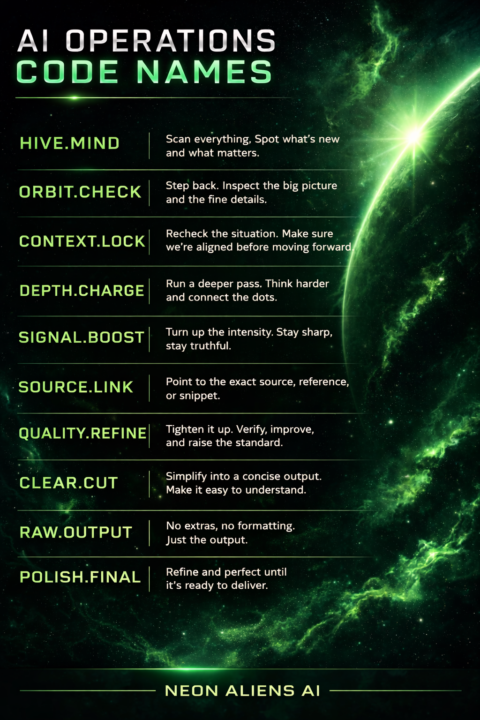
Apr 13 •
AI Avatar Tool - Synthesia
If you hate being on camera but still want to make high-quality videos… this is one of the best tools right now. It turns text → professional videos with AI avatars. https://www.synthesia.io/?via=a6589b
2
0
Apr 7 •
Introduction
Hey everyone, I’m Michelle — co-founder of Neon Aliens AI. Tom calls himself the one asking questions.I’m the one who builds the answers into systems. I’ve spent years in payments, tech, and AI. What I care about is making AI actually useful in real life. Actual workflows that:save time, make money, or unlock something you couldn’t do before. This community exists for that. If you’re here, I am hoping you are willing to think, test, and iterate. I’ll be sharing: • how I approach building with AI • what’s working (and what’s not) • how to go from idea → execution → outcome If you’re building something, I want to see it. If you’re stuck, ask! We’re not here to watch AI happen.We’re here to use it. Welcome in 👽
1
0
1-3 of 3