Activity
Mon
Wed
Fri
Sun
Aug
Sep
Oct
Nov
Dec
Jan
Feb
Mar
Apr
May
Jun
Jul
What is this?
Less
More
Owned by Meagon
Beginner-friendly creator community for AI content, faceless brands, music, storytelling & digital income 💻 Build with us.🩷
Memberships
Six Figure CEO Society
306 members • Free
Pretty Girls Prompt Too
1.2k members • Free
Pretty Girl Universe
373 members • Free
Royale Business Institute
4.2k members • Free
workwithsydney
3.1k members • Free
Influencer Growth Lab
2.6k members • Free
DIGITAL PROFITS COLLECTIVE
2k members • Free
Pretty & Paid Playground
2.7k members • Free
Your First $5k Club w/ARLAN
32.6k members • Free
3 contributions to Credit Freedom Society

Aug '25 •
Hey sis, let me drop this gem for you. 💎
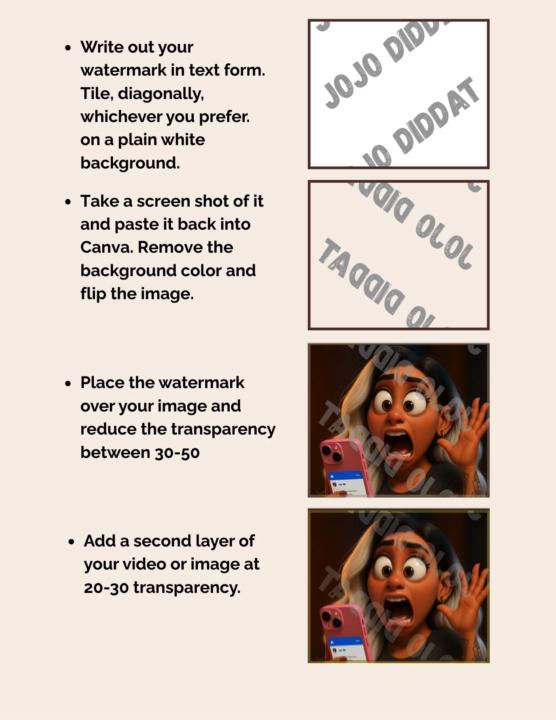
If you’re putting your work out there, you need to protect it — without messing up your aesthetic. Here’s why this method works: ✨ Backwards text throws off AI and editing tools that try to erase watermarks. ✨ Layered transparency makes it harder to remove without damaging your art. ✨ And flipping it? Adds one more wall of protection. It still looks clean — but it makes stealing your work way less convenient. Because protecting your creativity is self-respect, not selfish. 💖 Steps are in the picture.

3 likes • Aug '25
Thank you 😊
3 likes • Aug '25
Thank you ❤️
Aug '25 •
How to Connect ChatGPT and Canva
Step 1: Open ChatGPT (Pro Users Only) - Go to chat.openai.com - Make sure you're subscribed to ChatGPT Plus (required to access plugins or Canva integration via GPT-4) Step 2: Choose GPT-4 & Enable Canva - Click on GPT-4 at the top of your screen - Select "Explore GPTs" or the "Canva" GPT directly - You can also search for "Canva" in the GPT Store and click "Try" or "Use this GPT" Step 3: Give Canva GPT a Prompt - You can now type in prompts like: - "Create a Facebook post graphic for a self-care coach." - "Design a minimal pink and gold eBook cover for women in business." Step 4: Browse & Download Designs - Canva GPT will show you a few design options - Click "Open in Canva" to customize the design directly in your Canva account Step 5: Edit & Schedule in Canva - Make your final edits in Canva - Click "Share" > "Schedule" to post directly to your connected socials.
3 likes • Aug '25
Thank you ❤️
1-3 of 3

@meagon-potberg-8091
💅 Digital baddie in her builder era
🌳 AI, content & creative income
✨ Building my dream life one soft step at a time
Online now
Joined Jul 31, 2025