Activity
Mon
Wed
Fri
Sun
Aug
Sep
Oct
Nov
Dec
Jan
Feb
Mar
Apr
May
Jun
Jul
What is this?
Less
More
Memberships
AI Automation Mastery
30.1k members • Free
CC Strategic AI
3.2k members • $27/month
Clief Notes
41.6k members • Free
Openclaw Builders Club
293 members • Free
23 contributions to Openclaw Builders Club

17h •
Happy mid 2026! Let's keep building and learning agent-first systems
We're officially into the second half of 2026 and I hope you're all making waves in your field, your networks, and your approach to building cool products. Welcome to our newest members too. If you're in this group, you're on the bleeding edge of the AI race because you're using, learning, and building autonomous agent workflows and multi agent systems to manage things for you. This is where everyone wants to be and this is where we're all heading. If you've recently joined or have been here for the last few months, introduce yourself to people here and share your journey and goals. ➡️ What's your experience level with OpenClaw? ➡️ What field or niche are you in? ➡️ Where are you currently based? ➡️ What's one problem you solved this week? There's always someone who has similar interests to you or can help you solve a problem you're working on.
2
0

Jun 5 •
What did you accomplish this week?
Let's get after it this week! I want to hear about what you're tinkering with, what you're building, what you're learning, and just any wins you've had over this past week. Drop it below!
1 like • Jun 9
@Tamás Máté share those screenshots of the MVP, would be cool to see. Also, you could train a claw agent to learn the BMAD method and use this to build the system files for you. Or at least use as an interactive guide
0 likes • 17h
Yo @Tamás Máté how is the BMAD setup working for you? Drop your progress and images, keen to see it in action.
Mar 6 •
New Here? Start Building your AI Agents Right Away🍃
We're excited to have you in the community! You are among our first members, and we really appreciate you! You can explore the "Classroom" section where you'll find, what we are cooking for you in the following weeks. - Openclaw tutorials and step-by-step guides - 40+ ready-to-use skills (Soon) - Workflows and resources built for beginners New content will be continuously uploaded. Before you dive in, introduce yourself below and tell us: - Your name - What areas of your business you’d like to automate with AI systems We can’t wait to see what you’ll build and achieve with AI automation. Let’s get started and grow together!

0 likes • 1d
hey @Richard Asencio how are your content creation systems going? Very keen to see what you've put together.
0 likes • 1d
Welcome @Aqeel Ahmad great to have someone in your field in this space. Keen to hear how you're using AI and agents. What does your day to day look like in physio and how are you integrating agent systems into this?
Jun 4 •
Exciting new OpenClaw builds and agent systems for founders
Hey builders, hope you're already crushing June. We're busy behind the scenes gathering lots of info on which agent systems and Claw builds are best going to serve you guys. We're reading your interests, expertise, and skill level to get an idea of what systems are useful for you to build, manage, and eventually scale. A couple of aims here that we want all of you to achieve: - You build and use the system for your business/agency. Manage your agents to do your dirty work. - You build further products from one or multiple systems. Once you learn the setup, you can ship fast. This takes reps, so the more you build, the better you get, the clearer the vision becomes. - Once you understand the system yourself, you sell it. As a product, a SaaS, a B2B2C service. This has the highest ROI because you're in control of the setup and there's no ceiling on distribution and sales. Here's a sneak peak of some of the multi agent systems we're building here: - Smart Document Processor - Competitive Intelligence Agent - Lead Scoring & Routing Agent (this one is massive) - Customer Onboarding Automation - AI Outbound SDR Agent - Reddit-to-Content Agent - Digital Product Empire Agent (this is also a killer) - AI Review Response Agent - AI Client Renewal Agent - AI SEO Content Strategist (also huge) Which of the aims resonate with you the most? And what build makes the most sense in your niche that aligns with this aim? Keen to hear, drop your thoughts below.
1 like • 7d
Hey all, hope everyone had a productive month of June. Share what you've been working on and what your aims are for this month with OpenClaw and agent systems, we're always keen to hear from the smart minds of the community. Here's what we've been busy building in OpenClaw for the month of June and already posted online. - Smart Document Processor system - Reddit-to-Content Agent system - AI Revenue Forecasting and Churn Prediction Agent - Competitive Intelligence Agent - AI Vendor and Procurement Management Agent Tonnes of applications here. The builds are getting more extensive but easier to build the more you work with the OpenClaw system and understand how to manage your agents. If you want to get the full setups for these systems, comment below or DM me or Peter and we'll send them your way. In the meantime, share what you've learned recently, what you have planned, and how you want to keep learning here. Keep building 💯💯💯
1 like • 4d
@Mike Routen nice one, great use case. Automating the hours of the road part is a really solid take on where to pick up lost time. I've built with Hubspot using automated agent systems, happy to take a look. What's the basic setup and the errors you're seeing now? DM me the info and I can check it out.
7d •
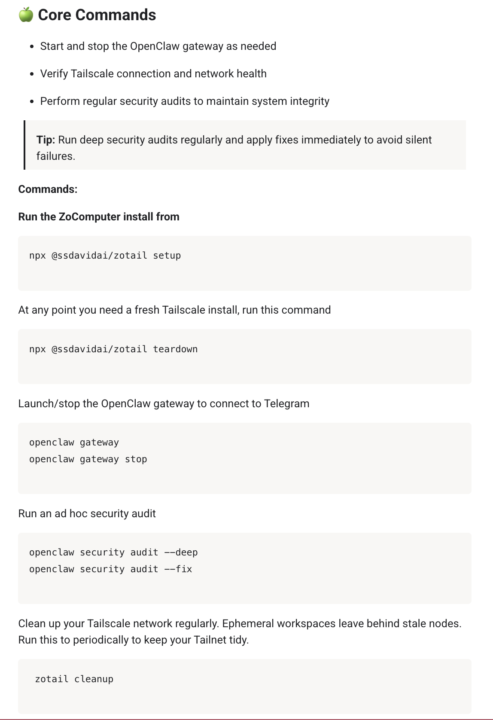
Here is the simplest set of commands to run your OpenClaw
New here and overwhelmed by OpenClaw setup and installation? Don't worry, you're not alone. It's a beast of a system but once you punch through the initial setup, everything becomes clearer Here is the must-have collection of commands to run your agent team, straight from our guides in the Classroom (see attached image). It covers installation steps, opening and maintaining your gateway with your agents through Telegram, and network health. Probably the biggest bang for your buck if you needed everything in one place. We have this in the Classroom right now, ready to follow in a full step by step guide. Check it out here and as always ping us with your installation, troubleshooting. and build questions, happy to help. https://www.skool.com/moltbot-builders-club-7244/classroom/14b4d86d?md=c0aff4632107409babc9b9ba1811b928
2
0
1-10 of 23

@matt-malishev-4225
I help founders and B2B owners in marketing, branding, and creative agencies regain 100's of hours and $100K's a year with smart agent systems
Active 10h ago
Joined Mar 10, 2026