Activity
Mon
Wed
Fri
Sun
Apr
May
Jun
Jul
Aug
Sep
Oct
Nov
Dec
Jan
Feb
Mar
What is this?
Less
More
Memberships
The AI Advantage
76.3k members • Free
AI Automation Hub
3.4k members • Free
Automatize-se
2.2k members • Free
Data and Ai Automations
1.2k members • Free
AI Automation Network
1k members • Free
Brendan's AI Community
23.7k members • Free
SaaS University (GoHighlevel)
7.1k members • Free
The Digital Marketing Bar
67.5k members • $17
AI Growth Tribe
2.5k members • Free
4 contributions to N8nLab

8d •
What Happens When Sales Tracking Runs Itself?
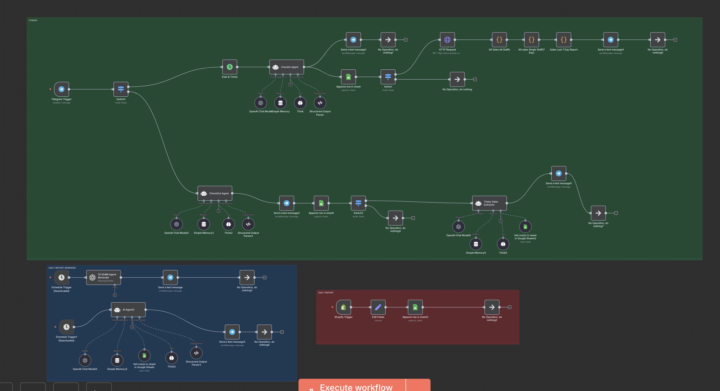
Ever noticed how much time businesses lose just tracking what already happened? Sales come in, someone exports data, another person updates a sheet, someone else prepares a report, and by the time the numbers are ready they are already outdated. I was looking at this workflow earlier and it’s a good example of how a few connected automations can remove most of that manual work. The flow captures events like new sales, processes the information, stores it in a sheet, and then automatically generates summaries and notifications. Instead of someone manually checking dashboards or compiling daily reports, the system simply pushes the information where it needs to go. What I find interesting is how this kind of setup isn’t limited to one type of company. Ecommerce stores could use something similar to track daily revenue. Agencies could automate client performance updates. Consultants or SaaS teams could automatically summarize activity and send internal reports without touching spreadsheets. The biggest lesson I keep seeing with automation is that the real value often comes from small things. Automating a simple reporting process or notification can easily save hours every week and also remove the risk of human error. Curious to hear from others here. What is the most repetitive task in your business that you wish could just run automatically in the background? 🤔
2
0

Nov '25 •
My dream
Guys i just joinned today in this comunnity and will share one digital dream that i never shared before, because here i really found a place that people help each other, and also lots of rich free content that help a lot people like me starting from scratch! my dream is to build an animated cartoon youtube series but till now i didnt find the way to fulfill my dream. Sometimes i see a new platform but always missing things… i already created characters and scenes where the histories will be told…and want to automatize the hole video creation, generating scripts, creating the real scenes , voice , narration, etc… my idea is a kids channel to teach emotions in a 3 -5 minutes video! I already have the channel created just dont know how to transform my idea in a fully automated process for this! Anyone can help?
1 like • Nov '25
@Fernando Nogueira hello, Fernando this a cool idea and. I don't mind lendiya hand, Kindly check your Dm as I have sent you a message
0 likes • Nov '25
@Fernando Nogueira sorry I'm unable to send a message as I haven't entered level 2 is there any other way I can reach out to you
Oct '25 •
How I Automated a Client’s Call Workflow
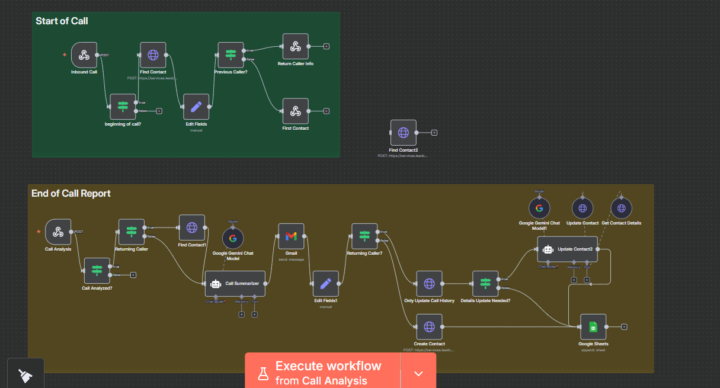
Ever felt like your team spends more time logging calls than actually handling them? That’s exactly the pain my client was facing. Each call meant jumping between spreadsheets, emails, and CRMs—time-consuming and messy. The goal was simple: create a smooth system that tracks calls, updates contact info, and summarizes conversations automatically. Using n8n, I built a two-stage automation—one that handles call intake and another that compiles detailed reports once the call ends. I integrated tools like Google Sheets, Gmail, and Gemini Chat Model, connecting every step with smart logic to detect returning callers and update only what’s needed. One major challenge was ensuring data sync across tools without duplication—but after refining conditions and testing triggers, it now runs flawlessly. The result? The client cut manual admin time by over 70%, with every call summarized, logged, and tracked instantly. They now have more time to focus on what matters—serving customers, not chasing data. If you’ve got repetitive workflows eating up your day, I’d love to help you reclaim that time. Let’s build something that actually works for you.
3 likes • Oct '25
@Jason Hagen built from scratch😁
2 likes • Oct '25
@Marilyn J Hernandez thanks very much

Oct '25 •
n8n workflow
Hello. I'm following your tutorial from this video https://www.youtube.com/watch?v=zEzcwjZf7c8&t=589s and I'm stuck @ download file. I'm getting this error: Cannot read properties of undefined (reading 'startsWith') Any ideas on how to fix this? Thanks.
1 like • Oct '25
@Mandy Teresa i sent you a message on how to go about it!!!
1-4 of 4

@marvellous-adegoke-7990
Professional website designer and automation expert helping businesses scale to the best they can. Let’s bring your vision to life.
Active 8d ago
Joined Oct 10, 2025
Powered by