Activity
Mon
Wed
Fri
Sun
Aug
Sep
Oct
Nov
Dec
Jan
Feb
Mar
Apr
May
Jun
Jul
What is this?
Less
More
Memberships
Ninjas AI Automation
3.9k members • Free
Business Builders Club
8k members • $33/month
The Skool Income Blueprint
111 members • Free
AI Automation Society
422.2k members • Free
Brendan's AI Community
25.9k members • Free
AI Automation Agency Hub
328.4k members • Free
12 contributions to AI Automation Agency Hub

5h •
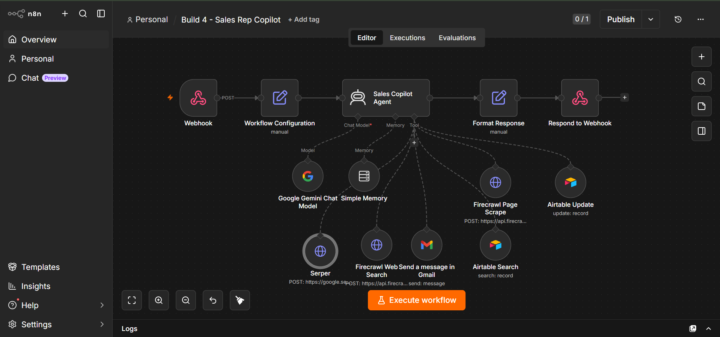
Build 4: Sales Rep Copilot
Build 4 done. AI Agents module: complete. The final build is a Sales Rep Copilot — a ChatGPT-style web app built with Lovable, backed by an n8n AI agent. Sales reps can look up leads, research companies, update the CRM, and send follow-up emails through a natural language interface. Live at https://copilot-chatter.lovable.app/ (works when my local backend is running). This one completes the full Smith Solar pipeline across all four builds — lead captured, qualified by voice, managed by copilot. A few things worth knowing if you're attempting this: The very first thing to check on any AI Agent node using a Webhook trigger: change "Source for Prompt" from "Connected Chat Trigger Node" to "Define below." The default breaks immediately and gives you a "No prompt specified" error. Every time. Don't put n8n expressions inside a JSON body in the Respond to Webhook node. It looks valid but n8n's JSON validator rejects it at runtime. Use "First Incoming Item" instead, it sends the previous node's output directly and is far more reliable. Test with PowerShell Invoke-WebRequest before touching the frontend. Simulating the exact POST body your frontend will send saves hours of debugging across the stack. For anyone in Africa blocked by SerpAPI's SMS verification: Serper.dev is the replacement. Email-only signup, 2,500 free searches, cleaner API. Apify LinkedIn scraping requires the $29/month paid plan. The free tier doesn't give access to the LinkedIn Profile Scraper actor. Liam found this out on camera too. Document the limitation and move on — don't fake it. Full breakdown on LinkedIn: https://www.linkedin.com/posts/mark-mwila-1bb779262_aiagents-n8n-lovable-ugcPost-7480632374658125824-O2Kt/?utm_source=share&utm_medium=member_desktop&rcm=ACoAAECKqN8B08HCNLn9gnczhcsNpq3kEDCKvWM
3d •
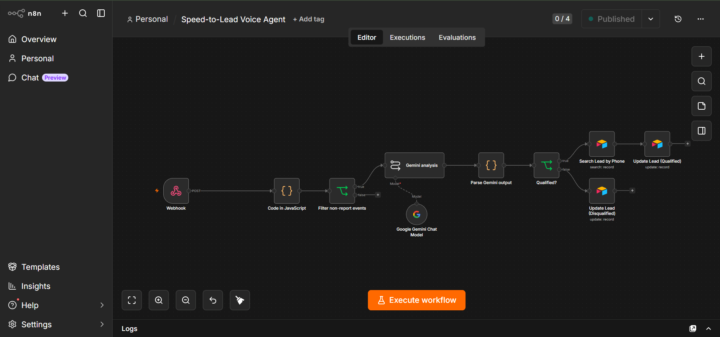
Build 3: Speed-to-Lead Voice Agent for Smith Solar, built on Vapi + n8n + Gemini + Airtable
This one connects directly to Build 2. The chatbot captures the lead and hands them Sam's number. Sam calls, qualifies them on three criteria, and Gemini updates the CRM automatically after the call ends. A few things worth knowing before you attempt this: If you're building from outside the US, check regional support before committing to any voice AI platform. Retell AI requires SMS verification — Zambian numbers aren't supported. I had to pivot to Vapi mid-build. Vapi supports email and GitHub signup only, which works fine. Vapi's Server URL field can look saved when it isn't. Refresh the page after saving and verify the field actually persisted. I spent a long time debugging ngrok, n8n, and Vapi delivery logs before realising the field had never saved in the first place. Vapi fires two events per call: status-update (immediate, empty transcript) and end-of-call-report (full transcript after the call ends). Don't use n8n's "Listen for test event" for this, it catches the wrong one. Use Published workflow + Production URL + Executions tab. Filter out empty transcripts before they reach your AI model. Phantom failed calls still fire end-of-call-report with nothing in the transcript. Gemini will return a qualified: false decision with "No transcript provided" if you let those through. For Airtable Update nodes, match by a unique column like Phone, not by record ID. And make sure your phone number format matches exactly what's stored in Airtable, + prefix included. If n8n starts throwing database ping failures after heavy webhook load, restart clean. SQLite gets unstable under that kind of pressure. Full breakdown of all eight problems and fixes on LinkedIn: https://www.linkedin.com/posts/mark-mwila-1bb779262_aiagents-voiceai-vapi-ugcPost-7479801291691606016-a0Gs/?utm_source=share&utm_medium=member_desktop&rcm=ACoAAECKqN8B08HCNLn9gnczhcsNpq3kEDCKvWM
0
0
10d •
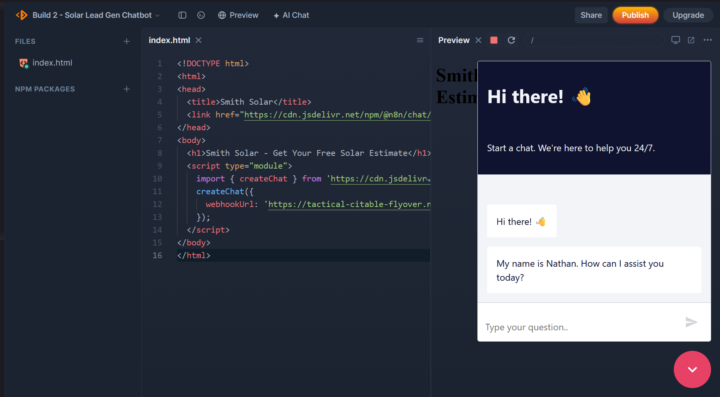
Build 2 of AI Agents done
A solar lead gen chatbot for a fictional client (Smith Solar, Texas) built on n8n with two workflows, Google's Geocoding and Solar APIs, Gemini, and Airtable. A few things worth flagging for anyone attempting this: The Google OAuth2 Client ID and a Google Cloud API key are not the same thing. The OAuth2 Client ID is for Sheets and Gmail. The Geocoding and Solar APIs need a separate API key (starts with AIzaSy) created under Credentials in Google Cloud Console. Mixing these up costs you a solid chunk of debugging time. Google's Geocoding and Solar APIs require a billing account to be linked even for free-tier usage. Both include 10,000 free requests per month with no expiry. For portfolio testing you won't get charged — but you do need the card on file. If Airtable is saving blank rows, check whether your Base is configured "By ID" or "By URL." Switching to By URL was the fix that made field mapping resolve correctly after five other attempts failed. Gemini 2.5 Flash will hit rate limits fast during testing. Switch to gemini-2.0-flash-001. And always activate your sub-workflows before testing. Every time. Full breakdown on LinkedIn: https://www.linkedin.com/posts/mark-mwila-1bb779262_aiagents-n8n-chatbot-ugcPost-7477284797250191360-UIL_/?utm_source=share&utm_medium=member_desktop&rcm=ACoAAECKqN8B08HCNLn9gnczhcsNpq3kEDCKvWM On to build 3. 🙏
0 likes • 7d
@Ahmad Khan For the time being, AI driven.
0 likes • 3d
@Ahmad Khan Lead qualification. That was the whole point of the build. The agent qualifies on three criteria: location, home ownership, and budget. After the call, Gemini analyses the transcript and updates the CRM automatically with a qualified/disqualified status and the reasoning. Actually just finished it, so the answer comes from experience rather than guesswork. Post coming soon!
14d •
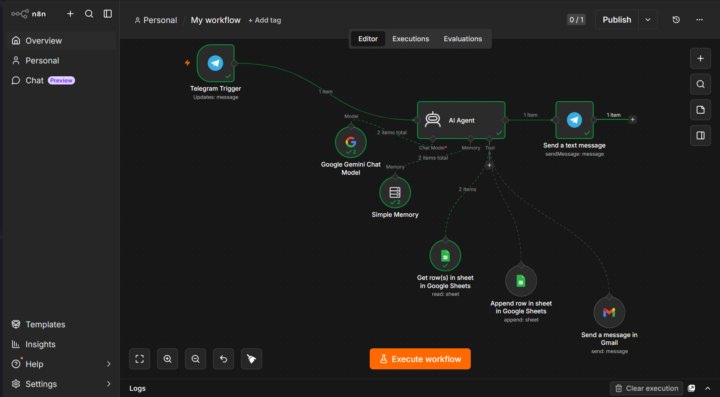
Build 1 of AI Agents done — a Telegram Receipt Analysis Assistant on n8n.
Quick heads up for anyone building this on Community Edition: "Build with AI" is cloud-only, so you're building every node manually. Not a bad thing. You end up actually understanding the architecture rather than just generating it. A few things that tripped me up: ngrok order matters. Start ngrok first, then set your WEBHOOK_URL environment variable in the same terminal window, then run n8n start. Every session, no exceptions. For the AI Agent's tool nodes, make sure you're using the Tool variants specifically — not the standard node versions. Wrong type = "Human review" errors that look unrelated. If Gemini is responding in markdown and Telegram can't parse it, add a plain text instruction directly in your system prompt and set Parse Mode to Markdown Legacy on the Telegram reply node. Hardcode your sheet name as a fixed value. The agent will guess and it will get it wrong. One known limitation: image OCR (actual receipt photo processing) isn't natively supported through the AI Agent node — Gemini Vision needs a direct API call for that. Documented it as a planned feature for now. Full breakdown on LinkedIn: https://www.linkedin.com/posts/mark-mwila-1bb779262_aiagents-n8n-telegram-share-7475967879604248576-1uIl/?utm_source=share&utm_medium=member_desktop&rcm=ACoAAECKqN8B08HCNLn9gnczhcsNpq3kEDCKvWM On to build 2. 🙏
30
0
17d •
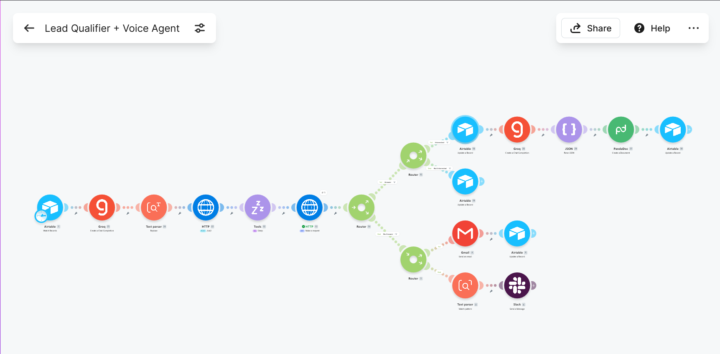
AI Automations module: complete. All three builds done.
Build 3 (AI Proposal Generator) was the smoothest of the three. Main thing to watch out for: when setting up the PandaDoc connection in Make, make sure the client ID and secret key fields under advanced settings are completely clear, or you'll get a 400 authorization error. Also stay sharp with your JSON formatting in the OpenAI (I used Groq) module — a single structural mistake will break the Parse JSON step downstream. For anyone who wants to see what the full pipeline looks like end to end — form submission to voice call to proposal in your inbox — here's where it all starts: https://tally.so/r/68PoZe Full breakdown of the journey across all three builds is on LinkedIn: https://www.linkedin.com/posts/mark-mwila-1bb779262_aiautomation-makecom-vapi-share-7474782799133065216-vRTo/?utm_source=share&utm_medium=member_desktop&rcm=ACoAAECKqN8B08HCNLn9gnczhcsNpq3kEDCKvWM On to AI Agents. 🙏
0 likes • 17d
Thank you
1-10 of 12

Online now
Joined Feb 17, 2025
Powered by