Activity
Mon
Wed
Fri
Sun
Nov
Dec
Jan
Feb
Mar
Apr
May
Jun
Jul
Aug
Sep
Oct
What is this?
Less
More
Snappy Community
530
Free
AI Automation Agency Hub
336.6k
Free
14 contributions to Snappy Community

Aug 9 •
Maccy: A tiny tool that speeds up my workflow with AI
I’ve been trying Maccy, a lightweight macOS clipboard manager, and it’s been a great workflow boost. It makes it easy to find and reuse recent copies to my clipboard, which cuts down on searching when I’m building or debugging with AI. If you juggle lots of snippets, links, or commands, a simple clipboard history can save a lot of time. Curious what tools others here use for this kind of thing!


1 like • Aug 9
I just use a text editor with a few tabs to store some information temporarily 😅 But there are many people out there using Raycast which has a built in clipboard history.
Nov '25 •
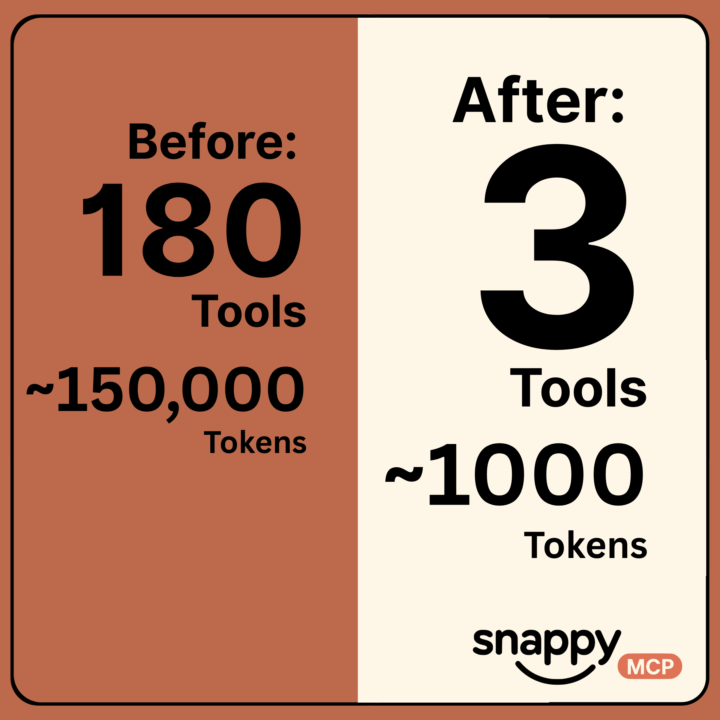
From 180 tools and 150,000 tokens to 1000 tokens and 3 tools!
Thanks to a great idea from Ray Deck, I have reduced the number of tools in the snappy.ai Xano MCP from ~180 tools and ~150,000 tokens to ~1000 tokens and 3 core tools: 1. Gemini Flash Powered Search - "What tools do I have?" (Semantic search across all tools - e.g., "create table", "list functions") 2. Info - "Tell me more about that specific tool" (returns parameters, examples, docs) 3. Execute - "Do it" (runs the tool with the right parameters) Now the initial handshake costs only ~1000 tokens instead of 150,000. Claude discovers tools as needed rather than loading everything upfront. This pattern should work for any MCP with dozens or hundreds of tools. Instead of exposing everything at once, create a search/discovery layer that lets Claude Code find what it needs when it needs it!
1 like • Nov '25
Very interesting approach. How does this affect the latency?

Jul '25 •
Passing an Array of Values to HTTP Request Node in n8n as an Expression
Hey, I'm working in n8n and trying to pass an array of values to the JSON body of the HTTP Request node, but I keep getting a comma-separated string instead of an actual array. I managed to fix it by adding square brackets and using .map() to wrap each item in quotes: "keywords": [{{ $json.output.keywords.map(k => `"${k}"`) }}] It works, but I'm wondering — is there a simpler or more elegant way to achieve this?
2 likes • Jul '25
Actually this is what I meant:
2 likes • Jul '25
@Damian Dąbrowski Great! About that JSON mode - it is the first option at the top of the set node I meant. It is sometimes faster to build a JSON object in the editor instead of defining a new option for each property. Both have different advantages.
May '25 •
Cabin Post: Finding Signal in the Age of Noise
I spent the last few days at a cabin, taking time to put together some thoughts. When I started this community in November 2022, 'communities' weren't a popular thing yet. It was just me, making posts nobody read, hosting weekly meetings that no one showed up to. I was miles away from product-market fit, but I was carefully listening to the signs this group was pointing me towards. @Rene Tatua was the first person to join the weekly call consistently, and when you're dancing alone, you need to have at least one person to join you so that you stop looking crazy. Eventually, @Mario Haarmann joined too, and the three of us have kept 'Happy Friday' going ever since. I used to stress about what to do with this community. As trends came and went, I admit I explored some of them - making the group paid, running affiliates, or starting another 'premium' group. I've had plenty of people offer to partner with me in order to monetize it, but we had already built something valuable by simply meeting every Friday. I'm thankful for the genuine group we have. While my business continues to grow and change, our calls have kept me grounded, and served as a reminder me that huge value can come from ignoring trends, and staying consistent.

1 like • May '25
Thank you Robert! I really enjoy the regular calls with you and Rene. The consistency is definitely something of high value. That’s a nice place you’re staying at. Enjoy your time there.
Mar '25 •
Xano MCP Now Available - 43 Powerful Tools for Your Projects!
I'm excited to announce my Xano MCP is now live on Smithery and ready for everyone to use! After a week of refinement, it offers a comprehensive suite of 43 tools to interact with your Xano instances. What Can This MCP Do? With this toolset, you can: - Manage Xano instances with ease - Create, update, and search databases and tables - Build complete data schemas and handle records - Perform essential file operations - Design API groups and individual endpoints - Export workspaces for backup or transfer The MCP streamlines Xano development, helping you build faster and more efficiently while maintaining full control over your instances. Check out the link in the comments to install it directly from Smithery. Whether you're a Xano veteran or just getting started, these tools will significantly enhance your development workflow. Let me know if you have any questions or feature requests!
1 like • Mar '25
Is it possible to call this MCP via cli and pass over certain commands like list tools? I tried this, but then I get stuck in a web socket session: npx -y @smithery/cli run @roboulos/simple-xano-mcp
1-10 of 14

@mario-haarmann-6335
Hi, I’m Mario from octionic.
We teach proven strategies about self- and team-management and also show how to sensibly embed them into digital tools.
Active 6d ago
Joined Apr 10, 2024
Germany
Powered by