Activity
Mon
Wed
Fri
Sun
Aug
Sep
Oct
Nov
Dec
Jan
Feb
Mar
Apr
May
Jun
Jul
What is this?
Less
More
Memberships
MSB Intel
1.6k members • Free
AI Automation (A-Z)
164.4k members • $7/month
Davie's Free Ecom Course
73.1k members • Free
Imperium Academy™
68.2k members • Free
AI Automation Society
422.6k members • Free
Hamza's Automation Incubator™
47.2k members • Free
AI Automation Agency Hub
328.4k members • Free
Data Alchemy
37.6k members • Free
8 contributions to AI Automation Agency Hub

Mar 5 •
Need help connecting n8n → Buffer (GraphQL API) for LinkedIn posting
Need help connecting n8n → Buffer (GraphQL API) for LinkedIn posting Hey everyone, I’m building an automation to publish LinkedIn posts through Buffer using n8n, but I’m stuck on the API mutation step. Stack I'm using - n8n (self-hosted via Docker) - HTTP Request node - Buffer GraphQL API - Bearer API token - JSON request body What works so far• API authentication works• I can run GraphQL queries successfully• I retrieved my organization ID and channel ID• Queries like fetching account / organizations / channels return data correctly Where it breaksWhen I try to run the createPost mutation to create a LinkedIn post, I consistently get a 400 error. I suspect the issue is related to the CreatePostInput schema requirements (fields like shareModel, schedulingType, text, etc.) or how n8n formats the JSON request. GoalAutomatically create or schedule LinkedIn posts in Buffer from an n8n workflow. If anyone has successfully done n8n → Buffer API → LinkedIn posting, I’d really appreciate seeing: - the correct GraphQL mutation structure - required input fields for createPost - or a working example Thanks in advance!
1 like • Mar 6
@Muhammad Khan Yes Muhmmad you were write that was the error of the bracket but the concern is it is still not working coming up with this error now. Can you have a look or come on meeting to make it resolve if have the idea about it. Thanks
0 likes • Mar 6
@Danielle John Great just learning this Automation game and purchasing the token
Feb 5 •
I’ve Chosen My Path
I’ve decided to go down the Consultant path. I chose this because it fits how I think and work. I like understanding problems, simplifying messy systems, and helping businesses make better decisions fast. I’m comfortable communicating, taking responsibility, and being client-facing, and I want a path where results matter more than titles or credentials. What I’m most excited about is building real leverage early. Talking to real businesses, solving real problems, and turning skill + clarity into income instead of waiting years to “maybe” see results. I’m looking forward to developing strong consulting fundamentals, improving my communication, and building confidence through execution. All in. Ready to do the work.
Feb 4 •
I’m All In
Hey everyone 👋 I’m Mahad, 21, based in Australia.I work in building managment while studying and building skills on the side. I’ve spent the last few years trying things, learning the hard way, and figuring out what actually matters. My current goal:Land my first client and build a real, high-ticket service business. Not theory, not vibes, actual execution. My why:I want freedom over my time, control over my future, and to build something I can be proud of. I’m done drifting, done overthinking, and done waiting to “feel ready.” I’m here to learn, apply, and move fast with intent. I’m going all in, staying consistent, and contributing where I can.Looking forward to connecting with others on the same path and supporting fellow beginners in here as well. Let’s build.
May '25 •
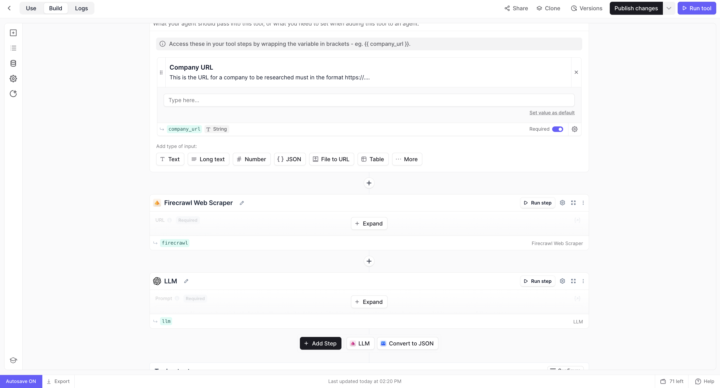
LLM Error During Tutorial – Not Using My Own Key but Still Getting Quota Issue
Hey everyone, I need a quick hand! I’m currently following the tutorial to build a website scraping + LLM summarization agent.The tutorial didn’t mention anything about setting up an OpenAI key, but when I try to run the LLM step, I get this error: “The maximum number of LLM runs per minute for your OpenAI Plan has been reached…” I didn’t intentionally add an OpenAI key, but it seems like it’s still using one — and now it’s blocking me.I tried deleting any existing key and thought it would switch back to Relevance’s key, but I’m still stuck. 👉 Can someone please guide me step-by-step on how to fix this and make sure it uses Relevance AI’s GPT access? Appreciate the help!
5
0
May '25 •
📢 Prompt Engineering Breakdown – Sharing My Notes
Hey everyone! 👋 I’ve been learning and experimenting with prompt engineering recently — and I wanted to share something that’s been really helping me. After testing different techniques with ChatGPT and other AI tools, I’ve built a personal structure that helps get the most accurate and useful results every time. Here’s a snapshot of what I follow: 🔹 Context – Who you are / what you’re doing🔹 Specific Task – Clear and focused request🔹 Intent – What you want from the AI🔹 Format – Bullet points, para, table, etc.🔹 Limits – Word count or number of points🔹 Tone – Formal, friendly, urgent, etc.🔹 Example Output – Give a sample if possible🔹 Role Assignment – Ask AI to act like a senior/expert🔹 Chain of Thought – “Think step by step before answering” I’ve also handwritten all of this in my notebook to lock it in. Happy to share the photo or a clean version if anyone wants it 🔥 Let’s learn and build together.
4
0
1-8 of 8

@mahad-ahmed-9601
Tech learner | AI & data enthusiast | Hustler
Active 18d ago
Joined May 14, 2025
Sydney
Powered by