Activity
Mon
Wed
Fri
Sun
May
Jun
Jul
Aug
Sep
Oct
Nov
Dec
Jan
Feb
Mar
Apr
What is this?
Less
More
Memberships
Sewing Pattern Secrets
16 members • $27/month
4 contributions to Sewing Pattern Secrets

2d •
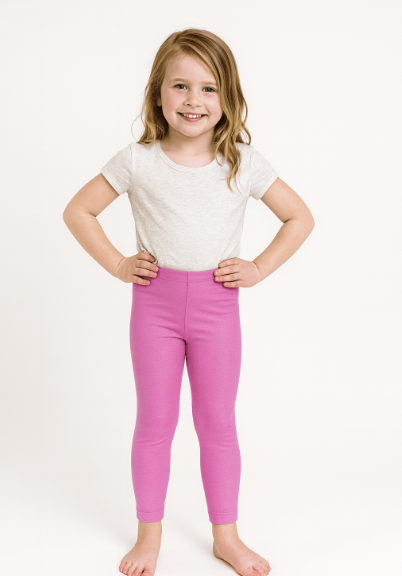
If you had a little girl to sew for — would you agree the Girl's Leggings are a good first stretch knit project? 👧🧵
We think it ticks a lot of boxes: ✅ One pattern piece ✅ Simple construction ✅ A real live fit model to try them on mid-project ✅ A result that actually gets worn — repeatedly But we want to hear from you. Have you sewn leggings before? Was stretch knit everything you expected — or did it surprise you? And if you think there's a better first stretch knit project for a beginner — what would you suggest instead? 👇 The Girl's Leggings are waiting for you in your Sewing Pattern Secrets classroom — Module 1. 🌱

0 likes • 2d
Looking forward to making this for a granddaughter that has trouble finding ones that fit.
0 likes • 1d
@Margie Vaudreuil She is 9 but is 'chunky' so the pants never stay up.
2d •
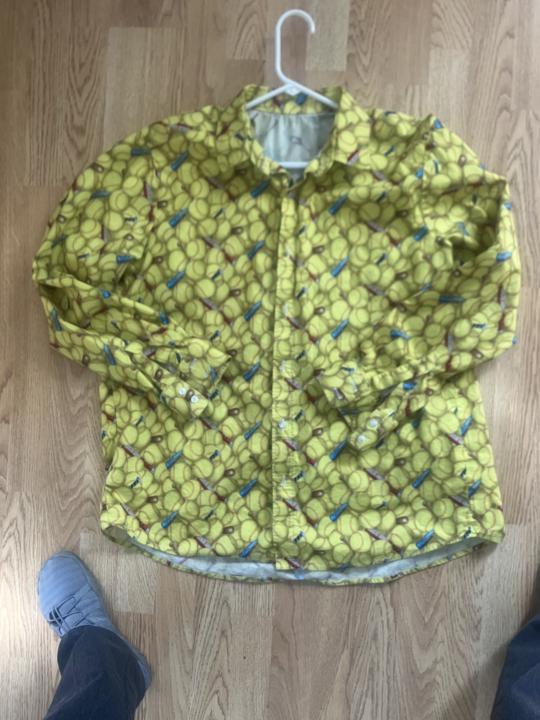
An "over my head" project.
I tend to 'jump in' so here is the first project I tried from SPS. Not great but my husband wears it anyway🥰
0 likes • 2d
@Margie Vaudreuil Yes, I was doing it in secret for a Christmas present and I probably tore out as many as stitches as I put in.
5d •
🚪✨ Doors Opening and Set Up for Saturday Studio: Creative Explorations
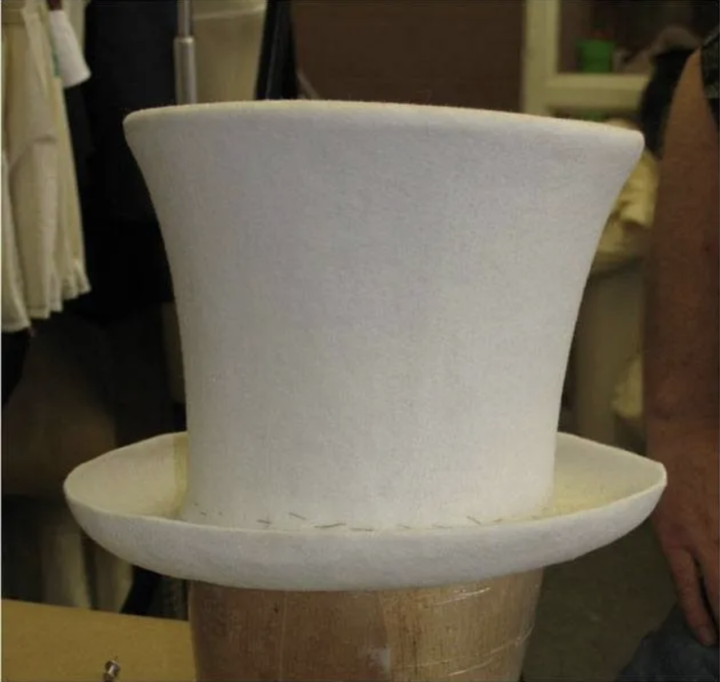
Tomorrow morning at 9:30am EDT I'll be in my design studio setting up for our first day of Creative Explorations. Every Saturday while you wait for our live call I'll be experimenting, discovering, and sharing from my studio. Next Saturday — our very first Creative Exploration. I'm taking a look at a material that has been sitting on my shelf for a year. It's called Fosshape — and it does something extraordinary. Apply heat and it transforms into a rigid, perfectly shaped structure. No water. No wire. No messy adhesives. Just heat and imagination. Hats, masks, bodices, headpieces — anything you want to hold a shape permanently and beautifully. 🎩✨ Doors are officially opening. Stay tuned. Margie 🧵 Artists are not know for the left two, but artist, Marte LaConte crafted the elaborate crown and staff on the right.
0 likes • 2d
Was on vacation so I missed this🙃
5d •
: 📱 How to Access SewingPatternSecrets with Margie on Your Phone
You're already in — now let's make sure you can reach us from anywhere! Here's how to get the Skool app on your phone. 👇 STEP 1 — Download the Skool App Skool has a free app for both iPhone and Android. Here's how to find it: - iPhone (iOS): Open the App Store and search "Skool Communities" — or go directly to: 👉 apps.apple.com/us/app/skool-communities/id6447270545 - Android: Open the Google Play Store and search "Skool" — or go directly to: 👉 play.google.com/store/apps/details?id=com.skool.skoolcommunities The app is free to download. STEP 2 — Log In with Your Skool Account Open the app and sign in using the same email and password you used to join this community. The app will remember you so you only have to log in once. STEP 3 — Find SewingPatternSecrets with Margie Once you're logged in, you should land directly in our community. If you don't see it right away, tap the grid/menu icon and look for SewingPatternSecrets with Margie in your communities list. STEP 4 — Turn On Notifications When your phone asks if you'd like to allow notifications from Skool — say YES. That's how you'll know when new patterns drop, lessons go live, and live sessions are happening. What You'll Find Inside: - 🧵 Community — our discussion feed, wins, questions, and announcements - 📚 Classroom — your pattern lessons and course content - 📅 Calendar — upcoming live sessions and events - 🏆 Leaderboard — points, levels, and milestone rewards 💻 Prefer the Desktop? No problem — everything is available at skool.com in your browser anytime. Questions? Problems logging in? Drop a comment below or email us at support@sewingpatternsecrets.com and we'll get you sorted right away. So glad you're here — now let's sew something great! 🧵✨ — Margie
0 likes • 2d
Done. That was easy.
1-4 of 4
@lila-moeller-4689
Retired teacher from South Dakota that loves to sew. Made a lot of my kids clothes when they were little.
Active 1h ago
Joined Apr 20, 2026
Garretson, SD
Powered by