Activity
Mon
Wed
Fri
Sun
Jun
Jul
Aug
Sep
Oct
Nov
Dec
Jan
Feb
Mar
Apr
What is this?
Less
More
Memberships
The Imaginarium
201 members • $7/month
20 contributions to The Imaginarium

17d •
Vibe Session today
Good afternoon! Has a link been posted somewhere for session today? Wanted to be sure I didn’t miss it. Please repost here if it was posted elsewhere—many thx!
1 like • 17d
@Lekeisha Vone thx! just got the email. chk ur inboxes :)
25d •
Classroom Resources > PDFs
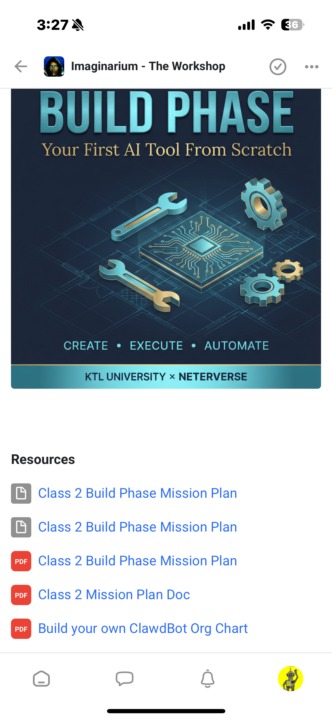
Peace! Following up about the PDFs for class sessions #4-#8. Under the RESOURCE section for classes #1-3 they were uploaded — thank u. but still missing PDFs for the other sessions. Maybe they were posted elsewhere? If so, please advise where to find those resources. I have screenshots for reference to show what’s accessible and what’s still to be uploaded. I missed some class time and a couple vibe sessions so the PDFs are key tools for catching up and staying on track with the learning pace. Thanks!
2
0
Mar 28 •
Manus!
Finally jumped on Manus after session last night to revamp and rebrand my website. I’m extremely happy about the output. Next step is to move over my existing domain name and shutdown old website! Thank you for your guidance! @Phillip Moreland Can’t wait for Claw Bot Bootcamp!
2 likes • Mar 28
@Lekeisha Vone niiiice! I’m thinking of doing the same to my website. Was it mostly aesthetic updates (fonts, colors, design schema)? Or did you update content too? I want to add a shop and services page to mine. I didn’t realize manus was the tool for this! Thanks for sharing. Let me know how the domain transfer works out — that would be the tricky part for me.
Mar 28 •
Class tonight!
Hi! Looking for the link for tonight’s session. I may have missed it. Where can I find? Thx! Just leaving a work event but will log on soon as I can!
0 likes • Mar 28
@Lekeisha Vone saw post (or maybe it was an email) about a session tomorrow eve. maybe there was schedule change? Please share here if you get the link!
1 like • Mar 28
Just got the link — sent to my email. Chk your inboxes!

Mar 17 •
SINNERS & WINNERS ARTWORK CONTEST!!!!!!!!!!!!!!!
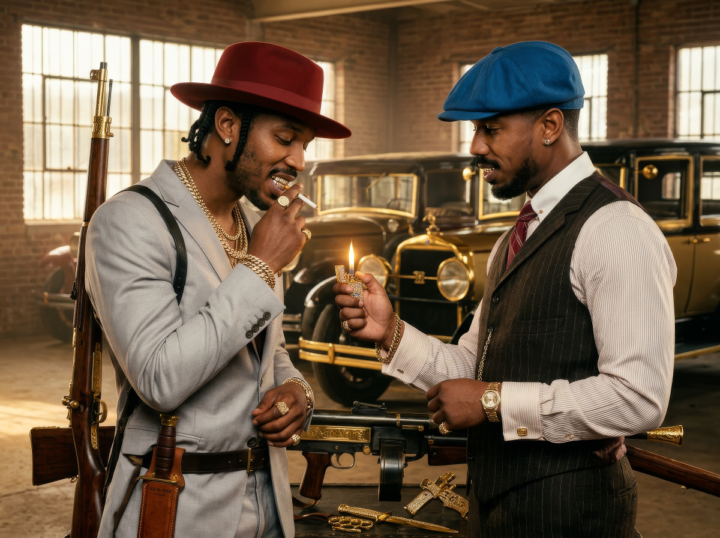
LETS GET YOUR BEST "SINNERS" AI ARTWORK...LET UR I-MAGI-NATION RUN WILD!!!! POST YOUR RESULTS IN THE COMMENT SECTION.. AND WE WILL DO A VOTE ON THURSDAY FOR #1 #2 #3
2 likes • Mar 27
I continued to run with this prompt — but switched movies to PEAKY BLINDERS the Immortal Man in honor of my Dad who recently passed — it was our favorite show! I used his old photos from 1950s and these were the best of his likeness. I will continue to build on this for a memorial video project I’m working on…I used Claude for prompts and chatGPT and Manus again for key images (manus was best) then i went to KLING to create a couple of video clips.
3 likes • Mar 27
These ensemble images were cool — but didn’t capture my Dad’s likeness very well. I burned SO many credits trying to get it right. SMH. Also chat gpt wouldn’t put the cigar IN his mouth. It was just floating! Still strong output though as a remimaged poster goes :)
1-10 of 20
@li-sumpter-1180
worldbuilder, mythologist, filmmaker, eco-arts activist from Illadelph— the city of otherworldly love
Active 1d ago
Joined Feb 14, 2026