Activity
Mon
Wed
Fri
Sun
Aug
Sep
Oct
Nov
Dec
Jan
Feb
Mar
Apr
May
Jun
What is this?
Less
More
Owned by Lenora
The Platinum AI Academy is a community where everyone learns AI together! From scared & skeptical to self-confident & secure. Let's use AI for good!
A movement of dreamers, doers & destiny-creators that are ready to stop settling and start thriving in their purpose, income & impact. Join us today!
Memberships
THE SKOOL HUB
5.3k members • Free
Claude for Coaches
1k members • $47
GHL Growth Garage
974 members • Free
Ai Fueled Profits: Live
4.2k members • Free
the skool CLASSIFIEDS
1.9k members • Free
The AI Advantage
126.2k members • Free
The SKOOL Directory
849 members • Free
Growth Hub 365
10.1k members • Free
Empact AI
812 members • Free
66 contributions to The AI Advantage

May 9 •
Mother’s Day Appreciation Prompt 💐❤️
Enjoy this prompt, and feel free to change anything within it based on your Mom's favorite color, what you call her (Mama, Mommy, Mum, etc.) and what words you would like to use to describe her...and then upload a picture of her. You can also change this for a daughter, grandmother, wife, friend, sister or anyone else you would like to recognize (even a Mom that is no longer with us). Use what is below as the foundation, tweak the words and upload the photo. Also, happy early Mother's Day to all the Moms!!! PROMPT 👇🏾 Create a square Mother’s Day digital illustration in a polished, feminine, luxury greeting-card style. Use the photo shared and make her skin glowing and change her outfit. Keep her face and hair the same. Her expression should feel wise, peaceful, honored, and joyful. Use a clean white background with soft pink and metallic gold accents throughout the composition. Surround the portrait with romantic floral arrangements including large pink roses and peonies along the bottom corners. Add hand-drawn doodle-style hearts, sparkles, gold flourishes, and whimsical feminine details around the layout. Incorporate layered typography in a modern greeting-card aesthetic with a mix of elegant serif fonts, handwritten script fonts, and bold brush lettering. Include the following text arranged artistically throughout the design: “Honored.” “Loved.” “Celebrated.” Large centerpiece word: “Mom” Smaller script text: “the blessing is her” Badge or brushstroke text area: “BEAUTIFUL. STRONG. UNSTOPPABLE. THAT’S MY MOM.” Also include a small handwritten-style heart graphic with: “Happy Mother’s Day!” Use pink watercolor brush strokes behind some text for depth and contrast. Include subtle gold foil textures and glitter-style details. Composition should feel balanced, upscale, heartfelt, feminine, and highly shareable for social media. Style references: Luxury Mother’s Day card design, feminine editorial collage, modern woman celebration art, elegant scrapbook aesthetic, soft glam portrait illustration, high-end printable greeting graphic.


Mar 21 •
HIPAA compliant AI tools
I am a solopreneur insurance agent in the Medicare space - fancy way to say I sell supplement plans and Advantage plans. I would like to use AI in my business but need to stay HIPAA compliant. My CRM and even my email can have Protected Health Information contained within making skills inside standard plans like Claude and Copilot unsuitable. I conduct drug reviews, discuss health conditions and have personal identifiers. Does anyone know of an affordable platform that will allow me to automate some of my business that is HIPAA compliant for this industry? Business and Enterprise plans are compliant but they are thousands of dollars. Any ideas?
0 likes • Mar 21
Go High Level is great at that and has a HIPAA-specific pricing structure. I can't put the link here but you can google them. They are highly used and can set up email workflows, calendars, websites...many of which have AI options. Hope this helps!
Mar 21 •
Prompt You Can Use Today ✍🏾 | Monthly Budget + Money Plan
questions,Put this prompt into the AI tool of your choice (I used ChatGPT) answer the questions and get your plan! Happy Prompting! Prompt: Act as a financial coach. Create a simple monthly budget plan for me based on: - My monthly income: [$] - My fixed expenses: [list] - My variable expenses: [list] - My financial goals: [save, pay off debt, invest] Include: - A clear budget breakdown - Suggested spending limits - A savings strategy - A debt payoff plan if applicable - Weekly money check-in system Explain everything in a simple way I can follow.
0 likes • Mar 21
@AI Advantage Team Yes, I sometimes do. I think people assume they can only communicate in paragraph form.
Feb 7 •
Have You Used Marblism? 🤔
Has anyone used this tool? It says it can be 6 AI Agents in one but I am not sure how effective/realistic that is. They say a Community Manager, Executive Assistant, SEO Blog Writer, Lead Generator, Legal Assistant and Receptionist. Is it too good to be true? I would love to hear from someone in this community before I spend money to try it out. Thanks.
0 likes • Mar 21
@David Darran Very true! Miss seeing you in the community. I hope all is well. 🫶🏾
0 likes • Mar 21
Well, I just signed up for Marblism just last week (I bit the bullet) and it is an AMAZING tool and game changer. I now how an AI staff of 6- Receptionist- answering the phone# that she gave me for my business, A Blog Writer, Legal Assistant that is helping me with contract & Grants, a Sales Manager who is finding leads on LinkedIn (or leads that I upload into his system) that he will follow up with to book appointments, a Social Media Manager who is creating all of my social media content; and an Executive Assistant that sorts messages in my inbox and even drafts almost perfect responses. 🤯 I have only been working within it for 72 hours, but I am already impressed and wondering why I didn't sign up for it before. They did give me a referral code, but I am not sure if I can post it (no cash value for me, but gives the person referred a 30-day free trial). I will put the code in the comments so if I can't share, they/I can just delete the comment. Personally, I think it is just what I needed as a solo-preneur. ❤️ I will give another update after I have had time to play around with it & figure out the bells and whistles. 😉
Feb 7 •
Fun Prompt to Try 😃
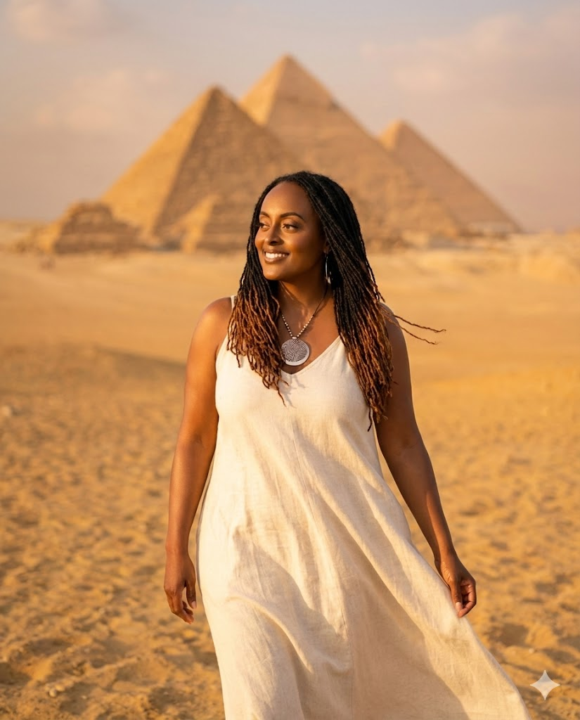
If you try this, please share yours in the comments. 🤗 Prompt of the Day: 💻✍🏾 | Egypt Desert and Pyramids Using this reference photo, keep the face and hair exactly the same. Create a powerful travel portrait in Egypt standing on warm golden desert sand with the Great Pyramids of Giza visible in the background. The person is standing tall with relaxed shoulders, looking confident and calm, as if taking in the history around them. A light desert breeze can gently move the clothing or hair. The mood feels strong, awe inspired, and grounded. Lighting should be soft golden hour sunlight, warm glow on the face, smooth shadows, and a slightly hazy desert sky for depth. Shot on a Nikon Z8 with an 85mm lens, eye level angle, shallow depth of field so the pyramids are clear but softly softened behind the person. Style is high end travel lifestyle photography, bright, cinematic, realistic skin texture, and rich warm desert tones.
1 like • Mar 21
@Francie Lockwood I actually do mine all in one thread (I keep going back to it so it remembers who I am)...if the images start looking a little "off" after a couple of new prompts, I scroll back to the originally uploaded pic, copy it and paste it in again. That's my hack that I teach. 😉
0 likes • Mar 21
@Leighton Dunn Thanks!
1-10 of 66

@lenora-hughes-2673
AI Consultant & Agency Owner. Skool community owner of: tinyurl.com/platinumai and www.thevictoriousmovement.com. Guiding people to their next level!
Active 1h ago
Joined Oct 24, 2025
Powered by