Activity
Mon
Wed
Fri
Sun
Sep
Oct
Nov
Dec
Jan
Feb
Mar
Apr
May
Jun
Jul
Aug
What is this?
Less
More
Owned by Kevin
A safe and easy place to learn YouTube step by step. Just clear help so you can start and grow with confidence. This community exists to serve you!
Find your YouTube bottleneck, fix it first, and build momentum.
Memberships
KDP Publishing
1.6k members • Free
1of10: The Youtube Blueprint
2.4k members • Free
Your First $5k Club w/ARLAN
33.6k members • Free
Digital Roadmap AI Incubator
770 members • Free
Vibe Code On The Cheap
26 members • Free
The YouTube Blueprint
2.5k members • Free
Ai Storytellers-Nick Nebelsky
538 members • Free
Solopreneur Unleash AI Mktg
21 members • Free
Cooking with Ollie
248 members • Free
3 contributions to Vibe Code On The Cheap

Jun 11 •
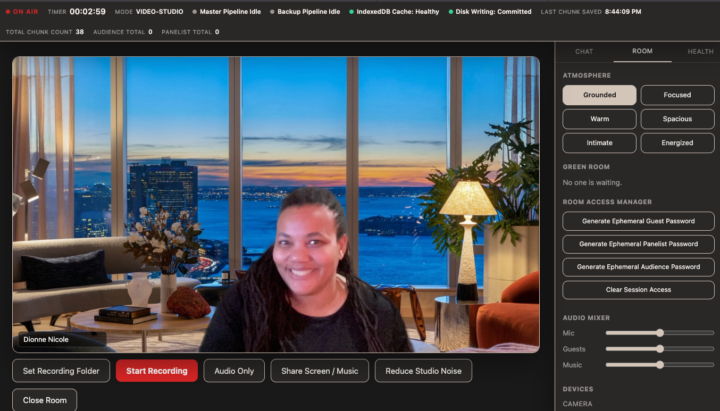
I built a Zoom-replacement with Claude Fable
This week for my Fable use case, I decided to build my own recording studio that was local to my computer. Why? 1) I wanted to see what was possible. 2) I have 60 more podcast episodes to make, and I didn't want to pay for Zoom or other podcast recording software every month. Now I can record audio only, video chats or even do a webinar. FOR ZERO DOLLARS. The files save locally on my computer. I spent 80% of my time (like I recommend) planning it out with Gemini (for the tech aspects) and my Vibe Thinking GPT for the user experience. When I brought it to Fable? It was built in 7 minutes and saved soooo many tokens! Take advantage of a two-week trial period window until June 22nd to try it with your Claude Pro ($20/m) account. Our next live class is happening Friday, 6/11 at 12pm EST and I will be going over my build! And doing on the spot Q&A! Other time zones: 1:00 AM CST (Chicago), 9:00 AM PST (Los Angeles), 5:00 PM GMT/UTC (London) And always remember, even though the community is going to be archived for now, you can always reach out for a 1:1 to go over your build.

🔥
2 likes • Jun 11
I like this. I would love to see it done live buy I'll be at work from 3pm to 11pm. I catch the replay.
🔥
2 likes • Jun 11
@Dionne Nicole sounds good. I'll DM you the best time time to meet. Thanks.
Jun 3 •
Archiving Community + Last Live Session
Hi everyone! Update: I will be archiving this community. Why? I need to narrow my focus. My main project is Instinctual Design, and yes, I love creating apps and tools but I can't maintain sustained focus. Or rather, slow down enough to capture things to report back when I'm already in the thick of it! It won't be deleted so you'll still have access to the classroom and the Vibe Thinking GPT (I just used it the other night)! That said, let's end with a bang! Vote below for the best day/time for a vibe coding session where we talk about all the things!
Poll
7 members have voted

🔥
1 like • Jun 4
@Dionne Nicole sorry I'll be at work during those calendar times. Hopefully, if there's a replay, I can catch it. Thanks.
May 10 •
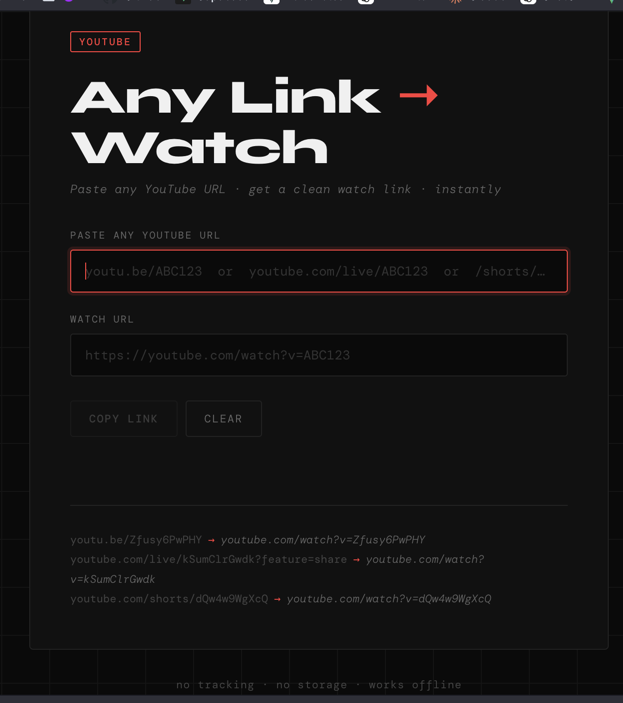
10-Minute Build: YouTube URL Converter
So, one of my workflows involves me needing a specific version of a URL link for YouTube. I got tired of manually doing it, so I created a website where I can just type in the URL, and it will do it automatically. Cost to build: $0 (included in Claude subscription) Cost to run: $0 🟡 Workflow transcribed by my Littlebird AI 👇👇👇 1️⃣ The Build (with Claude) - You jumped into Claude and explained the specific conversion logic you needed: taking a /live/ YouTube URL (like youtube.com/live/[VIDEO_ID]?feature=share) and extracting the video ID to rebuild it as a standard watch?v= URL. - Claude immediately wrote a clean, single-page index.html file for you. - You had Claude bake in SEO and AEO (Answer Engine Optimization), including Open Graph tags, FAQPage schema, and WebApplication schema so AI search engines like Perplexity and ChatGPT would understand the tool. - You also made sure the footer included links to your LinkedIn and your Vibe Code on the Cheap Skool community. 2️⃣ Pushing to GitHub - You created a new private repository on GitHub called youtube-live-converter. - Instead of dealing with the command line, you used the web interface to drag, drop, and upload the index.html file directly into the main branch. 3️⃣ Deploying via Vercel - You immediately headed over to Vercel and clicked "Import from GitHub." - You selected the new youtube-live-converter repository and deployed it under your personal projects workspace. - The build took just about 3 seconds, making the app instantly live at youtube-live-converter.vercel.app. 4️⃣ The Final Polish & Indexing - Once the Vercel domain was generated, Claude reminded you to go back into the index.html file and update three specific spots with your live URL (https://youtube-live-converter.vercel.app): the canonical tag, the og:url, and the WebApplication schema URL. - You pushed those final updates to GitHub, which automatically triggered a redeployment on Vercel. - Finally, you discussed dropping the new URL into your existing Google Search Console account to speed up the indexing process so people can actually find it.
🔥
1 like • May 10
@Dionne Nicole Yes this looks like something that will save time.
1-3 of 3
🔥
@kevin-degarcia
Join YFB Community: Learn how to use YouTube to get clients, build authority, and grow your business. Outcomes, not just tutorials!🥇
Active 1h ago
Joined May 7, 2026
ENFJ
Toronto, Ontario