Activity
Mon
Wed
Fri
Sun
Nov
Dec
Jan
Feb
Mar
Apr
May
Jun
Jul
Aug
Sep
Oct
What is this?
Less
More
2 contributions to Grasshopper3D Challenge
Jun 7 •
Portfolio Coaching That Changed My Career
Working with Ertunc as a coach to build my portfolio has been a career-changing experience that went way beyond my initial expectations. Many may know Ertunc as a computational design expert. Through working with him closely, however, I have discovered that Ertunc is simply much more than that: he is an outstanding leader with an exceptional talent for teaching and motivating others to do their very best with a positive, self-reflective and healthy mindset. Ertunc's ability to tailor his advice to my very own situation and to give the right guidance based on context, without dogma, are rare gifts among specialists. I started the coaching with some very scattered, unpresentable work and a very vague, over-ambitious and therefore unproductive idea of how to deliver the portfolio as a whole. Coaching with Ertunc on a twice-a-week basis gave me a structured roadmap, from base camp to summit. Starting an adventure with a guide is completely different from having no guide and having to figure out everything on one's own. I will be forever grateful for his earnest and relentless push (always cordial, respectful and with a lot of warmth) for me to leave my comfort zone at exactly the right time. This is exactly what coaching is about: pushing you to confront uncomfortable realities and make adjustments accordingly, instead of giving you sugar-coated feedback. I will also be forever grateful for his willingness to accept a success-shared payment model. No one else in the architectural world does this, absolutely no one. This shows Ertunc's patient way of seeing coaching as an investment in a person's success and his genuine wish to make you succeed. As a result of working with Ertunc, I evolved from having no presentable portfolio and feeling very stuck with a non-traditional master's degree, to having a very strong portfolio that earned me interviews with leading firms in Berlin, Hamburg and Karlsruhe, and eventually got two offers - one solid architect role covering LPH 1–5 in a German university town as well as an architect role at Europe's biggest architectural firm - and I chose the latter one.
1 like • Jun 9
@Ertunc Hunkar Hi Ertunc, yes I’ve always worked hard, and you’ve guided me to work smart(er)! 😊 You are a gem and I hope more people in need of a career breakthrough will benefit from your support. Cheers!

Oct '25 •
Animate in Grasshopper!
Today’s goal is simpler :)Transform your Grasshopper script to an animation! Here’s what to do: 1️⃣ Download or recreate the script from the image below. 2️⃣ Find the slider labeled “Rotation,” right-click it. 3️⃣ Click Animate… 4️⃣ Set Frame Count = 60 5️⃣ Choose any folder to save the image sequence. 6️⃣ Go to ezgif.com → upload all the frames → convert them into a GIF. Then post your result below! (You can upload your GIF directly in the comments.) Tip: You can also try changing the rotation speed or curve count before animating for different motion effects. I’ll share my version tomorrow :) Looking forward to seeing your animations!
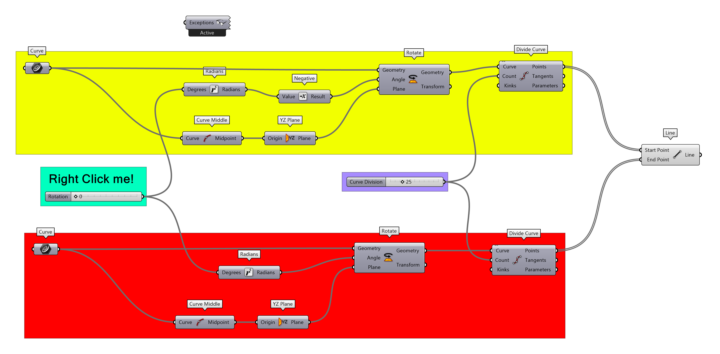
3 likes • Oct '25
cool function i didn't know before :-) Thank you Ertunc
1-2 of 2
Active 21d ago
Joined Oct 3, 2025
Germany