Activity
Mon
Wed
Fri
Sun
Jun
Jul
Aug
Sep
Oct
Nov
Dec
Jan
Feb
Mar
Apr
May
What is this?
Less
More
Memberships
FunnelHub Community
2.3k members • Free
Dental Marketing Agency Owners
1.9k members • Free
OfferLab
9.5k members • Free
ChatGPT Users
12.7k members • Free
AI Scaling Specialists
1.1k members • Free
GoHighLevel Growth Systems
1.3k members • Free
Active Solutions
3.5k members • Free
Agency Owners
19.9k members • Free
Automate Business AI
5.9k members • Free
8 contributions to AI Automation Society

Oct '25 •
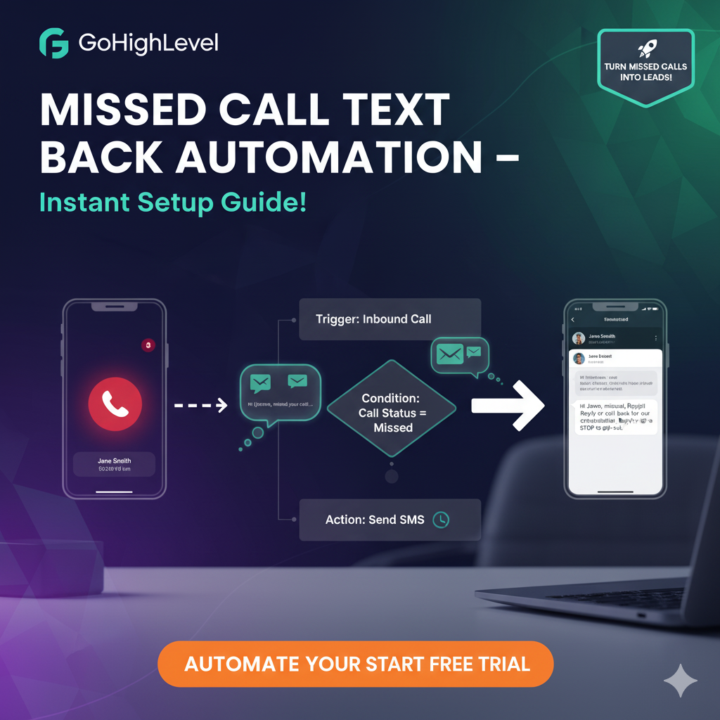
Missed Call Text Back Automation in GoHighLevel
Hey GHL fam! 👋 Missed calls = lost leads? Not with Missed Call Text Back automation! Here’s a short, actionable guide to set it up in GoHighLevel. Let’s do this! Step 1: Create Workflow Dashboard > Automations > Workflows > + Create Workflow. Name it “Missed Call Follow-Up”. Trigger: Inbound Call. Hit Create. Step 2: Set Missed Call Trigger In trigger settings: - Choose Call Status: Missed. - Optional: Filter by number/campaign. - Enable Run Once Per Contact to avoid repeat texts. Test with a dummy call. Step 3: Add SMS Action Drag Send SMS from sidebar. Write a short message: - E.g., “Hi {{contact.first_name}}, missed your call! Reply or call back for [offer].” - Use merge fields for personalization. - Keep it <160 chars, add “Reply STOP to opt-out.” Step 4: Configure & Test - From Number: Pick a GHL-registered number (Settings > Phone Numbers). - Delay: Wait 1-2 mins for natural feel. - Test: Simulate a missed call, check SMS delivery in Conversations tab. - Publish: Go live, monitor in Analytics > Workflows. Step 5: Avoid Pitfalls - Don’t skip delay – instant texts feel robotic. - Keep texts short and compliant (opt-out). - Save as template for reuse. - Track replies, tweak if low response. 6/6 Done! Your missed calls now spark leads. What’s your fave GHL automation?
Oct '25 •
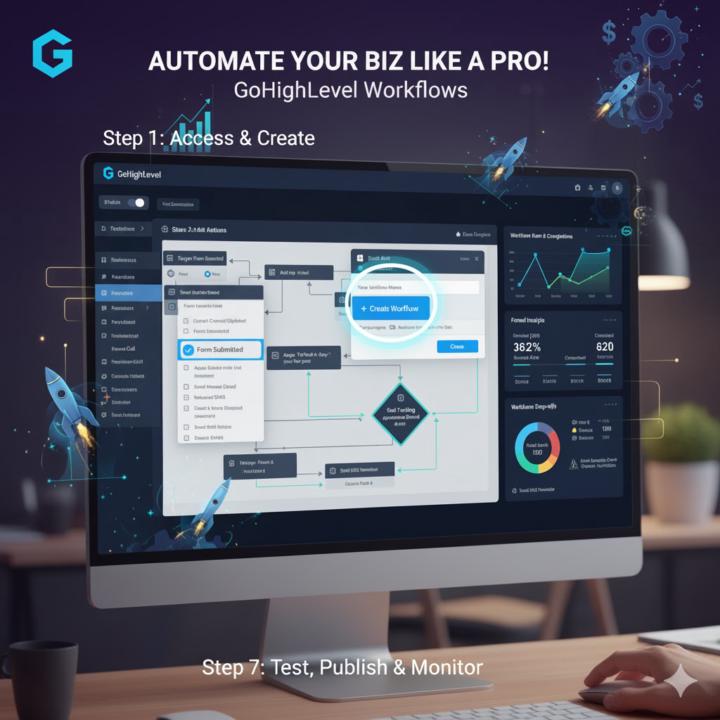
The Best Way To Go About Gohighlevel Workflows
Workflows are the secret sauce for ditching manual tasks and scaling leads effortlessly. If forms capture them, workflows nurture them. Today: A quick, no-fluff guide to building your first automation from scratch. Basics to advanced – let's automate! Thread 🧵 1/9 Step 1: Access & Create Dashboard > Automations > Workflows > + Create Workflow. Name it descriptively (e.g., "New Lead Nurture"). Choose a trigger: - Contact Created/Updated: Starts on form submit or tag add. - Form Submitted: Ties right into your leads. - Inbound Call/SMS: For real-time responses. Pick one we'll use "Form Submitted" for continuity. Hit Create. Blank canvas? Time to build! 2/9 Step 2: Add Actions Drag from sidebar: - Send Email/SMS: Welcome message with merge fields (e.g., "Hey {{first_name}}, here's your free guide!"). - Add Tag: Auto-segment (e.g., "Hot Lead"). - Wait/Delay: Pause X hours/days before next step – prevents spam vibes. - If/Else Branch: Conditional magic! E.g., If tag = "Agency" → Branch to custom path. Stack them logically: Trigger → Delay 1hr → Email → Tag. Pro tip: Use templates for quick starts. 3/9 Step 3: Triggers & Filters Refine your trigger: Filter by specific forms or tags to avoid firing on everything. Under Trigger settings: - Run Once Per Contact: Prevents loops. - Enrollment Rules: Only if "Source = Webinar" or custom fields match. This keeps it targeted no blasting irrelevant peeps. Test early: Use "Test Workflow" button with dummy data. 4/9 Step 4: Advanced Automations Level up: - Webhooks: Send data to external tools (e.g., Zapier for Slack alerts). - Task Creation: Assign follow-ups to your team (e.g., "Call lead in 2 days"). - Goal Tracking: Set endpoints like "Appointment Booked" auto-exits workflow. - A/B Split: Test two paths (e.g., Email A vs. B) for better engagement. For multi-step: Chain actions like Email → If no open → SMS reminder. Boosts response rates big time. 5/9 Step 5: Integrations & Notifications Connect native: Twilio for SMS, Gmail/Stripe for payments. Under Actions:

Sep '25 •
🚀 Looking for Execution Partners (Automation & YouTube)
I’m looking for partners to execute projects. I know how to sell and bring in clients, but I need to step out of the operational side. I’m not looking for an employee or an expensive agency. I want partners who are also growing, but who already know the basics to build flows and deliver real results. Projects include: • Systems that generate YouTube videos • Automation for clinics and businesses • Other digital flows that deliver results The idea is to delegate the technical side and develop projects together, always on a per-job basis, with the possibility to grow in partnership. If you have experience with automation and want to build together, reach out. Note: I’m not looking for expensive agencies or people who take days to deliver. I need fast partners who charge fairly and understand this is business outsourcing. High prices don’t make sense at this stage.
1 like • Sep '25
@Mih Cristina The upside of working with the right expert is that you’re not just delegating tasks, you’re creating repeatable systems that generate results across projects whether that’s automation, clinic workflows, or client-facing funnels. That’s what let you scale partnerships without worrying about fulfillment falling behind. If you had someone who could deliver reliably and efficiently without the agency price tag, how quickly do you see yourself scaling these projects?

Sep '25 •
HIRING: local n8n + deepseek + aitable.ai
We have multiple workflows we are looking to outsource to someone to design, build, deploy and maintain. Wether you are new or experienced we may have the right project for you. Do note that we outsource and hire directly to the freelancer/contractor that does the work, we do not work with agencies or middle man. You will need to verify your identity and your experience before getting hired. If you lack experience we can potentially take a risk and a assign you with a test project with a small budget. When replying specify your email in the comments or message me directly. Happy automating!
3 likes • Sep '25
@Aleksandr Partnership Thanks for sharing this opportunity. Just to clarify, are your workflows mostly centered around lead gen, client communication, and follow-ups, or are they more complex multi-step automations across different platforms? Would it make sense to connect and go over one of your priority workflows so I can show you exactly how I’d approach designing, deploying, and maintaining it? That way you’ll have clarity before assigning the first project.

Aug '25 •
Work Smarter, Not Harder
I’ve noticed something lately… The biggest breakthroughs in business don’t come from pushing harder — they come from removing the things that drain your time and energy. For me, that’s been: ✅ Automating repetitive tasks ✅ Streamlining client follow-ups ✅ Cutting out “busy work” that doesn’t drive results Doing less manual work gave me more space to focus on strategy, relationships, and growth. 👉 I’m curious, what’s ONE thing you’ve done recently that saved you time, energy, or stress?It could be a tool, a system, or even a simple habit. Drop it below, I’d love to learn from your wins!
0 likes • Aug '25
@Natalia Smitt Good to know
1-8 of 8

@joshua-elijah-1096
Smart systems, Better conversions, Real growth-driven marketing Expert | Let’s build a client journey that actually works for your business
Active 189d ago
Joined Jul 9, 2025
Powered by