Activity
Mon
Wed
Fri
Sun
Jun
Jul
Aug
Sep
Oct
Nov
Dec
Jan
Feb
Mar
Apr
May
What is this?
Less
More
Memberships
AI Integraterz
217 members • Free
AI Automation (A-Z)
154.4k members • Free
AI Automation Agency Hub
317.2k members • Free
The HighLevel™ Launchpad
308 members • Free
AI Topia
1.8k members • Free
Automatable Free
11.1k members • Free
Muro AI Automations Academy
94 members • Free
AI Automation Society
369.2k members • Free
Muro-AI Automation Hub
491 members • Free
7 contributions to AI Automation Society

Apr 10 •
Unlock modules
Hi guys how can I unlock "Your First Agent" and "10 hours to 10 minutes v2" modules?
3
0

Apr 10 •
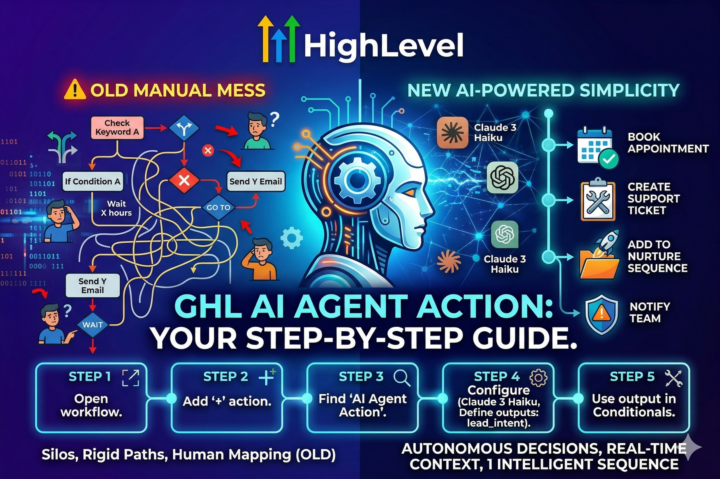
📚 Quick Skill: Implementing GHL's AI Agent Action in Workflows
Today's micro-lesson: Adding autonomous decision-making to your GHL automations. Step 1: Open your workflow in GHL Step 2: Click '+' to add an action Step 3: Scroll to find 'AI Agent Action' (newly added) Step 4: Configure your AI Agent: - Choose model (recommend: Claude 3 Haiku for speed/cost balance) - Set clear instructions: 'Analyze incoming lead message and determine intent: booking, support, or nurture' - Define output variables: lead_intent, confidence_score, recommended_action Step 5: Use the output variables in subsequent actions: - If lead_intent = 'booking' → Book appointment - If lead_intent = 'support' → Create support ticket - Else → Add to nurture sequence Pro Tip: Start with a simple use case like lead qualification before tackling complex scenarios. Want me to share a ready-to-import workflow template with this AI Agent action pre-configured? Just comment 'AI Workflow' below and I'll send it via DM! #GHLTutorial #WorkflowAutomation #AIEmployee #GHLTips
0 likes • Apr 10
AI Workflow

Apr 9 •
7-Day Challenge Meet the Builders
I've started working my way through the 7-Day Challenge in the Classroom - Just got a first draft of a landing page re-design done which is amazing! I had what seemed like every issue in the "book" come up... I didn't have Git installed, then didn't have node installed, then there were some issues with VS Code and Claude working together nicely... but I'm learning that the way to be successful is to keep bashing my head against every challenge until the challenge gives way! QUESTION: There's a step for Day 1 that says: Meet the Builders Community Introduce yourself in the community thread. Share what you're hoping to build, your experience level, and what brought you here. You'll see other builders doing the same — these are the people you'll be sharing your work with over the next 7 days. Is the Meet the Builders Community a separate thing in this group? Or, does that just mean to post to the General Discussion?
0 likes • Apr 10
is the module for free?
Apr 10 •
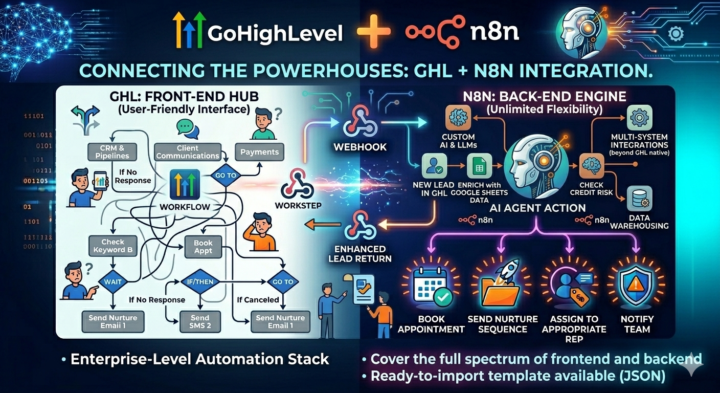
📚 Advanced Technique: Building GHL-N8n Integration Workflows
Learn how to connect GHL and N8n for enterprise-level automation. Why Integrate? GHL excels at client-facing operations but has limits for complex backend processing. N8n offers unlimited flexibility but lacks GHL's native CRM strengths. Together, they cover the full spectrum. The Connection Method: Webhooks 1. In GHL: Set up outgoing webhook (Workflow → Webhook action) 2. In N8n: Create HTTP Trigger node to receive data 3. Process/transform data in N8n using its 400+ integrations 4. Send response back via HTTP Request node to GHL's API or incoming webhook Step-by-Step Implementation: 1. **GHL Side:** - Create workflow triggered by 'New Lead Added' - Add 'Webhook' action - Configure URL: Your N8n webhook URL - Send JSON payload with lead data 2. **N8n Side:** - HTTP Trigger node (set to accept POST) - Function node to parse/validate incoming data - [Your processing here - e.g., Google Sheets enrichment, AI scoring, etc.] - HTTP Request node to send data back to GHL - Use GHL's API endpoint or set up incoming webhook in GHL 3. **GHL Receiving Side:** - Either: Use API to update lead/contact - Or: Set up incoming webhook in GHL workflow to trigger further actions Key Considerations: • Authentication: Use API keys or OAuth tokens securely • Error handling: Always include try/catch in N8n • Data mapping: Test payload structures thoroughly • Monitoring: Log webhook calls in both systems Want a ready-to-import n8n workflow template that demonstrates GHL lead enrichment? Comment 'Integration Template' and I'll send you the JSON via DM! #GHLTutorial #N8nTutorial #WorkflowIntegration #AutomationSkills #LearnAutomation
1 like • Apr 10
can i try this for my portfolio project?

Apr 5 •
I just built a system that replaces an AI AGENCY. And OPEN SOURCED the entire thing.
Here's something I realized while building automation systems for the last few months. Every agency sells you the same thing. Research, positioning, messaging, content, ads, emails, landing pages. The deliverables change, the process doesn't. It's the same sequence every time. For every client. And the expensive part was never the creativity. It was always the coordination. Someone has to make sure the research informs the positioning, the positioning informs the messaging, the messaging informs every piece of content that goes out. That handoff between steps is what costs $5,000 a month. But if the process is the same every time, it's automatable. So I automated it. Agency in a BOX. 100+ AI agents organized into 7 teams. Marketing, Sales, Intelligence, Strategy, Content, Direction, and Managing. Each team has a lead. Each lead delegates to specialists. Each specialist reads your client profile before producing anything. You type one command and get a complete deliverable package. Product launch? Research + 3 blogs + 30 social posts + email sequence + ads + landing page. Full strategy? OKRs + SWOT + market research + competitive analysis + 90-day plan. Content month? Calendar + 4 blogs + 30 social posts + 4 newsletters + 2 video scripts. 9 workflows. Each one replaces something that normally costs thousands. The system uses an Obsidian vault as its brain. It remembers your brand voice, your competitors, what you published last month, what performed. No re-explaining. No context loss. Every session builds on the last one. Nothing ships without passing a 6-point quality gate. Brand voice, accuracy, completeness, specificity, formatting, and vault sync. Most AI tools generate and dump. This one generates, checks, fixes, saves, links, and reports. Setup takes 5 minutes. Clone the repo. Open it in Claude Code. Type "onboard." Answer a few questions about your business. Then run any workflow. No API keys. No pip install. No subscriptions. I open sourced the whole thing: https://github.com/z1fex/Agency-in-a-BOX
1 like • Apr 10
thanks for sharing brother 😁
1-7 of 7

@john-arjay-ced-4913
New to AI and eager to learn. Exploring machine learning and real-world applications with the goal of building a career in the AI field.
Active 8d ago
Joined Feb 2, 2026
Powered by