Activity
Mon
Wed
Fri
Sun
Jul
Aug
Sep
Oct
Nov
Dec
Jan
Feb
Mar
Apr
May
Jun
What is this?
Less
More
Memberships
⭐️ The Writers Academy ⭐️
56 members • Free
Mobile Filmmaking Studio
98 members • Free
The Script Advantage Network
181 members • Free
The Screenwriters Lounge
76 members • Free
Fort Worth Film Club
229 members • Free
Script Angel Academy
172 members • Free
One Grand Film Skool
1.7k members • Free
Atomic Gains Ai Filmmaking
56 members • Free
The Indie Coach
75 members • $25/month
1 contribution to ⭐️ The Writers Academy ⭐️

2d •
A free Mac app for developing a story visually, now with a Fountain export
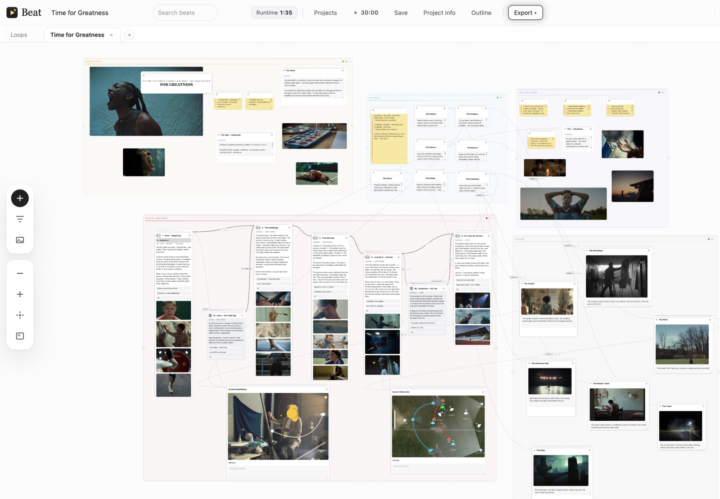
I am a director and I have always thought about story in pictures and out of order. I usually know the ending before I know the opening, and I carry two or three versions of a scene in my head at once. A blank page and a straight outline never held that, so I built my own tool. It is called Beat, a free Mac app. It is one visual canvas where you lay your beats or scenes out as cards, connect them into a spine, and branch any beat into alternate versions sitting right beside each other, so you can hold two ways a scene could go without losing either. You can start from classic structures like three act, Save the Cat, the hero's journey or the story circle. When the shape is right, it exports a clean outline to Markdown or Word, and now a real Fountain screenplay too. It just reached 1.5 this week. It runs on Mac, works offline, has no account and no tracking, and it is completely free. I built it for myself and I give it away. The two screenshots show the full board and a story spine. If you want to try it, it is at beatforfree.com. If anything feels off or missing for the way you develop a story, I would really like to hear it. I am Joao, a director represented by Creme Company, part of the Boiler hub. Lived in New York for a while, now back in Sao Paulo. Instagram is @____lutz if you want to say hi.
1 like • 15h
@Marcello Iori thank you, and thank you for the welcome. This is exactly the kind of room I hoped it would reach, people who care about the craft of the story itself. If anyone here gives it a try and hits something rough, send them my way, I answer everything.
2 likes • 15h
@Stacey Brooks this is so kind, thank you. You said it better than I did, preserving possibilities long enough to discover which one is right is the whole reason the branching exists. Holding two versions of a scene without forcing the choice early is exactly the thing I kept wishing for and never had. Really glad it resonates, and thank you for the warm welcome.
1-1 of 1