Activity
Mon
Wed
Fri
Sun
Aug
Sep
Oct
Nov
Dec
Jan
Feb
Mar
Apr
May
Jun
Jul
What is this?
Less
More
Memberships
The RoboNuggets Network (free)
57k members • Free
AI Workshop Lite
36.6k members • Free
Agent Empire
1.2k members • Free
AI Agents Lab
2.6k members • Free
AI Creator Profits
27.3k members • Free
useful AI
24k members • Free
AI Automation Society
422.5k members • Free
Webinar Masters
5.7k members • Free
The Sugar Reset Community
387 members • Free
5 contributions to Agent Empire

2d •
How are you using Agents?
Curious to hear from you all on how you're using AI agents. Are you: > Building AI employees for your own business to help you run more efficiently? > Building and Deploying AI Employees for Other Businesses? (AI automation agency) if you could also let me know the biggest challenges you're facing in the process of all of this, that would be super useful -- based on how you're building and deploying agents, be it for yourself or for others, I'll know how best to create content to help ! Thanks for being here! Super excited to pump out more content and build together :)

0 likes • 2d
Just paid the subscription after 3 day free trial(and errors) today. I wish there were more beginner friendly onboarding or videos or warning or directions. I had almost zero knowledge on terminal command and how things work. I couldn't select from model part-I saw other person also said he couldn't follow like you showed in discord message. Almost everyone here seems technical people. After stumble upon other video of you showing, just ask chat agent to help install things not trying to configure and do it yourself! After watching that video, it was so much easier. One thing. If I wanted to copy paste some texts from my laptop(some URL) and wanted to paste into Orgo browser web claude code, it won't work. Keyboard copy and paste didn't work. Is it normal or is there trick? Later I learned you need to click windows to choose which window you want to activate etc. I just finished setting Obsidian, Hermes agent, Telegram bot, one cron job(syncing with GitHub for Obsidian) the basics and feel how to start Hermes and choose model etc. I am learning and setting for my own business then I love the idea of selling this system to business like you mentioned like insurance firm or entrepreneurs. I like in Korea so this is so new and cool! I know this system isn't targeted for total beginner like myself so asking for beginner friendly videos might not be what you expect? Anyway! I like it! Will keep using and exploring. :)
0 likes • 1d
@Bryan Zimmerman I guess using everyday and learning/memorizing after many attempts will improve CLI abilities. Maybe just too eager...or impatient... :) BTW have you also experienced your keyboard copy and paste won't work into the browser part of windows? I copied key from my laptop at home then wanted to paste into claude code web in Orgo but none of it works/paste there. So frustrating... Is it normal??? Haha
5d •
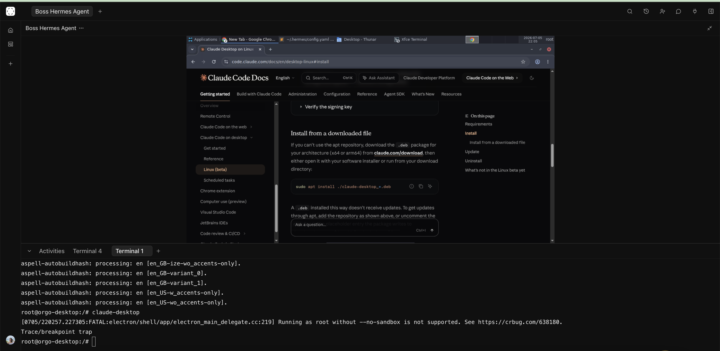
Installing Claude Desktop on Orgo
I setup one computer with one Hermes Agent. There is a template you can easily install Claude Code but when I click launch it install into a new computer. What I want to do it installing Claude Desktop app onto my first computer. I ran command line to install it but I am new to command CLI use style. Can anyone share how you did it or can Nick make video and share for community? Or explain some guide? Thank you! Is that the biggest screen I could make? Can't see well...to enjoy browser benefit for AI agent. Today's progress: 1. Setup Obsidian on my mac, GitHub, synced the files in Orgo. All synced free. 2. Claude was so amazing. With the Obsidian second brain and structures system, my productivity was through the roof today! So much accomplished and automated and made system 3. Set up telegram for Boss Hermes Agent in Orgo and perfectly working! 4. SSHed from Orgo to my laptop. Learned a lot on terminal command etc. Tomorrow I will setup Claude Desktop app or Claude Code and work through Orgo. To grow as fast as possible with my second brain with Hermes agent. With Claude as well. Will see how much beneficial this work style is. Obsidian was GREAT! Saving so much token I think! And understanding me and business better! Love to hear your experience and use cases and up and downs etc! :) Feel free to share your tips and challenges and growth etc! Future plan? :))
2
0
5d •
[Resolved] Root hermes folder? Want to setup slack
I'm trying to follow this instruction. https://hermes-agent.nousresearch.com/docs/user-guide/messaging/slack/ And trying to follow this video guidance but don't know how to get to the jason file in Orgo terminal. Connect Hermes Agent to Slack in 3 Minutes https://youtu.be/pLGnNWJRHug?si=6S_ty5-XIiixYFTn https://youtu.be/j5CIK1pcf3A?si=H4C0Vd4w6hC8KC2G&t=1057 Mark 17:37 Could you tell me how to get to /root/.hermes/slack-manifest.json from Orgo terminal? Not bottom terminal I am new to terminal. If anyone can do screen recording or loom, that will be a great help for non techie person. Thank you!!
0 likes • 5d
Finally installed successfully! When I followed the demo on YouTube, my arrow keys didn’t work, so I couldn’t choose the model or continue with the settings. Because of that, I had to set it up a different way. It took a long time, but Claude was very helpful with troubleshooting all the terminal and error-related issues! Now I can communicate with my Boss Hermes Agent bot from my Telegram and Slacks. Next, setting up Obsidian and syncing with GitHub so all my devices share same second brain. Also other AI models. Took 3 hours from asking the question here! Haha
5d •
Signed up 3 day free trial. How to setup Hermes? Obsidian?
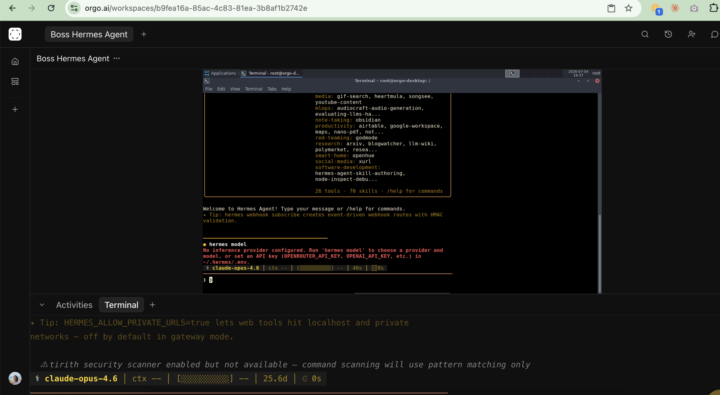
After resolving error, I am following demo on this video. https://youtu.be/Y7FVj4njob0?si=ztCXUAGa5oI4zxWq&t=2046 34:06 mark. Choosing model part. It says you could navigate by pressing arrow up and down but it doesn't work at all. How to choose option? First part, it worked-choosing first choice. But model part...I can't select by pressing arrow button. Up down. So I am stuck at this point. If I press enter key then it shows backend terminal choosing option which I don't know what to choose there either. ------------ This is my screen recording. https://www.loom.com/share/a22d3b996eb642c198c3b96306ea6c26 I found out I had to click bottom window which is terminal. So I could choose chatGPT 5.5 Then there was no more procedure like you showed as demo. I keep trying... This is last attempt. https://www.loom.com/share/0f5bf82b4f00431ab0e0709c6e46825b I can choose model again...how do you select? Choosing web search & extract etc...that part. Is it because I use free account so it doesn't show? -------------- I am non technical person. It would be very helpful to screen record from signing into your fresh Orgo computer then....how to set up Hermes and Obsidian. I setup Obsidian on my home mac and connected to GitHub-synced now. I want Orgo Obsidian to be synced with GitHub Obsidian. Anyway, first thing is how to make Hermes to work properly. I saw many videos on how to set Hermes on VPS. Thank you!
0 likes • 5d
OK. I learned I have to type that on terminal below.
7d •
Obsidian in Orgo & my macbook at home
Hi!! Thank you so much for the approval! I’ve been watching your interviews and YouTube videos, and I have to say… Orgo and everything you’re building is amazing!!! It feels like a whole new world—NEXT LEVEL! Lately I’ve been binge-watching videos about setting up VPN hosting, Hermes Agents, sub-agents, second brain/WiKi, Obsidian and so many. 😊 I wanted to make sure I’m building everything the right way for my use case. I’m a solo entrepreneur with years of valuable knowledge, but it’s scattered everywhere—Notion, iPhone Notes, YouTube bookmarks, PDFs, text files, saved links on my website, and more. I have a lot of information, but it’s completely disorganized. I noticed you installed Obsidian on the Orgo virtual machine. I already have Obsidian installed on my MacBook, but I haven’t created or set up my vault yet. I’ve also been watching videos about the Second Brain concept and Andrej Karpathy’s wiki-style approach to organizing knowledge. There are so many different methods that I’m not sure which one is best. Ultimately, what I want is one Obsidian knowledge base that all my AI models can access and learn from—ChatGPT, Claude, Gemini, and whatever comes next. I have lots of PDFs, text files, and other documents. Should I import everything into the Obsidian on Orgo? What about the Obsidian on my MacBook that I use every day? What’s the best way to keep everything synced? Even with my iphone? I’ve watched someone showed GitHub and google drive method. Obsidian vault lives in a GitHub repository so all AI models and agents can access the same Second Brain. But with Orgo way… Would you be able to explain—or even make a video—showing what you do immediately after installing a fresh copy of Obsidian? I think that’s the part I’m missing. I downloaded your Obsidian PDF, and I’m finally signing up for the 3-day Orgo trial today. I stayed up all night. It’s 5:52AM. I’ll sleep then when I wake up, I’ll start signing up and install etc!!!!!!! 🎉 My goal is to build a Hermes Agent that truly knows me and grows with me over time—not just like a regular Claude conversation.
1 like • 7d
This is what I found. Is this good way to go?
0 likes • 5d
@Michael Gründling I am now setting up Orgo. I'll sync my Obsidian with my Mac, Orgo, github, galaxy tab and iPhone. 5 places. I will update you when it's successful. I already finished Mac and github. 😄
1-5 of 5

Active 9h ago
Joined Jul 2, 2026
Powered by