Activity
Mon
Wed
Fri
Sun
Sep
Oct
Nov
Dec
Jan
Feb
Mar
Apr
May
Jun
Jul
Aug
What is this?
Less
More
Agent Zero
2.8k members • Free
Community Builders - Free
12.2k members • Free
The AI Advantage
127.9k members • Free
4 contributions to Agent Zero

4h •
Agent Zero v2.10 is out!
Three main dishes this time: a Browser that works on the real web, @ tagging for everything, and ACP support in the CLI. The Browser got stealthy: The internal Browser now handles bot detection properly. Sites that flagged Agent Zero as a bot and were unusable in previous versions now just work, including Gmail and your social accounts. You sign in yourself through an interactive authenticated viewport, then the agent works inside your session. The Browser runtime is shared across chats: sign in once, every chat can use it, tabs restore automatically, and cleanup is safer. On top of that: native resizing, DOM hover support, multi-page annotations, clearer loading feedback, and voice controls. The attached video shows it browsing Gmail. Tag anything with @: Type @ in the composer and get scoped autocomplete for agent profiles, files, folders, skills, and MCP servers. No more typing full paths or remembering exact names. It works in the Web UI and in the CLI, where completion also covers bounded local or container workspace paths. Composer drafts now persist per chat too, so a reload never eats your half-written message. The CLI speaks ACP: Run 'a0 acp' and the CLI starts an Agent Client Protocol stdio server backed by the Agent Zero connector, with session lifecycle and host-tool support. In practice, external editors that support ACP can now host Agent Zero directly: your editor becomes the frontend, Agent Zero does the work. Also in this release: Unified subordinate agent lifecycle across direct and parallel calls with resumable failed children, streamed tool calls preserved when final response envelopes omit them, plugin reload prompts scoped to global changes only, authenticated extension routes with path-traversal protection, and backup restore that no longer affects the active process settings. How to update CLI: open a terminal and type 'a0 update' Web UI: open Settings -> Check for updates -> Review update New here? Install guide: https://www.agent-zero.ai/p/docs/installation


1 like • 2h
Awesome!

28d •
Agent-Zero Safety Risks.
Hey everyone, I was looking into trying out Agent Zero for some local autonomous agent workflows, but I recently came across some security discussions highlighting potential risks. Specifically, I saw concerns regarding its unconstrained terminal/code execution, default network bindings, and reports of path traversal vulnerabilities (like the arbitrary file read issue in `python/helpers/files.py` via `get_abs_path`). For those of you who have used it or built with it: What is your take on its safety profile? Is running it strictly inside an isolated Docker container with zero access to sensitive host directories enough to mitigate these risks, or are there other major gotchas I should be aware of before deploying it? Appreciate any insights!
1 like • 27d
The docker container does isolate it, but there is a tool that if enabled or installed will let the agent edit files on yuor host. The A0 CLI. Discord is also a place to get more info.
Apr 21 •
🧑🚀 Meet Space Agent, our newest creation!
Hello everyone, Big announcement today. We are publicly releasing our newest creation — the Space Agent. This agent can completely change the way you use and experience AI agents. Claim your Space and try it now. No install. No configuration. Just your API key or local inference, and that's it -> https://space-agent.ai If you like Agent Zero, share and give us a Star on GitHub, or subscribe on YouTube to keep the momentum going!
4 likes • Apr 21
I had to play the snake game demo for a few minutes, very fun!
Mar 25 •
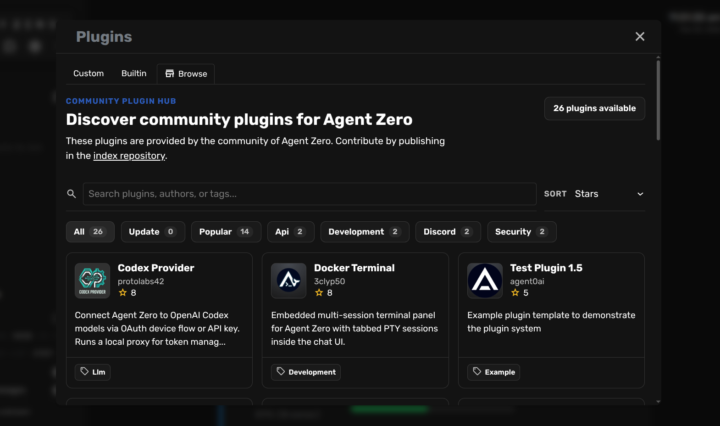
🧩 Plugin System LIVE in Testing. Try it today!
Hey everyone! Big update: Agent Zero Plugin System is now available in the testing Docker image! Install community plugins, update them, or create your own. Thanks to all the devs that started building plugins even before its release. How to Run the Testing Branch 1. Go to https://agent-zero.ai and copy the install script 2. Open your terminal (Windows PowerShell, Mac Terminal, or Linux) 3. Paste and run the script. A0 will download in about 3-4 minutes 4. While it downloads, open your preferred AI provider dashboard (OpenRouter, OpenAI, Anthropic, Google, etc.) and create a new API key --- 🧩 How to Use the Plugin Hub 1. Click the puzzle piece icon in the left sidebar 2. Click Browse to explore the A0 Community Plugin Hub 3. Install, uninstall, and update plugins with one click! 📂 Our Plugin Index listing is on GitHub, and provides additional guidance on contribution: https://github.com/agent0ai/a0-plugins --- ⚙️ First-Time Setup - When download completes, your terminal will show a browser link - open it - You'll see a "Missing LLM API Key" banner in the A0 UI - Click "Configure model settings", and paste your API key there - Pick your preferred models in model config for Chat and Utility tasks --- 🔄 Updating? Use Backup & Restore! Old A0 → Settings → Backup & Restore → Create Backup New A0 → Settings → Backup & Restore → Restore Backup → Upload zip All your settings & API keys migrate instantly. --- 📱 Connect A0 to Your Phone - Settings → External Services → Click "Flare Tunnel" - Click "Create Tunnel" - Scan the QR code with your phone - Access your Agent Zero instance from anywhere! --- 🛠️ Create Your Own Plugins Want to build and contribute? Just ask Agent Zero about its "plugin skills" - it knows exactly how to guide you. Or check the internal docs. Let's see what the community builds! Share your experiments in the Skool or Discord communities of A0. See you in today's Community Call, at 3PM UTC,
3 likes • Mar 25
Nice work!
1-4 of 4

Online now
Joined Feb 19, 2026
INFJ
Powered by