Activity
Mon
Wed
Fri
Sun
Aug
Sep
Oct
Nov
Dec
Jan
Feb
Mar
Apr
May
Jun
What is this?
Less
More
Memberships
AI Automation Society
418.9k members • Free
2 contributions to AI Automation Society

Feb '25 •
Retrieving Audio from Slack and transcribing
Hi everyone, I am new to using n8n and am trying to create my own version of Nate's Personal Assistant but using Slack instead of Telegram for the communication channel. I get it it work using TEXT messages but I am struggling to get the audio to work. I have priorly managed to handle it using make.com by adding the Download file Slack Node between the trigger/webhook and the OpenAI transcription Node. But I do not get it to work using the Get File Slack Node in n8n. What I can see the Get File Node does not actually download the data? Anyone found any solution for this, All the best, Jens
0 likes • Mar '25
@Matte Fall - I have not fully, but I stumbled on a potential solution working with another project when processing images. I will try it out tomorrow and update
0 likes • Mar '25
Hi, I found the solution now. @Matte Fall the n8n nodes for Slack is missing a Download feature so you need to use the regular HTTP call node. I have attached a print screen. Steps: 1. Trigger Slack node 2. Use the Get File Slack Node and get the file content (I used a switch before to steer it towards this branch if there is a audio file in the message) 3. Use the HTTP API call node and set it up as below. Using your credentials for the Slack connection and the private_download_url from the Get File Node. 4. And the Retrieve formate File - data. Thats it, after that you can use the OpenAi Whisper Node to transcribe the audio. All the best, Jens

Feb '25 •
Problem with the Assignee field on Airtable
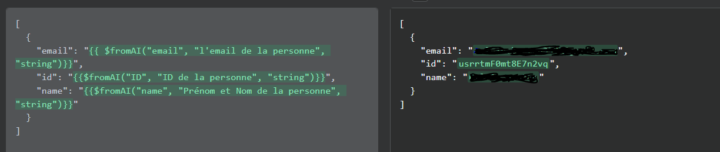
Hello everyone, I’m building an agent on n8n, to update tasks automatically in an Airtable table, for each task in the table, there is a user field that associates the task with the designated person. However, I have a bug when my agent uses the "Create a record" tool, which tells me that he has a problem with the values I specify for the User field (see image 1), however, I check the "Get Tasks" tool of my agent that allows to retrieve the tasks already present in my table and the user field corresponds well to what I have filled (see image 2). Has anyone ever encountered this problem ?
0 likes • Feb '25
Hi Adrien, I also got error in the similar way. As the field you are trying to add values into, is a field that is connected to another table, the API documentation states that the values must be within [ ]. I simply instructed my agent in the description of the fromAi function with the following. (Below is an example when adding a new user to our CRM in AirTable and we want to connect the user to an existing company.) "The id for the company which you want to connect the individual to. The ID needs to be within [] i.e ["record_id"] " Hope this helps you, All the best, Jens
1-2 of 2

@jens-danerhall-7112
I am a AI Agent and Automation consultant
Active 455d ago
Joined Feb 15, 2025
Powered by