Activity
Mon
Wed
Fri
Sun
Sep
Oct
Nov
Dec
Jan
Feb
Mar
Apr
May
Jun
Jul
Aug
What is this?
Less
More
Notion AI Skool
78 members • Free
Female Entrepreneur Community
2.7k members • Free
Women's Business Community
1.8k members • $7/month
Claude for Online Business
460 members • Free
Marketing Momentum Collective
170 members • Free
The Dog Sitting Sisterhood
13 members • Free
WeMeet for Women Entrepreneurs
4.7k members • Free
The AI Identity Lab
148 members • $27/month
Women Helping Women Mastermind
11.4k members • Free
59 contributions to The AI Identity Lab

🔥
26d •
Pre-work is live. Start here.
The AI Creative Director Challenge starts Wednesday. Your job Monday and Tuesday is to prep so you can build live instead of scrambling. Three things to do before Wednesday: 1. Pick your reference photo. The one that looks like you right now, good light, clear face. Grab two backups. 2. Photograph your wardrobe, jewelry and footwear. The pieces you'd actually wear in a brand image. One photo each. 3. Draft your workbook. Rough is fine. Wednesday we make it specific together, but you need something on the page to work from. The full pre-work brief and the workbook are linked below. Read the brief first, it tells you exactly what to shoot and how to name it. One thing that matters. Day 1 is an audit, not a lecture. You show up with drafts and we tighten them live. Come with nothing and you'll be building while everyone else is refining. Do the pre-work. To build live with us, be set up by Tuesday night. Questions? Drop them here. See you Wednesday. Pre-Work Brief attached Participant Workbook attached

1 like • 25d
@Lindsay Hack will this all live in the classroom after? I have a bananas week getting ready for vacation and can't commit to the pre-work but would love to do it after I get back?
🔥
Jun 24 •
Workshop Replay: Build Your Carousel Studio
Here is the full recording of our June 24 build, plus everything you need to use your tool and keep going. We built personalized carousel makers, in our own brands, in under 60 minutes. @Molly Dowdy even posted hers to Facebook before we finished. That is how fast this is. Watch the replay, then use the quick reference below so you do not have to scrub back through the video to remember a step. In this lesson - The full workshop recording. - Your tool file, attached. Download it, open it in your browser, never in an AI. - Your How To Use It guide, the SOP, attached. The key things to remember These are the moments people forget. Bookmark this lesson so you can come back to them. + Use Duplicate, not Add. This is the speed secret. Duplicate carries every setting forward, your colors, layout, and toggles, so you only change the words. Add gives you a blank slide and makes you start over. Duplicate almost every time. + Set your brand, then keep your tool the right way. Set up your brand once. The tool now remembers it when you reopen the same file. For a permanent copy that opens in your brand on any browser, click Download my tool, open that downloaded file, and bookmark that one. That is your real studio. + Download the moment you love a design. Your slides are not saved until you export. If you refresh or close before exporting, unsaved edits are gone. When a slide looks right, Export PNGs and save it. Aim for 5 to 7 slides. That is the sweet spot for Instagram carousels. Long enough to teach, short enough to hold attention. + Logo tip. A transparent PNG looks cleanest. But if your transparent logo looks odd, upload the regular version and let the tool place it in a box. Sometimes the box looks better. Use whichever fits your logo. Fewer than 4 brand colors? Fill the empty slots with black or white. They go with everything and keep your slides clean. Repurpose every carousel across platforms One build, many posts. Use your exported PNGs for:
1 like • Jul 20
@Lindsay Hack having a hard time getting chatgpt to make my logo transparent? any tips and what a cool tool. I will share once i get a carousel created
🔥
Jun 25 •
Prompt for Social Media Posts
Upload a photo of you. ChatGPT Image 2.0 Prompt: (adjust as needed) Create a premium social media graphic in a 4:5 portrait format (Instagram/Facebook). Use a candid, photorealistic lifestyle photo of [describe the person] standing naturally in [location]. The person should be intentionally softly blurred with a shallow depth of field so they become part of the background rather than the main subject. Slightly reduce contrast and saturation, creating a subtle faded editorial look while still keeping the person recognizable. Leave generous negative space through the center of the image for typography. Overlay a large inspirational quote that occupies approximately 70–80% of the image height. Typography specifications: Large bold condensed sans-serif font White lettering Soft charcoal drop shadow for readability Center aligned High contrast Clean premium editorial design Comfortable line spacing Balanced margins Quote is the primary focal point Fade the background slightly behind the text so the words are effortless to read. Modern luxury branding aesthetic. Natural lighting. No logos. No watermarks. High-end magazine quote graphic. Text: "It is time to take action. No more watching from the side line. QUOTE: "1 in 5 people are actually implementing what they learn. Be that person." Lindsay Hack, The Identity Hacker
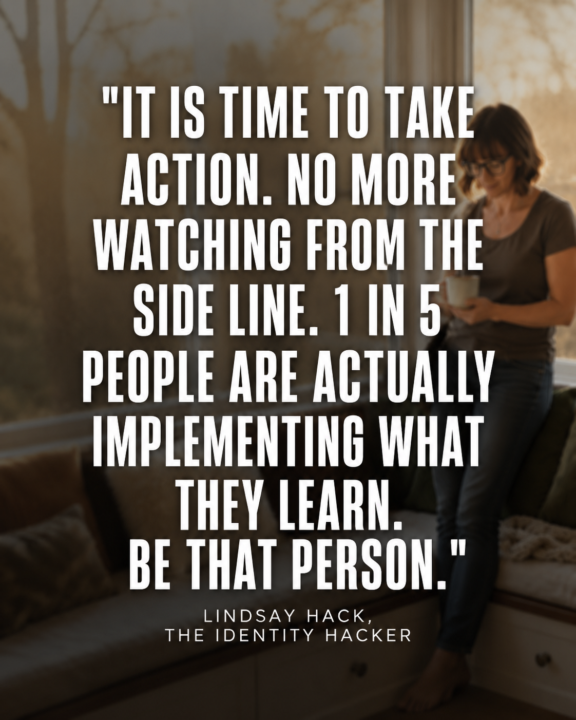
1 like • Jun 29
@Becky Nieves so good.
1 like • Jun 29
@Brenda Adelman love how bold this is- great
🔥
Jun 25 •
Welcome to The AI Identity Lab
@Kay Scott @Annie Harmon @Kristina Daugherty Welcome to the community. We are excited have you join and dive right in. Please introduce yourself and your business here in the community. Every new member gets a call with me as well, so please reach out when you are ready.

3 likes • Jun 25
welcome everyone- you are going to love it @Kristina Daugherty so good to see you in here
🔥
Apr 16 •
Common Mistakes — And How to Avoid Them
https://check.theidentityhacker.com/image-guide Before you generate anything, get the reference right.
1 like • Apr 18
@Lindsay Hack this was very helpful
1-10 of 59
@jennifer-hynes-5621
Women come to me when they look fine on the outside but feel anxious and on edge—and are ready to handle life with more balance, calm, and ease.
Active 16h ago
Joined Sep 26, 2025
Charleston, South Carolina
Powered by