Activity
Mon
Wed
Fri
Sun
May
Jun
Jul
Aug
Sep
Oct
Nov
Dec
Jan
Feb
Mar
Apr
What is this?
Less
More
Memberships
Making Better Agents
619 members • Free
OpenClawBuilders/AI Automation
484 members • Free
AI - OpenClaw - Code
347 members • Free
Ai & OpenClaw for Realtors
562 members • Free
Google Ads Masterclass
11.9k members • Free
WG
White Glove Lofty CRM Leads
31 members • $100,000/year
A.I. INFLUENCERS
1.5k members • $97/month
Leads | Listings | Leverage
1k members • Free
39 contributions to OpenClawBuilders/AI Automation

8d •
2026.4.5 and CLI
Anyone else seeing Major CLI issues with OC 2026.4.5 (linux Ubuntu 22). I rolled back to 2026.4.2 for now I got it working but the system load on 4.5 was 80% / 4.2 runs at about 6%
0
0

26d •
Co-Work Invites
I received 3 invites for a week of cowork. Looking to give them away in the group. Looking for ideas on how to have them out. Best OpenClaw Skill build out , submit your skill and show us how it works Best Mission Control Setup Best OpenClaw Troubling shooting tip. Best use case writeup that we can build together on a series of Lives Or , randomly select from the posts, available for the first people who send in one of the following Just share your information here 👇
0 likes • 18d
Just used CoWork to Audit my Books and Prepare my Schedule C Told Claude it was a CPA and that this was for a Realtor SoleP. Then it did a GAP analysis and cross referenced all charges and paper receipts by the last 4 digits of the account. ($20 plan was painful in the 4 hour block prison) (ChatGPT did the OCR work for shoebox of paper receipts / Claude tried and lost in this category) Last year 2024 it took me 40+ hours, this 2025 year 10ish hours (#winning)

20d •
Fastest way from scratch to multiple self improving agents
Hi All - I just bought a Mac mini, am about to install Open Claw, Nemo Claw, and wanted to ask - with the challenges (pros and cons to everything respectfully) - knowing what you know now - what would you say would be the fastest, easiest, most effective way to start from scratch, install software, and end up with multiple self-improving agents? I saw someone using Nemoclaw to install open claw saying is easier, faster, and more efficient. Has anyone tried this? looking for any and all help that I can find - thank you so much for your input and high five! :)
0 likes • 18d
what is your use case for the Box? RAM Amount?

26d •
API vs Claude Max?
I've burned an embarassing amount of money on LLM tokens on this thing over the past 6 weeks, learning as I go. Some streamers are talking about just connecting the openclaw gateway to anthropic via standard Oauth rather than api. I thought that only worked for Claude Code and actual anthropic apps. Is it possible to run openclaw (main and sub agents) just on the flat Claude Pro/Max plan to cap token costs?
1 like • 18d
OAuth openai-codex/gpt-5.4 has been my GoTo for operations Working on Coding outside of OC and then giving it REPOs for new applications. moving slowly. Next Week Ill have a 64GB QWEN 3.5 i7 Machine LLM for local coding calls (dedicated to coding)
19d •
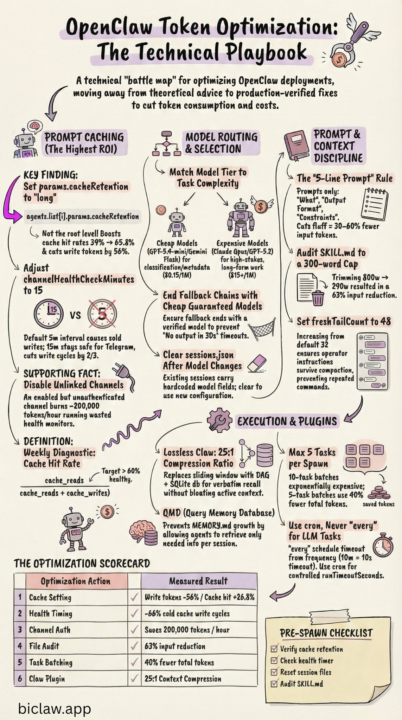
How OpenClaw Stays Sharp Without Burning Tokens
https://www.biclaw.app/blog/openclaw-token-optimization A technical playbook: real failures, exact fixes, measured results. Every technique here encodes a real incident. The failure mode, the config change, the measured outcome. No theory — only what worked in production. (Found this quite interesting)
0 likes • 19d
GAP ----------- Here is a verified action plan based solely on confirmed OpenClaw config keys, Anthropic prompt caching docs, and OpenAI prompt caching docs. Every item here can be cross-referenced in official sources. OpenClaw Cost & Efficiency Action Plan (Claude / OpenAI models only) Priority 1 — Immediate Config Changes (Low Risk, High Impact) 1. Set a cheaper model for compaction Why: By default, compaction uses the same model as your main session. If you're running Claude Sonnet or GPT-5.x as your primary, every context compaction runs on that expensive model. Confirmed config key: agents.defaults.compaction.model json{ "agents": { "defaults": { "compaction": { "model": "anthropic/claude-haiku-3-5" } } } } For OpenAI setups, use "openai/gpt-5-mini" or equivalent. This is the only legitimate way to pin a cheaper model for compaction — it's a real, documented field. The BiClaw blog's summaryModel in a plugin does not exist; this key does. 2. Enable context pruning Why: OpenClaw keeps full tool results in context by default. Long browser/exec tool outputs re-read on every turn add up fast. contextPruning trims old tool result content before sending to the LLM without touching the disk history. Confirmed config key: agents.defaults.contextPruning json{ "agents": { "defaults": { "contextPruning": { "mode": "cache-ttl", "ttl": "1h", "keepLastAssistants": 3, "softTrimRatio": 0.3, "hardClearRatio": 0.5, "minPrunableToolChars": 50000, "softTrim": { "maxChars": 4000, "headChars": 1500, "tailChars": 1500 }, "hardClear": { "enabled": true, "placeholder": "[Old tool result content cleared]" }, "tools": { "deny": ["browser", "canvas"] } } } } } The tools.deny list exempts browser and canvas results from hard-clearing (since those are often large but needed for next-turn context). Adjust minPrunableToolChars upward if you want to be more conservative. 3. Set agents.defaults.timeoutSeconds to a sane value Why: The default is 600 seconds. A runaway or hung agent turn holds a slot for 10 minutes and burns tokens. For most conversational tasks, 120–180s is sufficient. Set longer only for explicit long-running tasks.
1 like • 19d
MD File for the chat (or for implementation of action steps 1-11)
1-10 of 39

Active 7d ago
Joined Feb 21, 2026
Powered by