Activity
Mon
Wed
Fri
Sun
Jul
Aug
Sep
Oct
Nov
Dec
Jan
Feb
Mar
Apr
May
What is this?
Less
More
Memberships
AI Automation Society
389.2k members • Free
NextGen AI
36.6k members • Free
AI Creator Labs
907 members • Free
AI Video Creators Community
4.4k members • $9/month
12 contributions to AI Automation Society

4h •
Day 3 Skill ✅
For today’s build, I created an infographic/video around my video production workflow. The skill helps turn my production process into a more structured output and in this case, I used it to create an infographic based on my workflow. The graphics and text came out a little wonky, but I ran out of tokens, so I treated it as a first draft. I also experimented with an MCP for a video workflow and used AI video generation to test what was possible. Honestly, it was super impressive. It still had some quirks, but with better skill refinement, this feels like a game-changer for my multimedia work. Optimization: I realized the skill needs clearer instructions for layout, text hierarchy, and visual polish so the output feels more professional and less random. Big takeaway: skills + MCPs + AI video can become a real creative system, not just a one-off prompt. #AISChallenge

0 likes • 4h
@Jake Guagliardo Appreciate that! Yeah, that’s what clicked for me too, the structure is the real win. The graphics/text can be fixed with better prompting and more iteration. For the video workflow, I used Magnific MCP (Freepik), and the photos were also generated through the Magnific MCP. I also saw that Higgsfield has an MCP people can use inside Claude Code, which is what made me start thinking about how this could plug into a bigger multimedia workflow. My prompt was honestly pretty simple. I just asked for basic scenes to test the workflow. I’m sure if I got more detailed with shot style, camera movement, mood, lighting, and pacing, the results would’ve been even stronger.
1d •
Day 1 Build Newsletter ✅
Built a wellness/therapy newsletter concept using Claude, with a branded layout, headline, article sections, and visuals. Biggest learning: I created a knowledge base from a book and had Claude reference that instead of relying on the internet. That helped the output feel more grounded, focused, and aligned with the source material. It showed me that AI works better when you give it a strong foundation to pull from. Next thing I’d improve: make it more actionable with a simple CBT exercise or reflection prompt. #AISChallenge

0 likes • 4h
@Marian D Wow, I’d love to learn more about that. I’m still new to Claude Code and agentic workflows, so I’m trying to understand how people are applying it beyond content creation.
0 likes • 4h
@Drique Sd Honestly, this opened up a lot of ideas for me around content creation. It made me think beyond just prompting AI and more about gathering strong source material, organizing different perspectives, and turning that into useful content Maybe even learning modules, guides, or mini-courses.

4d •
Completed 7 day challenge!
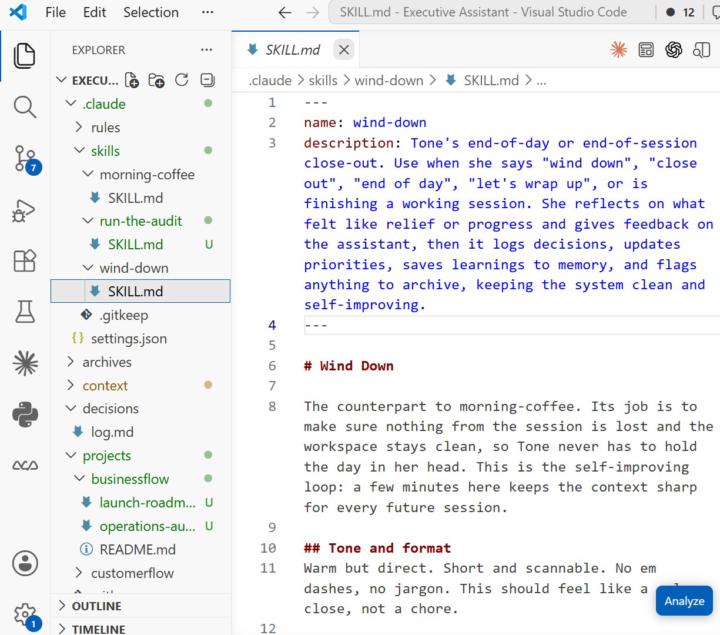
I just finished the 7-day challenge, and I’m honestly so glad I did it. I’ve learned so many new skills, gained a lot more clarity on how to move forward, and I now have my own Executive Assistant built. Because I completed the challenge, the AI OS also opened up for me, so now I feel like I have the beginning of a full system I can keep improving and personalizing. What I appreciated most is that this was not just listening or watching more content. It made me actually build, complete, post, reflect, and learn what to look for as I went. That makes it feel like a self-improving system. I really recommend it to anyone who has been watching from the side. Getting in and doing it made such a difference. Thank you, Nate and team, for this opportunity. Tomorrow I’m going back into my AI OS and continuing from there.🤖😁🤖
0 likes • 6h
Great work!
6h •
Day 2 Build ✅
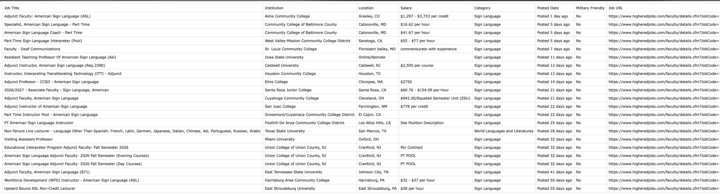
For today’s challenge, I scraped sign language faculty job listings and organized them into a CSV with titles, schools, locations, salary info, posted dates, and URLs. I built this with my brother in mind since he’s Deaf, and I started thinking about how web scraping could help the ASL/Deaf community find opportunities faster. One thing I learned: scraping is more powerful when it turns scattered information into something structured, searchable, and useful. #AISChallenge

3d •
Grinding to Level 3 to unlock the AI OS build — but does the locked video actually go deep?
Been pushing hard to hit Level 3 so I can finally access the locked AI Operating System video. The idea of having a full personal AIOS — one system that handles routing, memory, tasks, and execution — is exactly why I joined this community. But here's the question I keep coming back to: Does the Level 3 video actually give you a full, production-ready framework you can build on? Or is it more of a high-level overview that points you in the right direction? For those who've already unlocked it — did it cover the real technical depth (prompting structure, routing logic, tool setup, memory handling)? Or did it leave you with more questions than answers? Not trying to gatekeep the grind — leveling up is part of the process and I'm here for it. Just want to know if I should be supplementing with other resources while working toward it, or if the video is genuinely the blueprint. Would love to hear from people who've been through it.
3 likes • 1d
Someone help with a like to unlock a course🥇
1-10 of 12
Active 3h ago
Joined May 13, 2026
Powered by