Activity
Mon
Wed
Fri
Sun
Jul
Aug
Sep
Oct
Nov
Dec
Jan
Feb
Mar
Apr
May
Jun
What is this?
Less
More
Owned by Jamy
Master Figma Weave. Turn your vision into scalable node-based workflows. Move beyond prompting, start architecting. Free course + community inside.
Memberships
PYNK Society - AI Creative Lab
76 members • $49/month
$1 Club
188 members • $1/month
Synthesizer: Free Skool Growth
43.4k members • Free
42 contributions to The Weavy Way™ | Master Nodes

21h •
1,500 free Weave credits and discount code for this group.
I joined the Teach With Weave program from the Figma Weave team, and honestly, the first thing I wanted to do with it was bring something back here. So: ten times the standard free credits, through my sign-up link: http://app.weavy.ai/signin?promotion=jvodegel&ref=jamy76 For anyone going paid use this code: JVodegel20 20% off your first purchase. One time per person, so put it on an annual plan, not a month. Capped at 50, then it's gone. Transparency: runs through my affiliate. More of this coming. This community is the reason I push for this stuff.

1 like • 19h
@Mr Pynk get those free credits 🤑

Feb 3 •
Getting to grips with Weavy. Generating character sheets and locking in consistency
Need some help getting going with Weavy. I have generated some previous images in NBP and I like the model but would like to change the clothes to specific pieces and generate strong character sheets which I can then use to generate some cinematic stills from and eventually some moving images. The emphasis is on the neck snood as it is the product being 'advertised' Essentially I want to be able to produce a workflow which I can control each item of clothing. I have Also included a cinematic moodboard which I have previously created in NBP with the correct clothing

0 likes • 5d
@Jonathan Coleman Let me take a look. I've been building and re-building behind the scenes might have got lost. One moment.
0 likes • 5d
Yes, definitely lost in cleaning things up. I recommend you have a look at the latest posts about the RIMS workflow. There's a whole video and also a link to the workflow. https://www.skool.com/the-weavy-way-3948/rims-workflow-your-turn
Mar 20 •
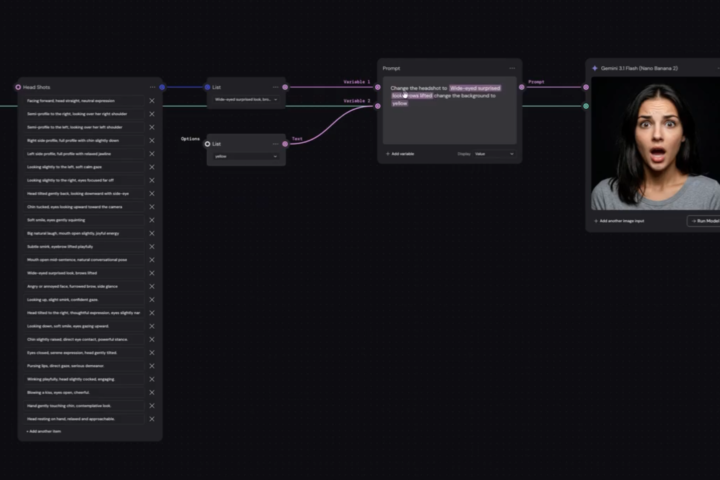
Q&A List Selector + Variables
Drop a comment below with your biggest takeaway from this lesson. One sentence is enough. Question: Could you use this in a workflow you're already building?
Poll
5 members have voted
0 likes • Mar 29
@Jigglypuff D 😂
0 likes • 18d
@John Laird thanks! :) I you have any question just drop them in a post. I've been a bit m.i.a. but I'm always here to anwser questions. There's been too much client work on my plate recently haha but I'm currently building the course.
Apr 2 •
Small ask, big impact, let's help each other.
I need your help. If you want to support me and this community, a follow on @thatweavyguy on Instagram makes a real difference. More followers means more visibility, which means more creatives find The Weavy Way. It's a small thing that helps a lot. 🙏 We're all here because we build workflows and create visual work. But most of us have no idea what the rest of the community actually makes outside of this group. This weekend you've got some time (I hope) 🐣. Let's use it. Drop your website, portfolio, or socials below. Let's inspire each other and connect beyond Skool. I'll go first: → ▶️ YouTube: https://www.youtube.com/@ThatWeavyGuy → 📸 Instagram: https://www.instagram.com/thatweavyguy → ▶️ Linkedin: https://www.linkedin.com/in/jamyvodegel/ Now your turn — drop your links below. Let's discover what everyone's building and connect outside of here. 👇

1 like • Apr 12
@Angela Domenici never enough connections!
1 like • May 6
@Stela Olaru thanks! Welcome to the club :)

🔥
Apr 17 •
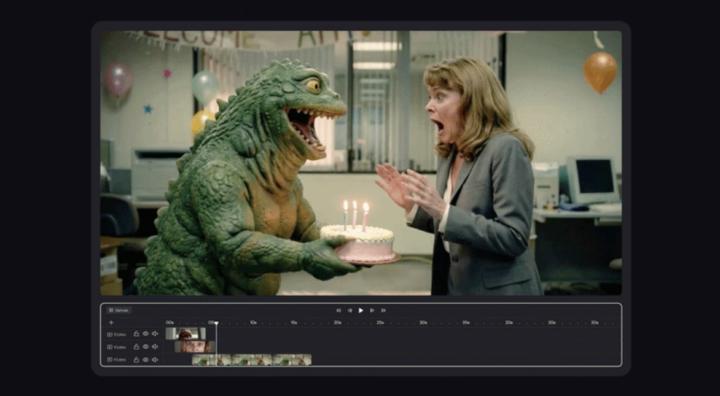
Timeline on Weavy!!
You thought AI was just about generating a million images? Cute. But let's be real. A hundred shots are useless without a VISION. Without a DIRECTOR. Without YOU. That's the cold, hard truth nobody wants to hear. Until now. Because what if you could take those AI-generated assets and actually direct them? What if you could orchestrate the chaos into a masterpiece, all within your creative flow? Forget endless exports and clunky editing suites. Forget losing your mind trying to stitch AI brilliance into a coherent story. We're talking about a REVOLUTION. A game-changer that puts the power of pacing, sequence, and sound back where it belongs: in your hands. This isn't just a tool; it's your new superpower. Get ready to compose, not just create! 🚀 Here's a sneak peek at how you're about to DOMINATE: The AI Content Conundrum: Solved! We'll dissect the biggest pain point for AI creators today: the sheer volume of assets without the means to effectively arrange and refine them. Discover why "more" isn't always "better" and how Timeline flips the script. Timeline: Your New Creative Command Center 🎬 Dive into the core functionality of Timeline. Understand how this integrated compositor feature empowers you to arrange clips, shape pacing, and layer sound directly within your workflow. It's seamless. It's intuitive. It's EVERYTHING. Master the Narrative: Pacing, Sequence, Sound 🎶 Explore the three pillars of storytelling that Timeline puts at your fingertips. Learn how to precisely control the flow, impact, and emotional resonance of your AI-generated content through expert sequencing and integrated audio. Iterate Like a PRO: Dynamic Updates & Endless Possibilities ✨ Uncover the magic of real-time iteration. See how updating prompts or swapping clips instantly reflects in your timeline, allowing for unparalleled creative freedom and lightning-fast adjustments. This is the future. This isn't just an upgrade. It's a paradigm shift. Are you ready to stop generating and start DIRECTING? Because the world is about to see what you can truly create.
2 likes • Apr 17
Man, they have been pushing so many updates this week. This one is great, but my favorite is Command Shift D. Have you tried that?
1 like • Apr 18
@Steve Tapia you should :)
1-10 of 42

@jamy-vodegel-4240
I create and teach node-based AI workflows in Weavy. Founder of The Weavy Way community.
Active 11h ago
Joined Jan 28, 2026
Breda, the Netherlands