Activity
Mon
Wed
Fri
Sun
Aug
Sep
Oct
Nov
Dec
Jan
Feb
Mar
Apr
May
Jun
Jul
What is this?
Less
More
Owned by James
We clarify the core decisions you need to make to LAUNCH your business!
Memberships
Skool Launch Lab
392 members • Free
The Reinvention Game
43 members • $9/month
Community Launch
14.8k members • Free
Roast & Promote 🔥📢
229 members • Free
Free Skool Course
71.6k members • $1
The Creative Boss Society
288 members • Free
The Hive Mind
119 members • Free
Business Ideas
947 members • Free
Business Ownership Academy
1.3k members • Free
3 contributions to Start a Business with No Money

🔥
29d •
Who's here to stay broke?
🔥 52% of this community is sitting at Level 1. And the funny thing is... nobody joined 𝗦𝘁𝗮𝗿𝘁 𝗮 𝗕𝘂𝘀𝗶𝗻𝗲𝘀𝘀 𝘄𝗶𝘁𝗵 𝗡𝗼 𝗠𝗼𝗻𝗲𝘆 because they don't want to make money. Every person here joined because they're looking for growth, opportunities, connections, clients, customers, ideas, momentum... something that moves the needle. But none of that happens when you're hiding at Level 1. 👀 The fastest way to get noticed in a community isn't lurking. It's showing up, it's commenting, and joining conversations. It's becoming a familiar face. Right now, 52% of members are hanging out at Level 1. Let's see if we can shrink that number and level some people up this week. 🚀 It's ridiculously easy too... 1. Pick a friend in the comments. 2. Tag them. 3. Go back and forth dropping: 💰 Your favorite money GIF 🎉 Your favorite "LET'S GOOOO!" celebration GIF 🚀 Or anything that screams momentum and success Every comment helps increase engagement, gets more eyes on your profile, and helps you climb those levels. Let's wake this leaderboard up and start moving people out of Level 1. 👇 Drop your GIF and tag your first leveling-up buddy below! 💰🚀🎉🔥


1 like • 3d
yup! lets go

🔥
25d •
If you have a Skool Community, do this TODAY
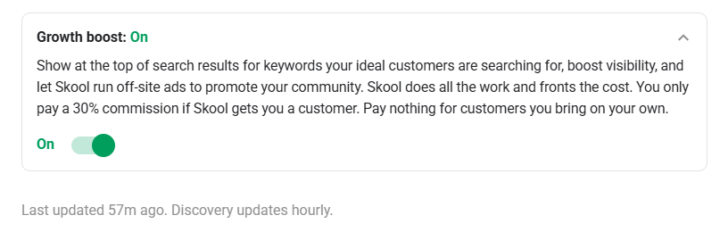
Skool just dropped the new "Boost" feature, and you need to take action right now. 𝗚𝗼 𝗶𝗻𝘁𝗼 𝘆𝗼𝘂𝗿 𝘀𝗲𝘁𝘁𝗶𝗻𝗴𝘀 𝗮𝗻𝗱 𝗺𝗮𝗸𝗲 𝘀𝘂𝗿𝗲 𝗕𝗼𝗼𝘀𝘁 𝗶𝘀 𝘁𝘂𝗿𝗻𝗲𝗱 𝗼𝗻. It is completely FREE until Tuesday, June 16th. This is a massive opportunity to leverage an external platform to get free members into your world without spending a penny of your own cash on ads. Go to: Settings>Discovery>Growth Boost Button Because Skool uses your Cover Image for these promotions, you need to make sure it’s high-quality, clearly explains exactly what you do, and is built to convert. If it isn't, you are completely wasting the opportunity. While you're at it, take the time to update and optimise your About page. Do not lose these free leads because your profile looks unfinished. If you leave Boost turned on after Tuesday, it switches to a 30% affiliate commission. As I've always said, 𝗽𝗲𝗿𝗳𝗼𝗿𝗺𝗮𝗻𝗰𝗲-𝗯𝗮𝘀𝗲𝗱 𝗮𝗱𝘃𝗲𝗿𝘁𝗶𝘀𝗶𝗻𝗴 𝗶𝘀 𝘁𝗵𝗲 𝗮𝗯𝘀𝗼𝗹𝘂𝘁𝗲 𝗯𝗲𝘀𝘁 𝘄𝗮𝘆 𝘁𝗼 𝗺𝗮𝗿𝗸𝗲𝘁 𝗯𝗲𝗰𝗮𝘂𝘀𝗲 𝘆𝗼𝘂 𝗼𝗻𝗹𝘆 𝗽𝗮𝘆 𝘄𝗵𝗲𝗻 𝗮 𝘀𝗮𝗹𝗲 𝗶𝘀 𝗮𝗰𝘁𝘂𝗮𝗹𝗹𝘆 𝗺𝗮𝗱𝗲, 𝗺𝗮𝗸𝗶𝗻𝗴 𝗶𝘁 𝘁𝗵𝗲 𝗽𝗲𝗿𝗳𝗲𝗰𝘁 𝘇𝗲𝗿𝗼-𝗿𝗶𝘀𝗸 𝘀𝗮𝗹𝗲𝘀 𝗺𝗼𝗱𝗲𝗹. Unless you are an absolute master of Google Ads and understand how to strictly monitor your ad spend, this is a super risk-free way to keep promoting your community on Meta and outside of the Skool ecosystem.and optimise Check your settings now, and make sure this feature is turned on.. I’ll add a graphic below to show you exactly where to look. 1. Check Growth Boost Is Turned on 2. Check and Update Your Cover Image 3. Make sure your about me page id fully optimised for Max conversions 𝗟𝗲𝘁'𝘀 𝗴𝗲𝘁 𝘀𝗼𝗺𝗲 𝗙𝗥𝗘𝗘 𝗦𝗸𝗼𝗼𝗹 𝗰𝗼𝗺𝗺𝘂𝗻𝗶𝘁𝘆 𝗺𝗲𝗺𝗯𝗲𝗿𝘀!
1 like • 16d
@Adam McCollough i need some help. I'm looking for feedback on my about page. would you tell me about it https://www.skool.com/halcyon-land-5118/about Can anyone help out? then once it looks right, whats the easy button to get traffic coming in?
1 like • 16d
@Adam McCollough hey man. Love it. Thanks. Lemme review and ill get back at ya

Apr 24 •
The very first step to start a business
Is validating your idea. Knowing if people will buy what you sell. There are a few different ways to do that, but they are either slow or expensive. Counting on family and friends usually backfires, as they will often discourage you, because they don't understand, or give fake validation because they don't want to hurt your feelings. You can pay for consultants to tell what you should do and auditors to point out the flaws in your work. That's expensive. You can also test by advertizing everywhere, but that takes a lot of work, and also money if you do paid traffic. So what is the alternative? Conect with people on communities like this one or mine, so people can validate what you're building without the need to pay for expensive professionals to do so. Seek out to people yourself by building real connections. Don't spend your time just wondering what you should be doing and bashing your head, thinking you should figure everything out by yourself. Test things out, seek feedback, apply what you learn and keep improving! What is the main thing you'd like to get feedback on?
Poll
2 members have voted

0 likes • 16d
@Paulo Costa, The Roaster Heyo, I'm looking for feedback on my about page. would you tell me about it https://www.skool.com/halcyon-land-5118/about
1-3 of 3