Activity
Mon
Wed
Fri
Sun
Feb
Mar
Apr
May
Jun
Jul
Aug
Sep
Oct
Nov
Dec
Jan
What is this?
Less
More
Owned by James
Memberships
Skoolers
190k members • Free
6 contributions to AI Automations with Dunbizzle

Nov '25 •
n8n gemini setting
hey guys im having trouble with setting nano banana on n8n, can anybody help me with that

0 likes • Dec '25
What issue are you facing?

0 likes • Dec '25
Hi, all of mine are currently on the community but if you want more head to - https://n8n.io/workflows/
0 likes • Dec '25
Hi mate, here's the yeti one
0 likes • Dec '25
The body cam one was more of a follow along tutorial

Oct '25 •
Trying to create remove background feature on my lovable app
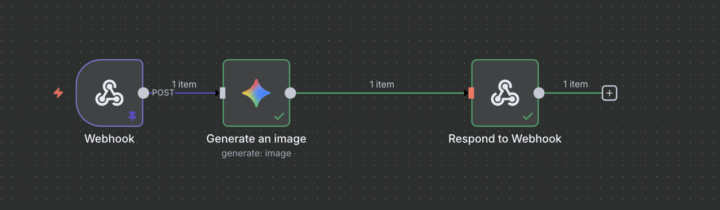
Hey everyone! Idk how active this channel is, but I just created an AI image generator website and I wanted to integrate a feature that removes the background of the AI generated image. I am trying to use remove.bg, but I'm struggling with integrating this feature into my current workflow. Basically, when a user clicks on the "remove background" button on my website I want the background to be removed by remove.bg. If anyones curious this is my current workflow, if anyone knows how to create this feature into my lovable app I'd greatly appreciate it.
0 likes • Nov '25
Hi Dylan, glad you enjoyed the video, sorry for such the late response: Modify your webhook to receive the action In the Webhook node, make sure the payload includes something like: { "action": "remove_bg", "image_url": "https://..." } Your Lovable front end simply needs to send this when the button is pressed. Add an IF node after the Webhook IF Condition Property: {{$json["action"]}} Operation: equals Value: remove_bg Now your workflow has two branches: true → run remove.bg false → run your existing image generator 3. Add an HTTP Request node for remove.bg remove.bg provides a REST API, so you’ll use a HTTP Request node. Node Settings Method: POST URL: https://api.remove.bg/v1.0/removebg Authentication Under headers: X-Api-Key: <YOUR_REMOVE_BG_API_KEY> Body Set Body Content Type = Form-Data (important) Add fields: Field Name Type Value image_url text {{$json["image_url"]}} size text auto Also add: accept: "application/json" Binary Output Set “Response Format → File” so N8N treats the output as image data. This outputs a binary “data” file containing the background-removed PNG. 4. Return the processed image back to Lovable Add a Webhook Response node and connect it to the remove.bg HTTP Request node. Set: Respond With: Binary Property Name: data (whatever your HTTP Request node outputs) Your front end receives the cleaned PNG directly. 🧩 FRONT-END LOGIC (Lovable) Your “Remove BG” button should send a request like: await fetch("https://your-n8n-webhook-url", { method: "POST", headers: { "Content-Type": "application/json" }, body: JSON.stringify({ action: "remove_bg", image_url: selectedImageURL }) }) .then(r => r.blob()) The blob returned is the cleaned image.
1-6 of 6