Activity
Mon
Wed
Fri
Sun
May
Jun
Jul
Aug
Sep
Oct
Nov
Dec
Jan
Feb
Mar
Apr
What is this?
Less
More
Memberships
AI Automation Society
342.4k members • Free
11 contributions to AI Automation Society

🔥
Nov '25 •
Looking to Repurpose YouTube Content
I know there are some solutions out there already that can repurpose long form YouTube content into Instagram Reels, or TikTok videos... I was hoping someone could give me some high level suggestions on what I could do to save myself time creating content and pushing it across multiple platforms.

3 likes • Nov '25
Nate has some really good templates for this. Here is one that I found: https://www.skool.com/ai-automation-society/new-video-this-workflow-auto-posts-to-9-different-socials?p=64b025be https://www.skool.com/ai-automation-society/new-video-i-built-the-ultimate-army-of-media-agents-in-n8n?p=647094be https://www.skool.com/ai-automation-society/new-video-i-built-a-viral-shorts-machine-for-075-using-ai?p=6a07c8b1 https://www.skool.com/ai-automation-society/new-video-how-i-automated-faceless-shorts-with-ai-in-n8n-free-template?p=23e32cd4

🔥
Nov '25 •
Google Sheets Help!
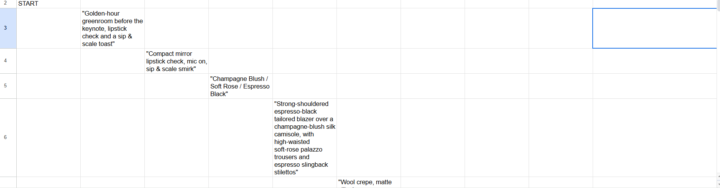
I'm trying to build a prompt agent but I'm having issues with my Google Sheets settings, n8n updates different row and different collums but I want the results in the same row, how do I fix this?
1 like • Nov '25
I think I can help you, anyway you can get me the json file of your workflow? @Tanvir Rahman? I have a couple of tools that can help out a lot with something like this. I just need to see the workflow.
Nov '25 •
Tired of Doing Repetitive Work? Let AI Handle It for You
Hey everyone 👋 — my team and I have been helping people automate their workflows using AI agents and smart integrations, and it’s been wild how much time this stuff can save. If you’ve got tasks you do over and over (sending DMs, updating CRMs, moving data around, client follow-ups, reports, etc.), we can build AI agents + automations that just… do it for you. We’ll help you: - Map out what you’re currently doing - Find where AI + automation make sense - Build custom agents that connect your stack (Slack, Notion, Airtable, ClickUp, HubSpot, Google Workspace, APIs — all that good stuff) - Keep everything running smooth in the background Some of the AI agents we’ve built recently handle things like: 🤖 Auto-sending client updates 📈 Generating reports + summaries 💬 Following up with leads 🧩 Syncing info between apps without manual steps It’s like having a super-reliable digital assistant that never gets tired. If you’re curious about what this could look like for your setup, drop a comment or DM me — happy to chat ideas or even show examples. Let’s get you out of the busywork loop 👊
0 likes • Nov '25
@Zamir M I am based in Utah.

Nov '25 •
Google sheets drives me crazy
Hello, I want to insert rows into a Google Sheet, but I want the new rows to contain the same formulas as the existing rows in the sheet. I can't do this using Google Sheet nodes. So I tried using an HTTP request, but I can't create the call correctly. Here is a simple example below I would like to insert a row between 3 and 4, with column E4 containing the formula. I would also like the row with the asterisks to become row 5. | | A | B | C | D | E | | --- | ---- | --------------- | ---------- | -------- | ----- | | | id | date | nom | age | | | 1 | 1 | 12/12/24 | jean | 12 | 1 | | 2 | 2 | 01/01/25 | eric | 15 | =D1+1 | | 3 | 3 | 03/02/25 | pierre | 18 | =D2+1 | | 4 | *** | | | | =D3+1 | I put this in the body of the HTTP request but got an error: ‘The value ’[object Object] ‘ is not supported!’ {{ { "requests": [ { "insertDimension": { "range": { "sheetId": Number($json.sheetId ?? 0), "dimension": "ROWS", "startIndex": Number($json.row_number), "endIndex": Number($json.row_number) + 1 }, "inheritFromBefore": true } }, { "copyPaste": { "source": { "sheetId": Number($json.sheetId ?? 0), "startRowIndex": Number($json.row_number) - 1, "endRowIndex": Number($json.row_number), "startColumnIndex": 0, "endColumnIndex": Number($json.nbCols ?? 26) // exclusif }, "destination": { "sheetId": Number($json.sheetId ?? 0), "rowIndex": Number($json.row_number), "columnIndex": 0 }, "pasteType": "PASTE_FORMULA", "pasteOrientation": "NORMAL" } } ] } }} Somebody could help, please ?
2 likes • Nov '25
You're wrapping the entire JSON object in {{ }} which causes the error. In n8n HTTP Request nodes, you should use expressions within JSON values, not around the entire JSON structure. Here's a complete n8n workflow that properly inserts rows while preserving formulas

Nov '25 •
Projects for practically FREE!?! 💰
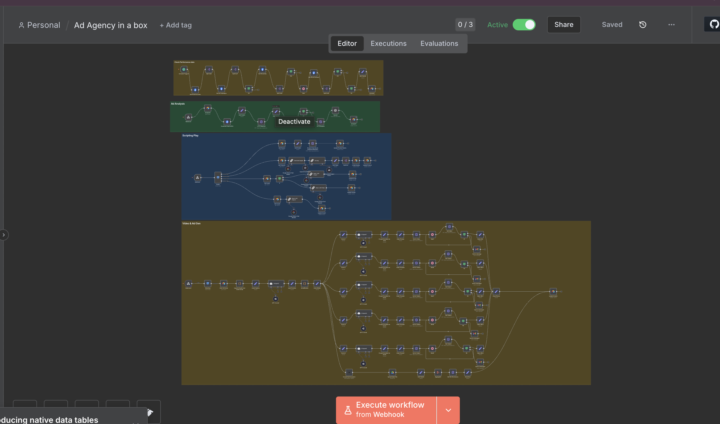
Hey!!! Do you have an AI project that you want to bring to life? If so I am offering my services at the low low price of a 1$ or free in return for a testimonial. I understand a lot of you are busy and don’t have time to build and automate those complex and beautiful workflows that you would love to see in action so allow me to. All I ask is that you record a video testimonial of you and your genuine reaction after working alongside me to bring you AI project to life or you can pay a small fee of just one single dollar. Book an appointment and lets talk over a call about your ideal workflow and lets bring it to life. (Workflows I've Dreamt up flowed out) 1. Ad Agency - n8n/airtable/sora (Scripts, creates, and analyzes ads ) 2. Voice Agent - n8n/retell.ai (Does appointment booking over the phone) 3. Linkedin Post generator - n8n/google/tavily (Generates Linkedin post daily) How to Reachout??? - Gmail: dotsondarionce@gmail - Skool DMS Reachout and lets see your project be brought to life
2 likes • Nov '25
This is a really solid idea!! My son and I are looking for a side gig and we have tried this as well.
1-10 of 11

@james-celli-8700
DevOps Engineer that wants to automate himself out of a day job, to pursue the real meaning of life.... Family!
Active 15d ago
Joined Nov 4, 2025
Hooper, Utah
Powered by