Activity
Mon
Wed
Fri
Sun
Aug
Sep
Oct
Nov
Dec
Jan
Feb
Mar
Apr
May
Jun
Jul
What is this?
Less
More
Owned by Jake
The Underwater Creator Academy: your one-stop hub to master ocean photo/video—from camera basics to pro shooting, editing, exporting, and feedback.
Memberships
Skoolers
166.4k members • Free
19 contributions to Underwater Creator Academy

May 29 •
UCA Updates 29/05/26
Core Concepts: Ocean Photo + Video Basics is now complete and live. If you’re on the Premium tier, jump in and start working through it. Quick update on how I’ll be building courses from here: you’ll get access to the full course as I’m creating it, so you can learn in real-time instead of waiting for the final release. And don’t forget — the first UCA photo competition is live. Upload your entries for a chance to win prizes (Premium members only).
2
0
May 24 •
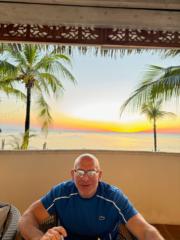
Yellow Headed Jawfish
I am posting what is actually two clips of yellow headed jawfish. I spent more time than I care to admit playing with these clips in Davinci😂. The first clip is edited less heavily, the second I probably overdid it with the color grading (added a LUT) but I can talk myself into thinking one is better than the other at any given time. I'd love to hear which one you guys think is better. The second clip I tried figuring out some things with stabilizing, zoom and slow-motion for the first time which was kinda frustrating at times. Both clips are out of focus in spots. I shot in program mode and think I need to try shooting in aperture priority or manual to increase my aperture and increase the depth of field. Anyone with experience with this that can give feed back would be much appreciated. I shoot in manual almost exclusively for stills but haven't trusted myself enough yet in getting into video. On the positive side, when I'm underwater working through these things I am definitely in my happy place. Thanks!

0 likes • May 25
What a cool little critter! Never seen one of those before! The second clip is much easier to watch with the stabilisation and speed changes you’ve done. Just need to tweak the white balance and reduce the warmth of the shot overall. One thing I learned recently that I need to add into the DaVinci course is that the LUTs in Resolve aren’t supposed to be used as they are, you are supposed to tweak the ‘opacity’ of the layer, which you can do in the Key tab of the colour page (I think it’s called). But nice work man! On your camera maybe try setting the focus point to wide and let the autofocus do the work, looks like you’ve got it on centre! The next course is almost ready which will get the basics of manual shooting photos and videos out there!
May 22 •
Competition entry
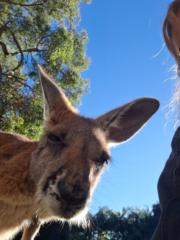
Hi! I would like to share some underwater water footage I have captured. I am a complete beginner with using any sort of camera. Now I don't go snorkelling without it. I can't wait to learn more and get better at making my videos smoother. -STILL These Sand Whiting were swimming right by the shore, they were very unfased by people in the water. Captured in Hillarys WA on 08/05/26

1 like • May 22
Hi Shontell, thanks for taking the time to upload! This is a great start! Next time you’re out with your camera try and get a bit lower, looking across instead of down. This will take your footage to the next level! What camera are you using?
1 like • May 23
@Shontell Couch ah yes! That’s always a problem! Grab yourself a weight belt and go from there! I’ve not tried the DJI Actions but I’ve heard good things about them!

Apr 28 •
Intro
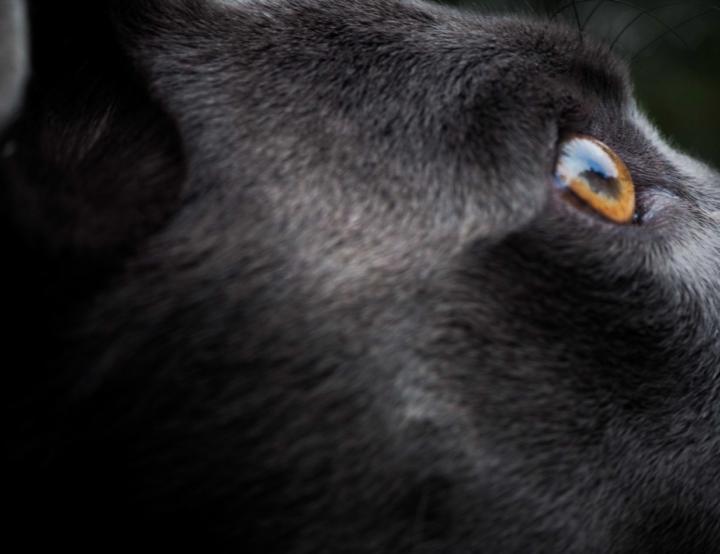
Hey guys my name is Tyler I introduced myself in the info chat but I wanted to put a pic you guys can roast. I don’t have any underwater gear so my pic is on land. Here’s a few of the types of pics I’ve been taking. But I’m getting back into scuba and will take underwater pics soon
0 likes • May 15
Hi Tyler, thanks for taking the time to send some photos in! Nothing to roast! Some nice framing, the edits look nice. The only thing on the first one, would be epic if the focus point was on the eye! Looking forward to seeing what you can do Underwater!
May 15 •
🌊 THE FIRST RTTO CREATOR COMPETITION IS NOW LIVE 🌊
Welcome to the very first RTTO Creator Competition inside the Underwater Creator Academy. Theme:“Stories Beneath the Surface” This competition is built around underwater storytelling — the moments, encounters, emotions and experiences that make us feel connected to the ocean. We want to see your creativity. That could mean:• Wildlife encounters• Cinematic underwater moments• Emotional storytelling• Conservation imagery• Adventure• Abstract or artistic interpretations• Human connection with the ocean There are intentionally very few creative restrictions. We want to leave space for your creativity to flow. ━━━━━━━━━━━━━━━ 📅 IMPORTANT DATES Competition Opens:May 15th Competition Closes:June 30th at 11:59PM AWST Winners Announced:July 3rd via Skool + Instagram ━━━━━━━━━━━━━━━ 📸 HOW TO ENTER Upload your entries directly into this competition section. Each submission must include:• Piece Name• Piece Description• Location• Date Captured Unlimited entries are allowed. ━━━━━━━━━━━━━━━ 🏆 PRIZES Premium Members are eligible to win:• 12 Months UCA Premium Access• RTTO Creator Gift Box (Australia)• $100 AUD RTTO Store Credit (International)• Featured Creator Spotlights• Reposts across RTTO + UCA platforms• Future creator opportunities Free Members can still participate and may receive Highly Commended recognition + community features. Please note:Winners must hold an active Premium Membership at the time of judging. ━━━━━━━━━━━━━━━ 🎬 RULES + GUIDELINES • Photo and video submissions are accepted• AI-generated imagery is not permitted• Colour grading/editing is allowed• Minor retouching/removals are allowed• Heavy compositing/manipulation is not permitted• Entries must be your original work• Respect wildlife and natural environments at all times• Images showing unethical wildlife interactions will not be considered• Baited experiences are allowed within reason and must still follow ethical wildlife practices• Shortlisted entries may be asked to provide RAW, TIFF or original files for ownership verification• Entries containing stolen content or misleading edits will be removed
1
0
1-10 of 19
@jake-mason-2245
Ocean storyteller & RTTO founder. Capturing marine life through film and photography. Join the adventure and see the ocean differently.
Active 4d ago
Joined Dec 19, 2025