Activity
Mon
Wed
Fri
Sun
Jul
Aug
Sep
Oct
Nov
Dec
Jan
Feb
Mar
Apr
May
Jun
What is this?
Less
More
Memberships
Ep - reMarkable Tablet Support
962 members • Free
7 contributions to Ep - reMarkable Tablet Support

6d •
🚀 CalSync v1.2.1 is Available Now!
This is one of our biggest updates yet, bringing powerful new planner customization features, cross-device planner syncing, and major improvements to reliability across the entire app. New Features Calendar Colors Now Show in Your Planner Your calendars now print using the colors you’ve assigned inside CalSync. • Each calendar keeps its own color• Automatic pastel colors are assigned if no color is selected• Color changes automatically apply the next time you generate your planner• No more random color assignments Limit Visible Hours on Time-Block Planners You can now focus your planner on only the hours that matter to you. For example, display only 9:00 AM–12:30 PM and turn the remaining page space into clean note lines. Perfect for focused schedules, students, professionals, and anyone who doesn’t need a full-day timeline. 🔄 Cross-Computer Planner Sync (Pro & Business) Your planner library now follows you. Create or edit a planner on one computer and automatically access it on your other computers. • Keep planners synchronized across devices• No exporting or importing required• Available on Pro and Business plans 🔌 Device & Connection Improvements We’ve made connecting to your tablet faster and more reliable. • Device profiles now always use the correct password• Switching between device profiles is now instant• Improved connection reliability throughout the app ↻ Auto-Sync Improvements • Auto-push settings apply immediately• Frequency changes take effect instantly• Always uses the active connected device• Universal Mode planners never auto-push by design 🗂 Improved reMarkable Compatibility Planner files now better match reMarkable’s current document format. Benefits include: • More reliable cloud synchronization• Accurate page counts• Better document consistency• Handwritten notes and annotations remain preserved when planners are regenerated 🛠 Reliability & Polish • Regenerating a planner now always preserves its layout and structure • Cleaner calendar color picker interface

0 likes • 6d
@Jason Smith If problem comes from my side, Please provide the link and : - Should i uninstall the existing version before installing the update ? - Should i restart the computer ? - What again ?
1 like • 6d
@Jason Smith 🚩Finally is Working 🚩

7d •
Fontsize
How come the font is so small in the weekoverview. I can hardly see the name of the days, the same goes for all the lines below each day. That space could be used for a larger font instead of all the lines. It is hard to see what the agenda is due to the small fonts. Thank you!
0 likes • 6d
Additionally, the layout could be optimized with an easy focus section on such as date (day/month), top 5 daily goals, top 3 priorities, and /or comments...
1 like • 6d
@Jason Smith Good news ! For me this should be a major update for the panner ! Downloading now ...and come back with feedback ....
12d •
CalSync v1.1.6 Released
We’ve just released CalSync v1.1.6 with improvements focused on making purchasing, licensing, and planner creation even easier. What’s New ✅ New Ad Hoc Planner Option - Added a new one-time purchase option for users who only need a planner for a specific calendar year. ✅ Simpler Planner Setup - Improved the planner creation process to make getting started faster and more straightforward. ✅ Better Purchase Experience - Added clearer information during checkout so it’s easier to understand what each plan includes before purchasing. ✅ Improved Account & License Management - Made license activation and account updates more reliable across all plans. ✅ Enhanced Planner Reliability - Improved planner generation and validation to help ensure everything works as expected. ✅ General Improvements - Bug fixes - Performance enhancements - User interface refinements Download v1.1.6 Apple Silicon (M1 / M2 / M3)https://www.einkpads.io/api/calsync/darwin/arm64/releases/latest Intel Machttps://www.einkpads.io/api/calsync/darwin/x64/releases/latest Windowshttps://www.einkpads.io/api/calsync/win32/releases/latest Linuxhttps://www.einkpads.io/api/calsync/linux/x64/releases/latest Thank you for your continued support and feedback. Every update is driven by suggestions from this community, and we appreciate everyone helping us make CalSync better.
0 likes • 11d
@Jason Smith Yeah , let's enjoy the possibility to choose the time-range according to our daily routines... For the synchronization through my.remarkable.com, I've seen it on more than two others... But not sure for violating the remarkable security policy... Please go in deep !
1 like • 10d
@Jason Smith i'm waiting for the most advanced version where i'll be in full control of the day hourly schedule. Other remarks is that the automatic synchronization through the Wifi is not wrking properly, it needs manually push... Add the ability on desktop app to run in backgroud with autostarting - continuesly autosynchronization on wekup of the PC. The security issues reMarkable's matters 🚩
19d •
🚀 CalSync v1.1.4 is now available
This release brings full support for the new reMarkable Paper Move along with major improvements to planner generation, event handling, diagnostics, and overall reliability. What’s New in v1.1.4 reMarkable Paper Move Support CalSync now officially supports the reMarkable Paper Move. This update introduces two brand-new layouts optimized specifically for the Move’s smaller display: • A redesigned Day View featuring: – Daily timeline – Two mini calendars – Improved readability and navigation • A new 7-Day Week Agenda layout designed for compact weekly planning Move-specific summary templates will continue rolling out automatically in future updates. New Timeline & Event Display Settings Move planners now include powerful new timeline customization options: • Timeline Mode Choose between: – Full 24-hour timeline – Smart Event Window mode that automatically focuses only on hours where events exist • Timeline Buffer Hours Add extra spacing before your first event and after your last event to keep timelines feeling clean and readable • Week View Event Limit Limit how many events appear per day in the 7-day agenda view to prevent overcrowding on busy schedules Improved Calendar Event Coverage Fixed an issue where recurring events later in the year could sometimes be excluded from generated planners. Planner event generation now properly spans the full planner date range. More Reliable Licensing & Sync This release resolves multiple edge cases involving: • Device authorization • Vault Mode • Plan upgrades • Cross-device synchronization • Settings reverting unexpectedly Overall syncing and account reliability should now feel significantly more stable. Expanded Connection Diagnostics The diagnostics screen now includes: • Outbound SSH testing • Firewall checks • Better connection validation This makes it much easier to determine whether issues are caused by: – Network/firewall restrictions – Router configuration – Or the tablet itself being unreachable
0 likes • 18d
Good news @Jason Smith ! But can you make this notifiations arrive into the registered email so it can be take in consideration
0 likes • 18d
@Jason Smith I'm having troubles when installing the last updates, even after uninstal it. Now i've uninstalled - downloaded - reinstalled three times without have the sofware updated. While downloaded from the link and inside the software itself When installing it shows version 1.1.4 but after it indicates 1.1.3 : and actually the
20d •
🤨reThinking of Planner (Ep CalSync)
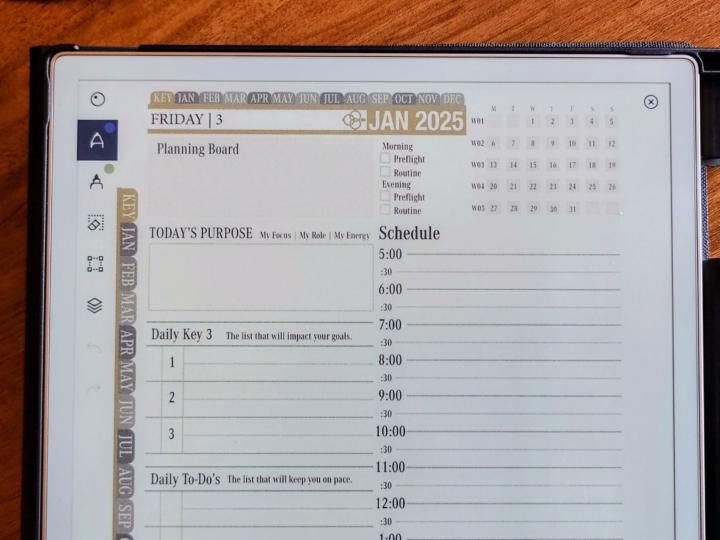
Hi every one My feedbacks and few interface improvements on Ep CalSync : - Allow users to set their preferred active hours during setup (e.g., 6 AM – 9 PM) to eliminate the unused lines currently spanning from 00:00 AM to 11:30 PM. - Add a prominent, centered date at the top of the page for quicker reference. - Make the monthly overview smaller to keep the primary focus and detail on the Daily schedule - Utilize the space saved to increase line spacing, improving overall text readability. Overall, the design should prioritize the daily page with more detailed and user-friendly information. For example, a previous template I used offered excellent flexibility and layout options, although it lacked integration with platforms such as Google or Microsoft, my reaseons to leave it !
0 likes • 18d
@Jason Smith 👆
1-7 of 7