Activity
Mon
Wed
Fri
Sun
Aug
Sep
Oct
Nov
Dec
Jan
Feb
Mar
Apr
May
Jun
Jul
What is this?
Less
More
Memberships
AI Automation Agency Hub
328.7k members • Free
2 contributions to AI Automation Agency Hub

3h •
How do I get my first pilot users?
I just finished a functional Demo for an AI-Powered Enterprise Expense & Reimbursement Automation System. The core stack is built on: Multimodal AI, OCR, LLM Agents, Workflow Automation, and an Enterprise Rule Engine. Long story short: users just drop receipts or PDFs into it, the AI instantly extracts the data, cross-checks it against company policies (detecting duplicates, spending limits, etc.), and automatically pushes the clean data into an analytics sheet. Now, I want to follow our community's golden rule: Stop over-building and start talking to real users. To stress-test the model, find edge cases, and collect my first batch of testimonials and case studies, I am completely open to doing Free Pilots or very low-cost trials at this stage. ———————————— Since this is my first time launching a financial/administrative automation tool, I’d love to get some wisdom and insights from the vets here: 1. Is my current approach—using free/low-cost pilots to co-create and find data boundaries—on the right track? 2. For this specific finance/admin automation niche, what’s the lowest-cost way to find my very first target client and get them to actually test my Agent? ———————————— If anyone here has experience with outreach or client acquisition in the finance/admin automation space, I’d heavily appreciate your feedback and insights!
0
0

9d •
Just shipped my first production automation — CRM Sync with deduplication & error handling. Feedback welcome.
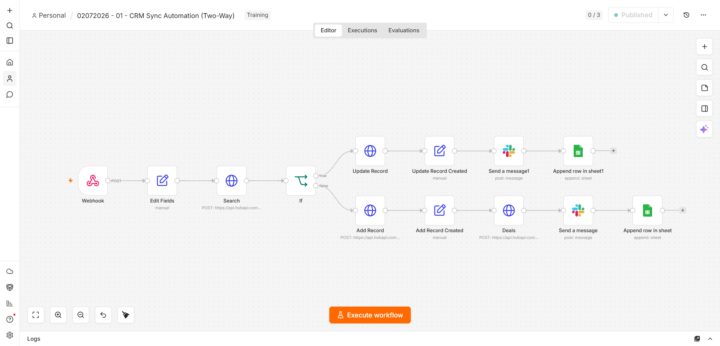
Hey everyone 👋 First real post here. I've been learning from a lot of you silently, and I just finished my first production-grade automation. Wanted to share the build and get your feedback. The Problem Small businesses capture leads via forms, then **manually copy the data into their CRM**. This means wasted hours, duplicate contacts, and a CRM nobody trusts. What I Built An n8n workflow that: 1. Receives form submissions via webhook 2. Normalizes the data 3. Searches CRM for existing contact by email 4. Updates if exists / Creates if not (deduplication) 5. Creates a deal associated with the contact 6. Sends a Slack notification to the sales team 7. Logs everything in a Google Sheet (audit trail) 8. Error Trigger → Slack alert + fallback sheet if anything fails The Workflow [Webhook: POST /crm-sync] ↓ [Set: Normalize fields] ↓ [HTTP Request: GET /contacts/search by email] ↓ [IF: contact exists?] ├── YES → [HTTP Request: PATCH /contacts/{id}] └── NO → [HTTP Request: POST /contacts] ↓ [HTTP Request: POST /deals] ↓ [Slack: Notify sales team] ↓ [Google Sheets: Append audit log] [Error Trigger] → [Slack: Alert] → [Google Sheets: Fallback save] Tech Stack - n8n (self-hosted on Railway) - Tally.so (form) - HubSpot CRM (REST API v3) - Slack (incoming webhook) - Google Sheets (audit log + fallback) What I Learned 1. API docs are everything — reading HubSpot's docs took longer than building the workflow. 2. Error handling is not optional — broke the API key on purpose to test. Silent failures are unacceptable for a paying client. 3. Test with bad data — missing fields, duplicates, special characters. Each edge case found a bug. 4. Audit logs build trust — the Google Sheet isn't just for debugging. It's what makes the client feel in control. What's Next - Two-way sync (CRM → Google Sheets back) - AI lead scoring (form data → OpenAI → route by score) - WhatsApp Business API notifications If you made it this far, thanks for reading. Any feedback, criticism, or "you should've done X instead" is welcome — that's how I'll get better. 🙏
0 likes • 7d
Congratulations! 🎉
1-2 of 2