Activity
Mon
Wed
Fri
Sun
Mar
Apr
May
Jun
Jul
Aug
Sep
Oct
Nov
Dec
Jan
Feb
What is this?
Less
More
Memberships
14 contributions to AI Automation Society

Dec '25 •
steal my $2.5k ai receptionist build (free templates + workflows)
I build AI voice agents for high call-volume businesses at QwickStep, and I’m giving away the exact no-code AI receptionist setup I usually charge up to $2.5k for, including the templates, prompts, and workflows. I keep seeing home service teams miss calls and lose jobs because scheduling is a mess. So I built a simple AI receptionist that handles it end-to-end. What it does: - answers inbound calls - checks live availability - books the appointment into your calendar - captures name + email + service address - answers basic FAQs from a knowledge base - transfers to a human when it’s out of scope What you’ll get in the free pack: - the 11Labs system prompt template (ready to paste) - tool schemas for check availability + book appointment - the backend workflow templates (so you’re not building from scratch) Download everything here
Dec '25 •
How I pulled £33,468 of “hidden” revenue out of an old CRM list
I ran an AI voice reactivation campaign on dead leads and uncovered £33,468 in revenue in 19 days, and I’ll outline the system at a high level below. Most CRMs are full of leads that looked “not ready” at the time. Wrong timing. No follow-up. Then they just… sit there. That was the case for a UK claims firm we worked with. Thousands of leads. Months (some years) old. Zero systematic follow-up. Instead of throwing humans at it, we built a simple AI-led reactivation voice agent. The idea was straightforward: 1. Let an AI voice agent call old leads automatically 2. Have it run a short, natural conversation to see if timing has changed 3. Log the outcome and only pass genuinely interested people to a human That’s it. The AI handles: - the calls - basic qualification - light objection handling - call summaries + CRM updates Humans only step in when there’s real intent. We tested this on a small batch of dormant leads. Within a few weeks, it surfaced meaningful revenue that previously didn’t exist.From data the company already owned. The interesting part isn’t the numbers It’s the pattern. Most businesses already paid to acquire these leads. They just never re-checked the timing. If you want the full breakdown—exact call logic, pipeline stages, tooling, and how the revenue was modeled. I’m happy to share the full case study. Just reach out!

Nov '25 •
The easiest way to turn “we want an ai agent” into a clear build plan
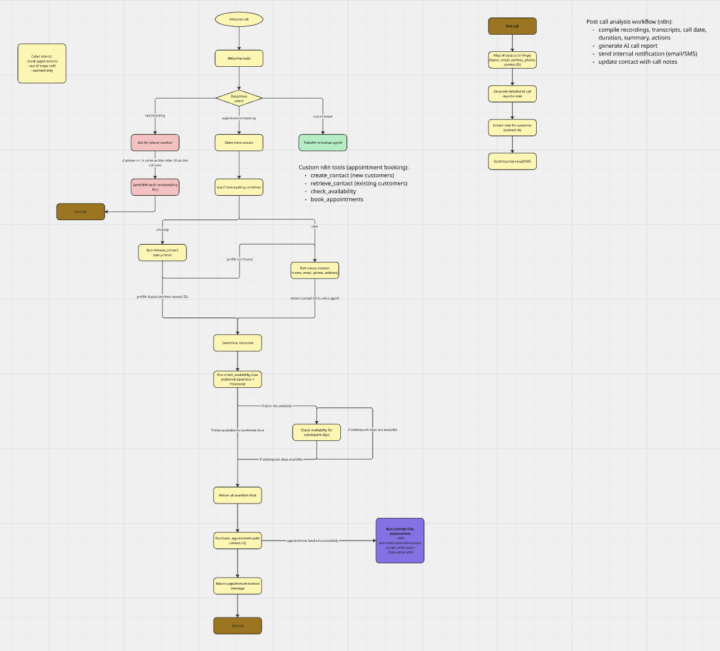
After scoping 15+ ai voice agent projects and shipping $30k+ in custom builds, I finally landed on a scoping workflow that turns messy client requests into clean, buildable technical plans. i keep seeing ai voice teams stuck in the same loop: clients speak in outcomes… we have to build in systems. that translation layer is where projects blow up. here’s the lightweight scoping “automation” I use to avoid that: what it does - takes the client’s non-technical wishlist - breaks it into: - required systems (crm, calendar, voice platform, phone, automation, sms/email, external apis, compliance) - core use case (e.g. booking agent, lead qual, receptionist) - caller intents (book, reschedule, support, out-of-scope) - for each intent, maps: - behavior → what the agent says - data → what must be collected - system actions → what tools/functions we need - turns everything into a simple flowchart that becomes the project blueprint everyone agrees on why it works - prevents scope creep (everyone sees all branches upfront) - catches missing dependencies early (apis, calendars, compliance rules) - makes tool design almost automatic - booking flows typically boil down to: - create_contact - retrieve_contact - check_availability - book_appointment - simplifies pricing ← complexity is literally drawn on the board if helpful, here’s the full step-by-step guide I use inside my agency: https://how-to-scope-ai-voice-ag-7i8lpn7.gamma.site/

Nov '25 •
A dead-simple way to scope any voice agent (no dev needed)
After scoping 15+ custom voice agents, I realized most projects fail for the same reason: the scope is vague. Everyone jumps into “Let’s just build it,” but no one agrees on the systems, intents, or actions that actually define the project. Here’s the simple 3-pass checklist I now use to scope any AI voice agent cleanly: 1. Systems Write down every tool the agent will touch: CRM, calendar, voice platform, automation layer, SMS/email, external APIs, KB sources, phone routing, and any compliance checks. If it's not on this list, it’s not in the scope. 2. Intents Map all possible caller intentions from a single “Welcome” node: - New inquiry - Existing customer - Reschedule - Support request - Out-of-scope - Spam Each intent becomes its own branch you can design independently. 3. Actions For each intent, define two things: - Data: What fields must be collected? - System actions: What does the agent do in your stack? (create/update contact, check availability, book appointment, send SMS, tag lead, generate call report) Most scoping issues happen because one of these three passes was skipped. If you can’t visualize the full flow on one clean page, you're not ready to build yet. If you want the exact guide I use to scope any AI voice agent project, I’ve linked it here: https://how-to-scope-ai-voice-ag-7i8lpn7.gamma.site/
Nov '25 •
How I cut my voice-agent QA time from 3 hrs to 12 mins (free SOP)
After building voice agents for 15+ clients, I turned my entire QA process into a quick LLM-powered workflow that cuts out 80–90% of the manual testing. Testing voice agents used to drain my week. Every small update meant another round of manual calls. Fix a node → retest. Update a fallback → retest. Change a price → retest everything again. It was brutal. So I built a tiny internal system to automate almost all of it. Here’s the exact flow: 1. Export the full agent as a JSON file. 2. Drop it into an LLM along with the client’s FAQ, KB pages, and policies. 3. Paste a system prompt that forces the model to understand every branch and condition. 4. Auto-generate 15–25 realistic test cases with: – emergencies – confused callers – angry callers – pricing checks – spam filters – function call tests – out-of-order info – multi-language attempts 5. Convert the whole output to Retell’s JSON format. 6. Import it into simulations. 7. Run everything at once and skim transcripts for anything weird. Total time: ~12 minutes. The real win isn’t just speed — it’s consistency. Every agent gets tested the same way. Every update gets retested with the same suite. No more “Oh I forgot to test billing flows” moments. If you want this level of sanity back, here's my exact SOP

1 like • Nov '25
@Muskan Ahlawat hope it helps!
1-10 of 14

Active 3h ago
Joined Apr 18, 2025
Kuala Lumpur, Malaysia
Powered by