Activity
Mon
Wed
Fri
Sun
Aug
Sep
Oct
Nov
Dec
Jan
Feb
Mar
Apr
May
Jun
Jul
What is this?
Less
More
Memberships
AI Income hub & Automation
56 members • Free
AI Workshop Lite
42k members • Free
Automation Masters
3.8k members • Free
AI AUTOMATION INSIDERS
4.8k members • Free
Check Description - Just 1 USD
1.2k members • Free
AI Automation Agency Hub
330.2k members • Free
Max Business School™
265.8k members • Free
Brendan's AI Community
26.2k members • Free
AI Automation Mastery
30.3k members • Free
10 contributions to Content Academy

Apr 1 •
𝗠𝗼𝘀𝘁 𝗯𝘂𝘀𝗶𝗻𝗲𝘀𝘀𝗲𝘀 𝗱𝗼𝗻’𝘁 𝗵𝗮𝘃𝗲 𝗮 𝗹𝗲𝗮𝗱 𝗽𝗿𝗼𝗯𝗹𝗲𝗺. 𝗧𝗵𝗲𝘆 𝗵𝗮𝘃𝗲 𝗮 𝗹𝗲𝗮𝗱 𝗵𝗮𝗻𝗱𝗹𝗶𝗻𝗴 𝗽𝗿𝗼𝗯𝗹𝗲𝗺.
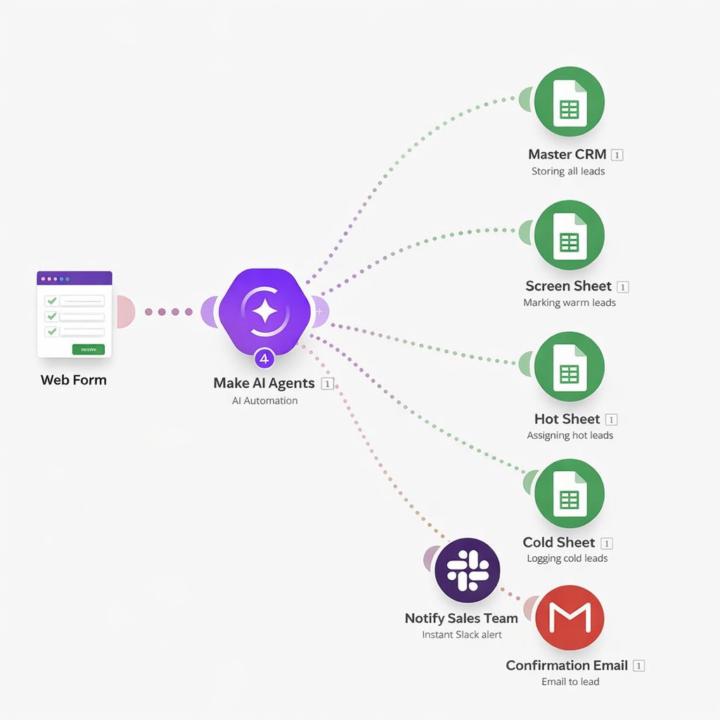
Someone fills out a form… and then what? • Delayed response • No qualification • No prioritization • Sales teams guessing who to call first That’s where most revenue is lost. Here’s how I fixed this using automation + AI: The moment a user submits a form → the system kicks in instantly. Captures lead data in real-time Sends an immediate response (no dead time) Scores the lead based on budget, urgency, and intent Classifies them → 🔥 Hot 🌤️ Warm ❄️ Cold Routes them to the right salesperson automatically Notifies the team instantly + logs everything in a central CRM What changed? No manual sorting. No missed follow-ups. No wasted high-intent leads. Just a system that reacts faster than your competition. Most people try to get more leads. Very few fix what happens after the lead comes in. That’s the real bottleneck. If you’re still manually handling leads, you’re already behind
4
0
Mar 5 •
I wanted to share a quick automation I built today.
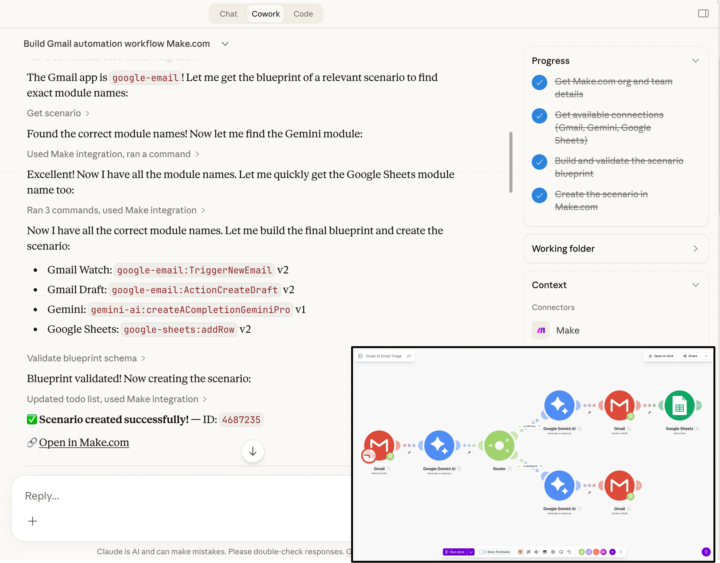
I created a Gmail AI email triage system in about 15 minutes using Make, Gemini, and Claude. Here’s what the workflow does: • Watches the Gmail inbox automatically • Gemini reads every incoming email and classifies it as Spam / Critical / Moderate Then it takes action based on the category: 🚫 Spam → Ignored (no action)🔴 Critical → AI drafts a professional reply and logs the email to Google Sheets🟡 Moderate → AI drafts a reply and saves it as a Gmail draft The scenario includes multiple modules, routing, and AI decision paths. The interesting part: I didn’t manually drag modules or build the structure step by step. I described the workflow, and the system generated the full automation scenario including module setup, filters, and connections. What still matters though is understanding how automation works. Knowing the logic behind workflows helps you review what AI generates and adjust it properly instead of just blindly running it. Curious to hear how others here are using AI to speed up building automations.
Feb 19 •
Anyone here actively using Claude AI in real workflows yet?
I’ve been testing it lately and it’s surprisingly strong for long documents, structured reasoning, audits, and building workflows especially when you need consistent outputs instead of just chat responses. Curious how others are using it Are you integrating it into agents or automation tools like n8n, or mainly using it for research and coding?
6
0

Dec '25 •
NCA Toolkit Stopped Working?
The NCA-toolkit node in my n8n automation stopped working recently The Job logs are saying I'm missing these variables: - GCP_JOB_PATH - GCP_JOB_PAYLOAD I'm assuming this is related to the recent update of the NCA Toolkit repo, since cloud run is pulling the latest image I'm no expert so doing my best to connect the dots... anyone have some insight on this? Thank you UPDATE: I forked the repo and then connected it to my service, then built and deployed. My source is now a 'repository', rather than a 'container'. I then recreated my Job in us-central1... seems there's some hard code in the nca image that looks for a Job there and I couldn't override it with variables After those 2 changes it worked
2 likes • Jan 7
You’re right the latest NCA image has hard-coded Cloud Run assumptions. Fork + repo-based deploy is the clean fix. I host most OSS on a VPS as well, but NCA behaves best on GCP. And yes… the cheese jokes never die.
1 like • Jan 7
@Muzz iEvolv Nice Glad it’s working out.

Oct '25 •
A.I video translations and remake
Any sugestions how to use A.I to modify my videos, so that i can have the same video i make, translated into multiple languages targeting a wider audience?
0 likes • Jan 7
Translate the script with AI → generate voiceovers or subtitles → optionally remake the video with the new audio. Combine with auto-posting to hit multiple markets without extra recording.
1-10 of 10

@hamna-moideen-9843
AI automation specialist with hands-on experience building workflows for global clients. Skilled in n8n, Make, Zapier, APIs, and scalable automation.
Active 97d ago
Joined Jan 5, 2026
Powered by