Activity
Mon
Wed
Fri
Sun
May
Jun
Jul
Aug
Sep
Oct
Nov
Dec
Jan
Feb
Mar
Apr
What is this?
Less
More
Memberships
Automate Your Income
16 members • Free
AI Workshop Lite
20.4k members • Free
Automation Masters
3.8k members • Free
AI AUTOMATION INSIDERS
3.8k members • Free
Master AI Automation
170 members • $1/month
Check Description - Just 1 USD
1.2k members • Free
AI Automation Agency Hub
312.2k members • Free
Max Business School™
264.7k members • Free
Brendan's AI Community
24.2k members • Free
6 contributions to AutomationForDays

22d •
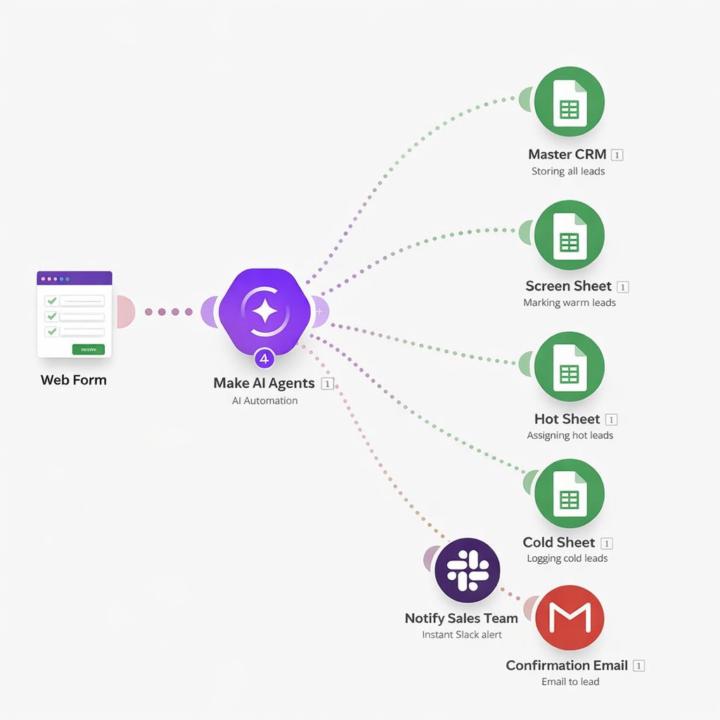
𝗠𝗼𝘀𝘁 𝗯𝘂𝘀𝗶𝗻𝗲𝘀𝘀𝗲𝘀 𝗱𝗼𝗻’𝘁 𝗵𝗮𝘃𝗲 𝗮 𝗹𝗲𝗮𝗱 𝗽𝗿𝗼𝗯𝗹𝗲𝗺. 𝗧𝗵𝗲𝘆 𝗵𝗮𝘃𝗲 𝗮 𝗹𝗲𝗮𝗱 𝗵𝗮𝗻𝗱𝗹𝗶𝗻𝗴 𝗽𝗿𝗼𝗯𝗹𝗲𝗺.
Someone fills out a form… and then what? • Delayed response • No qualification • No prioritization • Sales teams guessing who to call first That’s where most revenue is lost. Here’s how I fixed this using automation + AI: The moment a user submits a form → the system kicks in instantly. Captures lead data in real-time Sends an immediate response (no dead time) Scores the lead based on budget, urgency, and intent Classifies them → 🔥 Hot 🌤️ Warm ❄️ Cold Routes them to the right salesperson automatically Notifies the team instantly + logs everything in a central CRM What changed? No manual sorting. No missed follow-ups. No wasted high-intent leads. Just a system that reacts faster than your competition. Most people try to get more leads. Very few fix what happens after the lead comes in. That’s the real bottleneck. If you’re still manually handling leads, you’re already behind
3
0
Mar 5 •
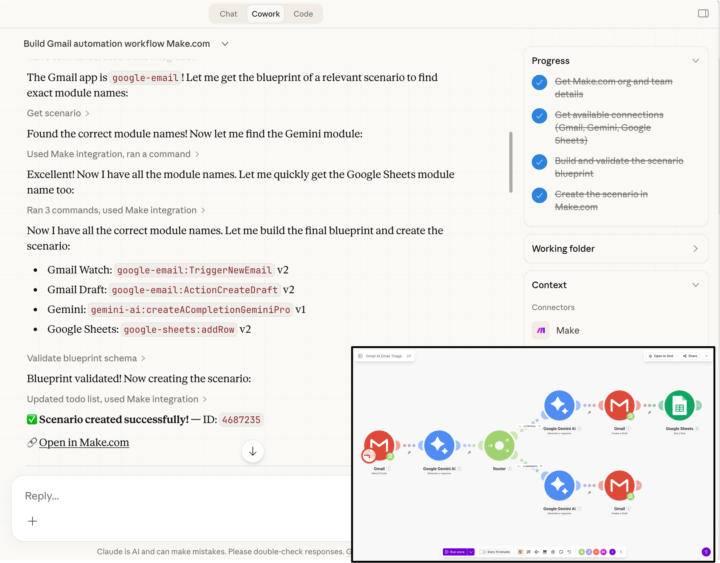
I wanted to share a quick automation I built today.
I wanted to share a quick automation I built today. I created a Gmail AI email triage system in about 15 minutes using Make, Gemini, and Claude. Here’s what the workflow does: • Watches the Gmail inbox automatically • Gemini reads every incoming email and classifies it as Spam / Critical / Moderate Then it takes action based on the category: 🚫 Spam → Ignored (no action)🔴 Critical → AI drafts a professional reply and logs the email to Google Sheets🟡 Moderate → AI drafts a reply and saves it as a Gmail draft The scenario includes multiple modules, routing, and AI decision paths. The interesting part: I didn’t manually drag modules or build the structure step by step. I described the workflow, and the system generated the full automation scenario including module setup, filters, and connections. What still matters though is understanding how automation works. Knowing the logic behind workflows helps you review what AI generates and adjust it properly instead of just blindly running it. Curious to hear how others here are using AI to speed up building automations.
Feb 25 •
Finance teams often end up spending more time managing invoices and payment tracking than doing actual financial planning or analysis.
In one recent workflow we reviewed, billing depended on multiple tools being updated manually. Teams were: • Creating invoices after projects were marked complete • Cross-checking client details and tax information between project management and accounting systems• Tracking payments separately and updating records by hand • Fixing duplicate entries and mismatched billing data The work itself wasn’t complex just repetitive. But it slowed invoicing cycles and made financial visibility harder. We approached it as a workflow problem rather than a finance problem. By connecting the project management system with the accounting platform through automation, the process became more consistent: • Invoice data stayed aligned across systems • Manual entry and duplicate corrections were reduced• Billing moved faster with fewer delays • Teams gained clearer visibility into receivables Curious how others here are handling billing workflows across multiple tools still manual steps involved or mostly automated now?
1
0
Feb 19 •
Anyone here actively using Claude AI in real workflows yet?
I’ve been testing it lately and it’s surprisingly strong for long documents, structured reasoning, audits, and building workflows especially when you need consistent outputs instead of just chat responses. Curious how others are using it Are you integrating it into agents or automation tools like n8n, or mainly using it for research and coding?
0
0

Feb 2 •
🚀✨ Building Quietly, Scaling Smart with AI
One of the channels I’ve been building behind the scenes using AI-powered, faceless YouTube systems is already showing strong momentum 📈👇 📊 Channel snapshot • 👥 504K+ subscribers • 👀 72M+ total views • 💰 ~$89,000 generated so far No personal brand 🙅♂️ No camera setup 🎥❌ No daily burnout 😮💨 Just a repeatable system, consistency, and smart use of AI tools 🤖⚙️ If you’re still doubting whether YouTube really pays creators—especially those running faceless channels with AI automation—this is a simple reminder that it does ✅ And it rewards people who stay patient, improve their process, and think long-term 🧠⏳ What excites me most isn’t only the numbers—it’s seeing how content + systems compound over time when done correctly 📈 This channel is still growing, and more results are loading 🚀 I share insights, breakdowns, and lessons around faceless YouTube and AI workflows here (purely educational): 🔗 Telegram Community: https://t.me/youtubegrowthhubbyadeyemizainab 📩 Telegram DM (questions & clarity): t.me/zivayt Slow build 🧱 Smart systems ⚙️ Long-term wins 🏆 This is how 2026 is being shaped

1 like • Feb 9
this sound interesting
1-6 of 6

@hamna-moideen-9843
AI automation specialist with hands-on experience building workflows for global clients. Skilled in n8n, Make, Zapier, APIs, and scalable automation.
Active 3d ago
Joined Jan 29, 2026