Activity
Mon
Wed
Fri
Sun
Sep
Oct
Nov
Dec
Jan
Feb
Mar
Apr
May
Jun
Jul
What is this?
Less
More
Memberships
Master The Workflow
183 members • $9/m
1 contribution to Master The Workflow

Oct '25 •
AVID shortcuts
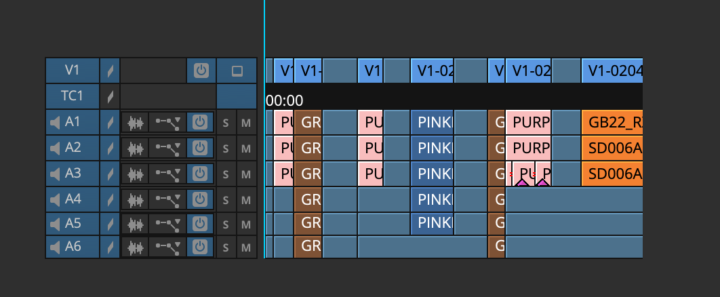
Does anyone know how to remove the gaps for the vision and audio tracks without the audio clips merging together?
1 like • Oct '25
@Lawrence Jordan Hi Larry, Thanks for the reply! I did try to untick the lock sync option on the vision and audio track 1, 2 and 3 and close the gaps. Which it worked but the audio clips on track 4, 5 and 6 still merged together. Trying to align it to the original clip is quite labour intensive, especially on a bigger timeline and I have quite a few to clean. I ended up separating the clips based on the colours since the number of audio tracks are consistent, phew (Brown has 6, blue has 5 etc). I was able to apply Richard’s instructions and it worked because the number of vision and audio tracks now have the same pattern for avid to read. Thanks so much for your help!
1 like • Oct '25
@Richard Sanchez Thanks Richard. This worked like a charm! I had to separate the clips that have the same number of audio tracks first to apply this instruction.
1-1 of 1

@gisela-dunikowski-9484
Gisela is an Australian Assistant Editor in unscripted Reality TV
Active 2d ago
Joined Oct 12, 2025
Melbourne
Powered by