Activity
Mon
Wed
Fri
Sun
Aug
Sep
Oct
Nov
Dec
Jan
Feb
Mar
Apr
May
Jun
Jul
What is this?
Less
More
Owned by Gilbert
For business owners tired of running your business from memory. In 7 days install your Notion Command Center + AI Executive Assistant.
Memberships
ACQ VANTAGE
1.1k members • $1,000/month
Community Launch
15k members • Free
Skoolers
165.4k members • Free
Mindset with Trent
14 members • Free
Synthesizer: Free Skool Growth
44.6k members • Free
AchieveGreatness.com Community
370 members • Free
Especially Made
2 members • Free
Flippin' Empire
3.8k members • Free
TG
The Grounded Vet
3 members • Free
165 contributions to The Institute Social

10h •
Install Your Executive Command Center
A lot of you have heard me talk about my Notion Command Center. That’s the place where the business lives. Tasks. Projects. Content. Notes. KPIs. All of it. So I recorded a quick training showing you exactly where to go to install it inside this community. This is not a long complicated setup. I’m literally giving you the same exact Notion template I use in my business so you can duplicate it into your own account and start using it right away. Here’s what to do: Go to Classroom Open Start Here Click the lesson: Install Your Executive Command Center Create your free Notion account if you haven’t already Click the template link Duplicate it into your workspace That’s it. Once you do that, you’ll have the same structure I’m using: dashboard tasks projects content notes scoreboards and more The point is not to make you build this from scratch. The point is to give you a clean starting point so you can stop running everything from memory and start using a real system. So after you finish this video, go do it. Don’t just watch it. Install it. That’s a real win. If you get stuck anywhere in the process, comment below or DM me and I’ll help you through it.
0
0

4d •
If You’re In This Room And Haven’t Gotten Activated Yet, START HERE.
I recorded a quick walkthrough showing you exactly how to get activated inside the community. Step by step. Click by click. Because I want this room to be as useful as possible for you, and the truth is: You’ll get way more value out of this place once you actually go through the activation process and start using the tools the right way. Inside the training, I walk you through: - how to go through the Start Here post - how to post your Intro + 30-Day Focus - how to book your onboarding activation call - how to comment “Activated” once you’re done - where to go in the Classroom - which first 4 lessons to watch - how to install your Executive Command Center - how to turn on your Executive Assistant - how to use the 5-Minute Business Checkup to figure out where to start That’s the point of this room. Not to dump content on you. To help you get moving fast. To help you install real systems. To help you stop guessing. A lot of you don’t need more information right now. You need: - a clearer first step - a better place to run the business from - and a little momentum That’s what this activation path is built for. So if you haven’t done it yet, go watch the training and follow the steps. Make it simple: - Go through Start Here - Post your Intro + 30-Day Focus - Book your Activation Call - Go to the Classroom and watch the first 4 lessons - Run the 5-Minute Business Checkup If you do that, you’ll already be way further along than most people who join communities and just lurk. Get activated. Get moving. Use the room. Let’s build.
0
0

4d •
Quick AI Update That I Think Actually Matters For Business Owners.
OpenAI just moved Codex into the ChatGPT desktop app. If you don’t know what Codex is, keep it simple: ChatGPT helps you think through the work. Codex helps you move the work forward. That might sound small, but it’s a big shift. Most people still use AI like this: Ask a random question. Get an answer. Open a new chat. Start over again. That’s helpful, but it’s not where the real leverage is. The real leverage comes when you connect AI to a real system. That’s why the first thing I show you inside the Start Here classroom is how to set up your Command Center template and connect it with Codex. Because the goal is not to have better prompts. The goal is to give your AI a real place to work from. Your tasks. Your follow-up. Your ideas. Your content. Your offers. Your next steps. All of that needs somewhere to go. Once your Command Center is set up, Codex can help you do things like: Turn a messy brain dump into tasks. Review your offer and find what’s unclear. Turn notes into a follow-up plan. Build a weekly executive brief from your numbers. Take an idea and turn it into something usable. That’s the difference. AI becomes way more useful when it has: clear context a clear role a clear outcome a place where the work lives Side note: I’ve been using Codex for a few months now, and it has honestly felt like adding a small team for a fraction of the cost. But the tool is not the magic. The setup is. If you’re new here, go to the classroom and watch the Start Here. Use the template. Connect Codex. Then give your Executive Assistant one real job this week.
0
0

5d •
What AI Are You Using The Most?
I am curious to see the different AI's you are using currently along with what is your favorite and why?
Poll
2 members have voted
0
0

6d •
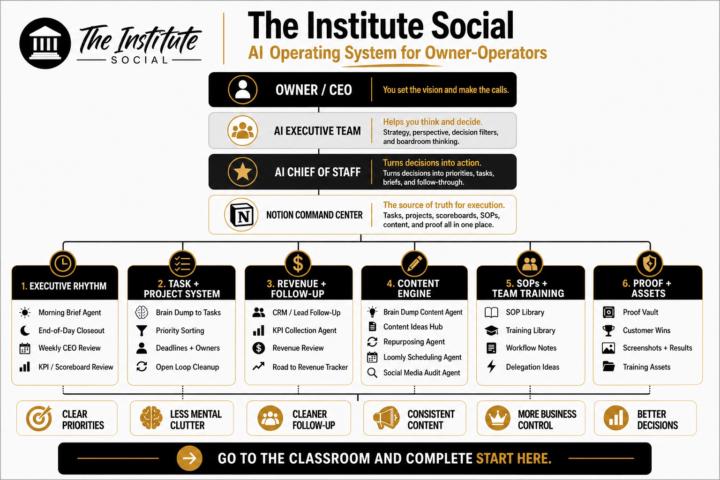
The AI Operating System We’re Installing In This Room
I wanted to show you the bigger picture of what we’re actually building inside this community. This graphic is the full operating system I use across my businesses. At the highest level, it has 4 layers: - You — the owner / CEO - AI Executive Team — helps you think, filter, and make better decisions - AI Chief of Staff — turns those decisions into priorities, tasks, briefs, and follow-through - Notion Command Center — the source of truth for execution From there, everything flows into the 6 main rooms: 1. Executive Rhythm 2. Task + Project System 3. Revenue + Follow-Up 4. Content Engine 5. SOPs + Team Training 6. Proof + Assets That’s the full map. But I want to be really clear: Your job is NOT to build all of this right now. That’s how people get overwhelmed. Your only job right now is to install the system in the right order. In your first 7 days: - install your Executive Command Center - get Room 1: Executive Rhythm working - set up your morning brief and end-of-day closeout - start using the system to run your week instead of your memory That’s it. Ignore the rest for now. Once that first layer is working, then we build into: - Tasks + Projects - Revenue + Follow-Up - and then the rest of the system over time That’s the whole point of this room. Not to dump a giant operating system on you all at once. To help you install the right pieces in the right order so you actually use them. What to do next: Go to Classroom → Start Here → 7-Day Executive Command Center Start with Lesson 1 today. Then come back here and comment: Installed ✅ Let’s build.
0
0
1-10 of 165

@gilbert-urbina-5659
I help service business owners install a 7-Day Notion Command Center + AI Executive Assistant so they run everything from one place.
Active 19m ago
Joined Apr 28, 2024
Corona, ca