Activity
Mon
Wed
Fri
Sun
Jun
Jul
Aug
Sep
Oct
Nov
Dec
Jan
Feb
Mar
Apr
May
What is this?
Less
More
Memberships
Nousify
152 members • Free
Automate Business AI
5.9k members • Free
AI Accelerator
18.6k members • Free
AI Automation Society
364.6k members • Free
Setter Certification Community
605 members • Free
9 contributions to AI Automation Society

6h •
7 Day AIS Challenge - Day 2 Build
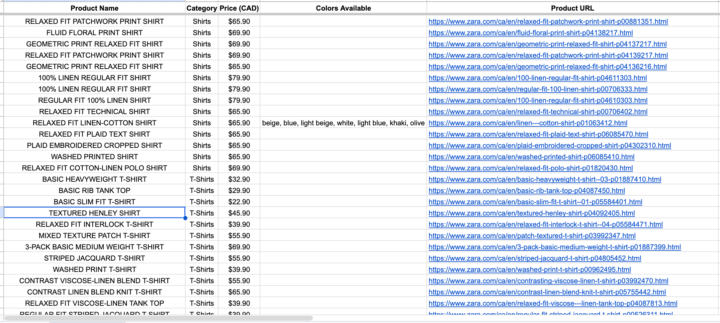
Scraped 100 products under the male catalogue of the Zara website (sweaters, t shirts, pants etc), then imported that data set into Google Sheets. Then did a second scrape for a water bottle brand, Larq, but this time asked Claude to write the data directly to the same sheet as the Zara data but into a new tab via a MCP vs me importing the data manually. I'm so used to going back and forth with AI so I was actually surprised to see Claude did the extraction with Firecrawl in a one-shot prompt without any corrections my side. It picked which data and columns to add without my specifying. So many use cases but top of mind is using Firecrawl to perform competitor or client research before hopping on a call, especially since you can use multiple Claude instances.
1 like • 6h
Trying to get deep in the automation trenches. These two brands just came to mind in the moment

11h •
If you landed on this page, would you know what I sell?
Be honest. I just pushed my Week 5 site live: withfouad.com
2 likes • 9h
@Fouad Hassanein Not the answer you want to hear but it depends. If a 5 year old or a complete newbie entered your website, it's probably too complicated to understand but for a professional with a working understanding of Web3 or AI, your core offering is clearer. I understood your services the more I scrolled through the website but not as much in the hero banner area. Terms like "Digital solutions", "engineer modern software", "AI-powered tools" are open to interpretation and could mean anything. I think you could ELI5 this / be more specific to showcase who your target audience really is. Separate point though - your website is more focused on the "what" rather than the "how", meaning it tells me me what you do (with technical details of the tools you use, what you have experience in etc), but it doesn't tell me how I benefit from using you. Overall, it's a good website and I understand your service the more I scroll through, just not right from the beginning. Hope this helps.
1 like • 6h
@Fouad Hassanein Nice! Hope it turns out great

11h •
Day 1: AIS#7DaysChallenge (Newsletter automation for my soon-to-be-launched Skool fitness nutrition community)
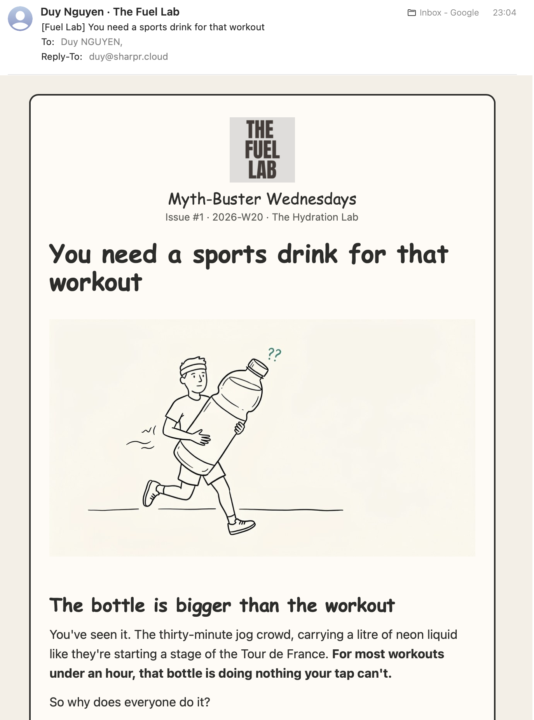
Hey everyone! Here's my submission: https://fuellab.sharpr.cloud/newsletter/issue-001.html Quick intro: I'm a software engineer, Level 3 PT and Level 4 Advanced Sports Nutritionist, HYROX racer, half marathon runner, and getting ready for my first Ironman next year. You also saw my recent winning post on the community a few weeks ago: https://www.skool.com/ai-automation-society/community-wins-recap-apr-25-may-1?p=2b0f460e So when I started looking at what to build for Day 1 of Nate's 7-day challenge, the project that picked itself was tied to the thing I'm actually trying to launch on Skool — a fitness nutrition community for athletes and busy people who train hard. https://www.skool.com/test-community-3892 Why this was the right project to start with Soft launch is close. To get there I needed a landing page, an email list, a video sales letter on that page, the legal pages every site needs, and a way to actually publish weekly content without burning a full day every Wednesday. Nate's Day 1 brief said "build a newsletter automation." I figured I'd kill a flock of birds with one stone — newsletter pipeline, landing page, subscriber capture, VSL, and the legal footer, all in one connected system, all in one session. The stack I'd been wanting to try Claude Design for a while, so the landing page got built there first — pure React + Tailwind, no build step, the hand-drawn-coach aesthetic I'd been carrying around in my head for months. That gave me a real surface to attach the newsletter to. For the video sales letter, I used HeyGen — recorded one solid take, let it handle the avatar lipsync and the cleanup. The footage embedded straight into the landing page hero. Saved a half-day of trying to film myself in a quiet room. For the Privacy and Terms pages — every site needs them, nobody enjoys writing them — I just asked Claude. It produced two real, brand-appropriate pages that hold up. Five minutes from "we need legal pages" to "legal pages are live."
0 likes • 9h
Awesome work @Duy Nguyen had a question, would be great if you can clarify - Nate also mentioned using trigger.dev for the automated email sends but couldn't I also just schedule a regular cron job locally on my machine if this newsletter automation is a strictly personal project. It seems that because your project is tied to a Skool community, a VPS solution made more sense fr you. Do I have the right understanding?

17h •
Improve Claude outputs
Hey everyone! Sharing something I use every single day when working with AI. Most people don't know that AI responds to shortcut commands — you don't need to write a whole paragraph. One word changes everything. Here are 5 that actually work: ELI5: [topic] — AI explains it like you're 5. Perfect when you're learning something totally new. Zero jargon. TLDR: [paste text] — Drops a 2000-word article down to 5 key points in seconds. I use this every morning for news. JARGONIZE: [your text] — Turns simple writing into something that sounds polished and professional. Great for LinkedIn or emails. HUMANIZE: [AI text] — The opposite. Strips out the robotic tone and makes it sound like a real person wrote it. FEYNMAN: [topic] — AI teaches you step by step until you can explain it back to someone else. This one actually makes stuff stick. Bonus: You can combine them. Try → ELI5 the TLDR of [paste article]. You get a 3-line summary a 5-year-old can follow. The PDF guide is in the post as well. Questions :-> 1.Try one today and drop below what you used it for ? 2. Any specific point you're struggling with Claude or any ai tool to solve?
0 likes • 9h
Appreciate you @Muskan Ahlawat
9h •
7 Day AIS Challenge - Day 1 Build
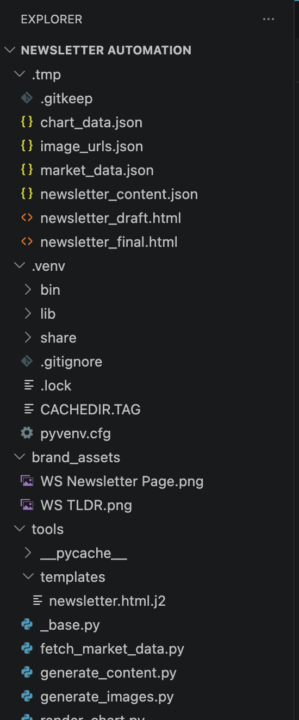
Hey everyone 👋 Completed a working version of my newsletter automation. Took brand inspiration from a popular financial newsletter here in Canada. If I were to iterate, it would probably be to further tailor the newsletter topics that are of interest to me specifically. Great learning experience overall.
1-9 of 9

Active 1h ago
Joined Apr 29, 2026
Vancouver
Powered by