Activity
Mon
Wed
Fri
Sun
Feb
Mar
Apr
May
Jun
Jul
Aug
Sep
Oct
Nov
Dec
Jan
What is this?
Less
More
Memberships
The AI Advantage
70.4k members • Free
The 7-Figure Accelerator
7.1k members • Free
7 contributions to The AI Advantage

2d •
3 things I do every weekend to set up my week
I’ve learned this the hard way. If you wait until Monday to get focused, you’re already behind. Here’s how I set up my week before it starts: 1. I choose ONE win that mattersNot a to-do list. Not busy work. One outcome that actually moves my life or business forward. That goes on the calendar first. 2. I remove friction ahead of time I look at my week and ask,“What’s going to trip me up?” Too many meetings, distractions, low-energy days. I fix it now so I’m not relying on willpower later. 3. I reset my environment Desk clear. Calendar clean. Priorities visible. When Monday hits, I don’t want to think... I want to execute. This isn’t about discipline. It’s about design. Winning weeks are built before they begin. What about you? What’s the ONE thing you do to set yourself up to win the week ahead? Drop it below 👇

1 like • 11h
Good tips that I need to implement to get better focused for the upcoming week, so that I'm not waiting until Monday.

⭐
Nov '25 •
Quick Reminder About This Skool Community + Bootcamp Access
We’re absolutely loving the content and engagement in this group. Seriously... the energy, the curiosity, the way you’re helping each other… it’s incredible. And we’re excited to continue bringing you AI education, tools, and tips to help you grow. We'll continue sharing resources and building this community and our AI experts will also pop in from time to time with trainings and insights — so stay plugged in here. That said, we want to clear up some confusion we’ve seen around the AI Bootcamp. If you enrolled in the AI Bootcamp, please remember that the Bootcamp does not live inside this Skool community. All Bootcamp trainings, replays, and the Bootcamp-specific community live inside your AI Advantage dashboard at: 👉 app.aiadvantage.com You should have received a welcome email with your login details shortly after enrolling. Didn’t Get Your Welcome Email? If you haven’t seen your access email come through yet, here are the next steps: 1. Double-check the email you used at checkout (typos happen more often than you’d think). 2. Check spam, promotions, and junk folders. 3. If you still don’t see it, please reach out directly to:support@aiadvantage.com Our support team works outside of Skool and is the only team with access to your account info — the moderation team here in the Skool community can’t view or verify emails on your behalf. The customer service team is working around the clock right now to get everyone squared away and make sure your access is correct. Thank you for your patience as they move through messages as quickly as possible. If you’re already in the Bootcamp Dashboard — amazing. You’re exactly where you need to be. If not — the team will get you taken care of. Let us know in the comments if this helps clarify!
2 likes • Nov '25
Thanks for the clarification
Nov '25 •
Workshop - Day1
Created my profile and provided it with my 5 Clifton strength results. It was amazing what the results i got from the "what is one thing that you can tell me about myself that I may not know about myself?" prompt.
Nov '25 •
Sooo Excited🚀 Our 30-Day AI Advantage Bootcamp Starts Tomorrow!
We’re beyond stoked to serve so many of you on the next journey to AI confidence, effectiveness, and efficiency… You showed up for the largest AI event in history, and tomorrow we take it to the next level. This 30-day bootcamp is going to blow your mind. We’ve obsessed over every detail to make sure you walk away with real transformation — time back, clarity forward, and momentum that lasts. Between Tony and I, we’ve got over seven and a half decades in business, and when you combine that with Igor Pogany’s genius for turning complexity into action, what’s coming is truly next-level. For those who love the thrill of the last minute — this is it. The doors close tonight at midnight. If you’re ready to not just keep up but get ahead, to reclaim 15 hours a week, this is your moment. And even if this isn’t your time to join, I’m so grateful you’re here — whether in this community or our Amplifier Club — staying connected, learning, and growing together. Thanks for being so freaking awesome. I love being part of this community — let’s keep it alive, impactful, and unstoppable. But if you feel it in your heart now is the time and we can’t wait to serve you —-> JoinAiBootcamp.com
2 likes • Nov '25
@Dean Graziosi Looking forward to it. I'm working on my initial AI partner prompt and it's 'kinda' scary and exciting.

Nov '25 •
AI and cyber security tips
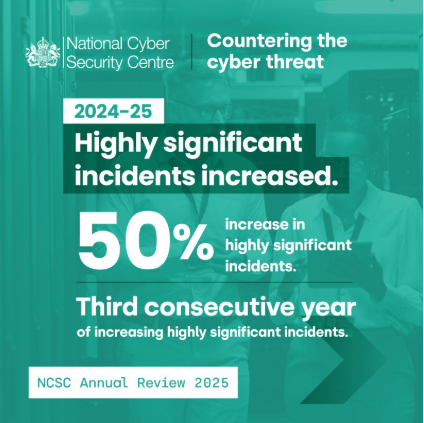
Stay safe online. Use only trustworthy tools and guidelines for your online safety, especially when using AI. As a former operations manager in cyber security, I share tips on how not to get scammed. Today - an example from National Cyber Security Centre, UK: highly and nationally significant cyber incidents increased by 48-50% over a year. 🛡️ AI & Cyber Safety Checklist 1. Know What You’re Sharing ✅ Never type private or sensitive information into an AI chat — no real names, addresses, phone numbers, IDs, or financial details. ✅ Avoid pasting entire documents, contracts, or internal data into AI tools unless you are 100% sure they are secure and compliant. ✅ If you must share examples, anonymise them: change names, blur locations, remove identifying details. ✅ Treat AI tools like social media — assume what you type might be stored or viewed by others. 2. Choose Trusted Tools ✅ Use AI platforms from reputable companies with clear privacy policies (OpenAI, Anthropic, Google, Microsoft, etc.). ✅ Prefer services that let you turn off chat history or opt out of data training. ✅ Be cautious with new, flashy AI apps that promise miracles — they often collect your data. ✅ Avoid downloading unverified browser extensions or desktop “AI assistants” that ask for too many permissions. 3. Protect Your Accounts ✅ Use strong, unique passwords/pass phrases for every AI platform. A secure password/passphrase is at least 16 characters. ✅ Turn on two-factor authentication (2FA) wherever possible. ✅ Don’t reuse passwords from email or banking accounts. ✅ Log out from shared computers, and clear chat histories if others can access your device. 4. Watch for AI-Themed Scams ✅ Be sceptical of emails or messages claiming to be from “ChatGPT,” “Microsoft AI,” or “Google AI” asking for money or login details. ✅ Real companies never ask for your password or payment info outside their official websites. ✅ Watch for fake app downloads — use only verified app stores and official sites.
2 likes • Nov '25
@Diana Skipper Szyper Thanks for the timely reminders. #2. Use Trusted Tool and #8. Being mindful of my digital footprint definitely resonated with me being in the system engineering space.
1-7 of 7
@garfield-pearcy-9247
Looking to set up systems that will give me the financial freedom to serve my family and community using my God-given talents to show forth His glory.
Active 9h ago
Joined Nov 6, 2025
Powered by