Activity
Mon
Wed
Fri
Sun
Nov
Dec
Jan
Feb
Mar
Apr
May
Jun
Jul
Aug
Sep
What is this?
Less
More
Realism to Revenue
448
5.0
Free
Web Wire Studios
354
Free
NextGen AI
60.6k
Free
ACT AI Video
2.2k
5.0
$24/m
AI Agents For Beginners
1.3k
5.0
$14/m
The Ultimate AI Academy
1.5k
Free
6 contributions to AI Agents For Beginners

Jun 16 •
AI Agent Lessons Locked
Hello, I have finished lesson 2 & 3 and there is a link stating to open other agents. when i follow this link it states i have to upgrade to gain access. Have I missed something?
Jun 16 •
First Self Made AI Agent
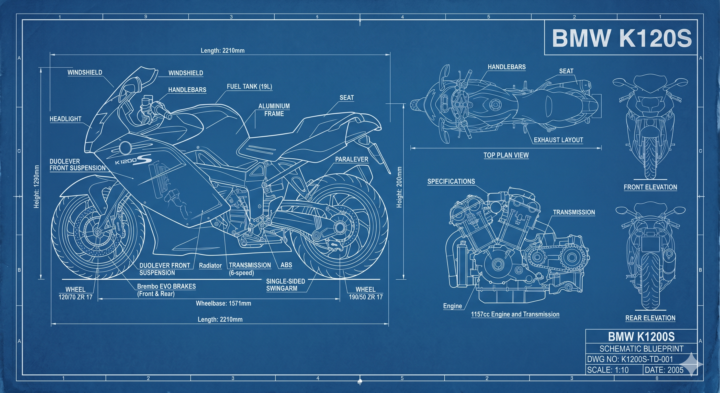
I Built My First [Prompt Assitant] AI Assistant! Description: Name of my AI assistant: [Prompt Assistant] What it will help you with: [write or create a top image from a simple one line of text supplied by me] Test prompts I used: [Create a blue print type image of a BMW K1200] What I liked about the result: [It created a image far better than I could of wrote.]
1 like • Jun 16
Gemini standard interface. I would like it to show the prompt used so that I could alter the prompt to insert other vehicles and things.

Mar 7 •
Ultimate Guide to Gemini Gems: How to Create Custom AI Assistants
Learn how to build, optimize, and use custom Google Gemini Gems to automate your workflows and ensure consistent AI results every single time. If you are still pasting the same massive prompt into Gemini every time you need to draft an email, analyze data, or brainstorm ideas, you are leaving a ton of time and efficiency on the table.🙌 Gemini Gems eliminate the issue of inconsistent AI outputs by letting you permanently lock in your best instructions. As an AI Innovation Lead with a background in UX/UI and SEO, I’ve found that mastering these custom agents is the single fastest way for beginners to bridge the gap between "messing around with AI" and actually getting professional-grade results.🤗 🔷 What Are Gemini Gems? Think of Gems as your own customized AI assistants. Instead of starting from scratch with a blank chat, you pre-load a Gem with specific instructions, a defined persona, and even your own reference documents. Once built, it lives in your sidebar, ready to execute its specific job instantly. (Note: You currently need a Gemini Advanced or premium workspace account to create and manage custom Gems.) ✅ How to Create Your First Gem in 6 Steps 1. Open the Manager: Go to the Gemini web app, look at the left sidebar, and click on Gem manager. 2. Start Fresh: Click the + New Gem button. 3. Name It: Give it a clear, action-oriented name so you know exactly what it does (e.g., SaaS Copywriter or 5K Running Coach). 4. Write the Instructions: This is the "brain" of your Gem. Provide strict rules on how to behave, what to analyze, and how to format its answers. 5. Upload Knowledge: You can upload files directly to the Gem to give it a foundation of facts. Attach your brand style guidelines, reference PDFs, or raw data spreadsheets. 6. Save & Pin: Hit save, and pin the Gem to your sidebar for one-click access. 🤩 3 Expert Tips for Professional-Level Gems - Use the PCTF Framework: Never write a vague instruction box. As a UX and SEO specialist, I recommend structuring your Gem's brain using this exact framework: - Leverage Your Own Data: Generic AI gives generic answers. A Gem becomes incredibly powerful when it stops guessing and starts reading your data. Upload your past successful reports, SOPs, or brand voice documents so it understands your specific landscape. - Iterate Like a Product Manager: Your first version will rarely be flawless. Treat your Gem like a living tool. If it spits out a summary that is too long, don't just fix it in the chat—go back into the Gem manager, edit the core instructions to say "Keep all responses under 200 words," and save it.

1 like • Apr 8
Looks very interesting. Will have to read it a few more times before it will sink in my head, but I will get there.
Mar 8 •
WELCOME TEAM: Start Here 👇👇👇
Explore our AI Agent Builders community designed to automate your business and daily tasks immediately with NO coding required! Welcome to AI Agents For Beginners! I am Diana, the founder of this community.🤗 A leading AI expert with a extensive background in helping businesses and educators implement AI easily and safely. I focus on engineering Google AI Gemini gems and zero code Claude Cowork setups that are immediately powerful yet completely intuitive to beginners without any coding skills. ✅ Where to Start?😃 1. Introduce Yourself Here First > (Include what AI tool are you most interested in learning & job) 2. Learn to Create Your First AI Agent Here > (No code!) Creating a no code AI assistant here only takes about 10-15 mins. You GOT THIS! 💡 Pro Tip: The more you comment in this group, the more others will help you out and resources you will unlock here!✨ Welcome to your new AI home!🏡

4 likes • Mar 19
@AI With Diana , video animation, and also to create caricature images of vehicles.
1 like • Mar 19
@AI With Diana , can I ask which agent or package did you use for the video. I am well impressed with that.
Mar 6 •
Share Your Introduction Post! 👋 Make Friends!
Welcome! So, happy to have you here! Lots of GREAT resources!😃 1) First Introduce yourself in a new post here 👇: ✅ Name & Profession: ✅ What AI tool are you most interested in learning?: 2. Build Your First AI Agent (Yellow) → 😃 If you are here for Claude Cowork, start here Have fun!🙌
5 likes • Mar 18
New To Agents and A.I Hi All, I am a 62 years old Disabled Army Veteran, I am housebound, so the internet is my link to the outside world. I am board playing games, so I thought to keep the old brain matter working I would try and learn as much as I can about A.I, I am based in the UK, Up North, in a town called Blackburn.
1-6 of 6
@fred-kaz-7655
62, Disabled Army Veteran. Wanting to learn a new skill
Active 31d ago
Joined Mar 17, 2026
Blackburn, Lancashire
Powered by