Activity
Mon
Wed
Fri
Sun
Aug
Sep
Oct
Nov
Dec
Jan
Feb
Mar
Apr
May
Jun
Jul
What is this?
Less
More
Memberships
AI Automation Society
421.7k members • Free
13 contributions to AI Automation Society

11d •
Day 6: Scheduled Automation and Loop
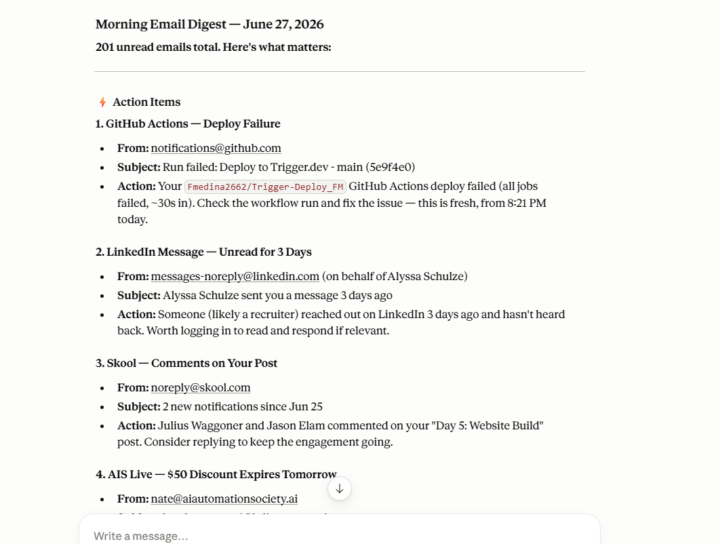
Hello everyone! I decided to make a simple scheduled task within the Claude Code Desktop App. At the start of every week, Claude will simply read my emails and report back any action items, misc. information, job prospects, or networking messages into a concise file for me to read in 5 minutes. I personally am terrible at checking emails, so this automation will be something I will regularly use, hence why it is a scheduled task rather than a loop. I also took my day 4 build, Trigger.dev Lead finder, and added a prompt for it to run every week as well to get familiar with a cloud version of this feature. This skill will be key for future client builds. Thanks!
12d •
Day 5: Website Build
Hello everyone, I've successfully completed my website build/landing page for my AI consulting business. The focus was to establish a proof of concept and utilize many of the hacks Nate mentioned in his video. The most useful hack was the Frontend Developer skill, specifically using /plugin commands to access the best-practice skills from Anthropic's archive. This was especially useful for me because typing the commands did not work for me at first. So, I worked with Claude to troubleshoot and worked in the terminal to get my /plugin commands to work properly within VS Code. This will come in handy for future client builds. Below are before-and-after screenshots. Other than general formatting tweaks, I also uploaded my own professional experience and letters of recommendation so the site had richer content to market my skills more effectively. Thanks!

16d •
Day 4: Trigger.dev Lead Generator
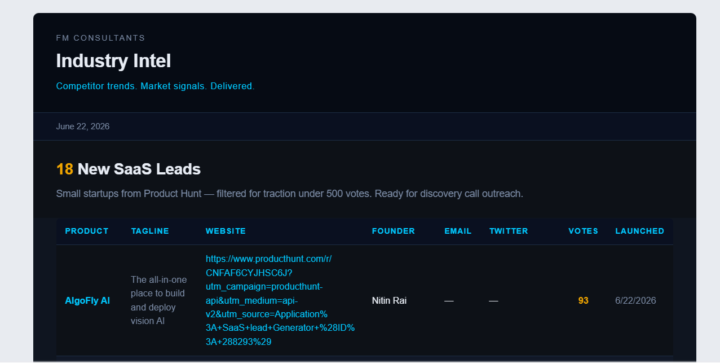
Hello everyone, This build took me a little while, mostly because I really wanted to understand the process of creating a live automation from VS Claude to Trigger.dev. For this post, I created a lead generator for potential clients within the Saas space. The output gets sent to my email with the same theme/format as my made up brand. It could use more touchup, but I focused on getting the proof of concept. One thing that broke was that trigger.dev was not picking up the task even when it was ran in development/local mode. Claude walked me through troubleshooting with the terminal and fixing things as we went, which was valuable practice. Ultimately, the Personal Access Token was being incorrectly referenced between Github and trigger.dev. Once I fixed that, everything ran as expected. There's A LOT more I could have done with this build, but to catch up I kept it simple. On to Day 5!
25d •
Day 3: Skill Builder
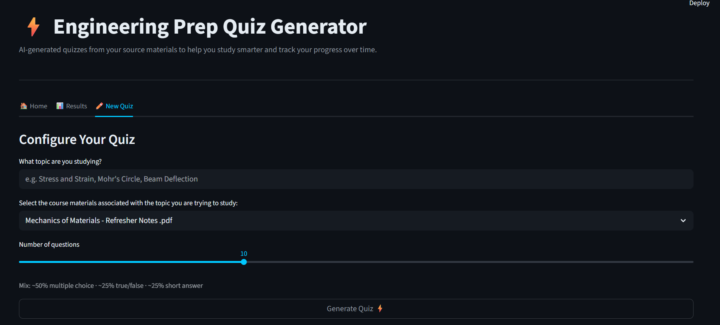
Hello everyone! For the skill builder, I decided to create a study tool that allows users to upload PDF textbooks or course materials and generate quizzes based on their requested topics for practice. The tool prompts the user to provide a few inputs, including the topic they want to study, the desired quiz length, and which uploaded source materials the agent should reference when generating the quiz. After experimenting with the skill, I implemented a few optimizations. First, I didn't want the tool to be limited to the VS Code desktop environment, so I connected it to an external website to make it more accessible and polished. Additionally, I added a progress-tracking feature that measures a user's performance over time as they complete more quizzes. On a separate tab, Claude records past quizzes and scores, allowing users to monitor their improvement and study more effectively. Thanks!
30d •
Day 1: Newsletter - Multifamily Real Estate Research
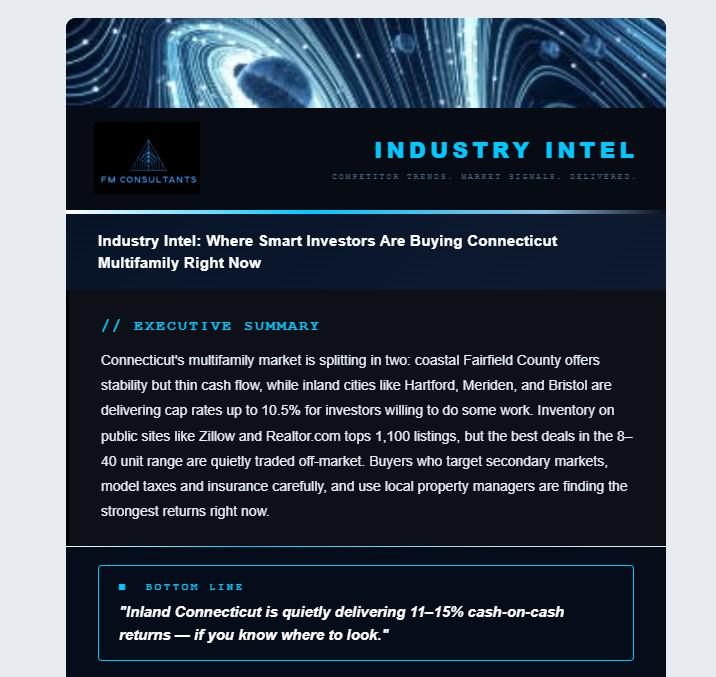
Hello everyone! I have completed my 1st newsletter in Visual Studio with Claude. This specific topic is about researching key information about Multifamily real estate, specifically in Connecticut. I learned some best practices in organizing the project files within Claude and how to provide it access to other web services via API keys and Authorizations. I really enjoyed messing around with this build, specifically coaching the Claude agent to produce a newsletter capturing a made-up business brand and their theme. For my next newsletter, I would look to make it more specific and tailored rather than trying to overload it with the immense information its able to gather. I would also like to push it to Github and have it run on a schedule via Modal as Nate suggested in his video. Thank you!
0 likes • 29d
@Nigel Vargas Yup!
1 like • 29d
@J T appreciate the tip, will definitely look into!
1-10 of 13

@frank-medina-5747
Robotics and Automation Enthusiast. Here to continuously learn and develop
Active 3m ago
Joined Apr 22, 2026
Powered by