Activity
Mon
Wed
Fri
Sun
Jun
Jul
Aug
Sep
Oct
Nov
Dec
Jan
Feb
Mar
Apr
May
What is this?
Less
More
Memberships
The RoboNuggets Network (free)
49.1k members • Free
Chase AI Community
63.5k members • Free
AI Sales Agency Launchpad
14.9k members • Free
AI Marketing Hub
3.5k members • Free
Make AI Automation Great Again
55 members • Free
Hamza's Automation Incubator™
46.7k members • Free
Kourse (Free)
112.7k members • Free
Agency Owners
19.9k members • Free
MinyonaFree
2.4k members • Free
6 contributions to AI Automation Society

Jan 30 •
Has anyone successfully kept "Claude Code" ($200 plan) running on a Linux VPS without a ban?
Hey everyone, I'm running Molt (Clawdbot) on a Hostinger Ubuntu VPS. I'm currently using the API key method (paying per request), but I'm looking at the Claude Max / Claude Code ($200/mo) plan to save money for 24/7 usage. Before I spend $200, I need a reality check from anyone actually doing this: 1. Authentication on Headless Linux: Since I can't open a browser on the VPS to do the OAuth login, how are you keeping the session alive? Are you copying the token from a local machine? Does it expire every few days? 2. Ban Risk: I've heard rumors that Anthropic is aggressively banning accounts that use "Claude Code" subscription credits from datacenter IPs (like Hostinger/AWS). Has anyone here been running this setup for more than a month without getting flagged? 3. Mac Mini vs. VPS: Is it safer to run this on a Mac Mini (residential IP) to avoid the "datacenter" flag, or does the 24/7 automated traffic get you banned anyway regardless of the hardware? I just want to know if the $200 plan is actually viable for an automated agent, or if I should just stick to the API key to be safe. Thanks!
Mar '25 •
Problem in Automating Sequential Email Sending from Google Sheets Using n8n or Make.com
I have a Google Sheet containing leads with details such as name, email, designation, and company name. I want to set up an automation that selects one row every hour, sends the data to an LLM to generate a well-personalized email based on a system prompt, and then sends the email to the respective person. The challenge I'm facing is not with processing the data or sending emails—I already know how to do that. My main issue is selecting a single row sequentially every hour without repeating previous rows. In Make.com and n8n, most triggers work when a new row is added. However, in my case, the data is already present, and I need a mechanism that picks rows one by one in order, ensuring each row is processed only once. How can I achieve this in n8n or Make.com while keeping it structured, clean, and time-controlled? Any guidance would be greatly appreciated!
1
0
Feb '25 •
Slack Integration Issue with N8n
Hi n8n Community, I recently updated n8n after being 5 versions behind, and now my Slack integration and workflows are not functioning properly. Here’s a breakdown of the issue: What’s Working: ✅ My old workflow (created before the update) with a Slack trigger still works fine. (See Screenshot 1)✅ The Slack bot is properly integrated into the channel.✅ Live workflows (older ones) are executing as expected. (See Screenshot 2) What’s Not Working: ❌ New workflow with Slack trigger does not respond to messages, even though settings match my working workflow. (See Screenshot 5)❌ No execution logs appear in the workflow history for the new workflow. (See Screenshot 6)❌ When switching to testing mode, it takes forever to execute—this happens across all agents and workflows.❌ The Slack bot is added to the channel, yet it does not reply to messages. Screenshots for Reference: 📌 Screenshot 1: Old workflow working fine.📌 Screenshot 2: Execution log of the working old workflow.📌 Screenshot 3: Slack trigger settings in my working old workflow.📌 Screenshot 4: Slack trigger settings in my new workflow (same settings as old one).📌 Screenshot 5: No response from Slack bot in the channel after sending a message.📌 Screenshot 6: No execution recorded in the workflow history for the new workflow. Steps I’ve Taken to Debug: 🔹 Double-checked that the Slack app has all necessary permissions.🔹 Compared Slack trigger settings in the old and new workflows (they are the same).🔹 Restarted n8n, cleared cache, and refreshed workflows.🔹 Checked logs—no execution history for the new workflow. Has Anyone Experienced This? Could this be a breaking change in recent updates affecting Slack triggers or execution handling? Any help or insights would be greatly appreciated! Thanks in advance! 🚀
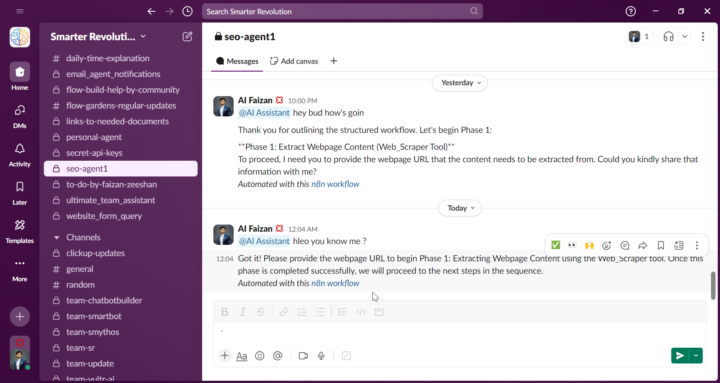
0 likes • Feb '25
@Nate Herk Please have a look
Jan '25 •
SEO Agent Building help
Hey there I have an idea to create an agent and I would need your precious insights on the building of this workflow Thank you : Goal: Automate SEO optimization for any webpage using AI and n8n to improve search rankings effortlessly. How It Works: 1️⃣ User Inputs: - Website URL (single page to analyze) - Target Area (e.g., New York, USA) - Business Category (e.g., AI Marketing Agency) 2️⃣ AI Analysis: - Fetches and analyzes page content - Finds high-ranking keywords specific to the industry & location - Compares with top competitors 3️⃣ User Selection (via Slack): - AI suggests best SEO keywords - User chooses which to use 4️⃣ AI Optimizes Content: - Rewrites page with new keywords - Suggests meta titles, descriptions, and tags 5️⃣ Final Output: - SEO Report (PDF/Doc) with all improvements - Delivered via Slack or Email
0 likes • Jan '25
Hey anyone here who can help me in this regarD ?
Jan '25 •
Jotform Connection Error
I have been facing the authorization error even after adding the api that got the full access in jotform . can anyone tell please what's the problem ?
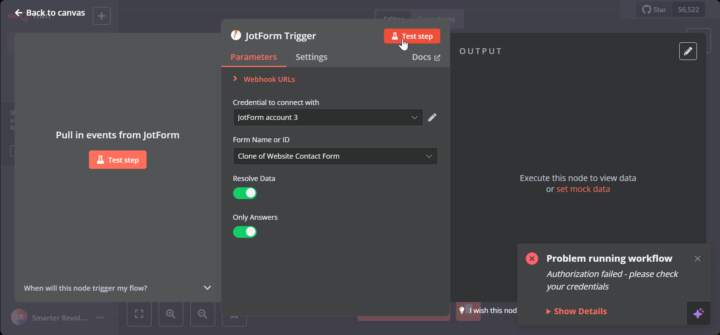
0 likes • Jan '25
@Jimmy Van Houdt hey I have checked it and confirmed it from my JotForm account and have checked all the domains one by one none of it works .
1 like • Jan '25
@Jimmy Van Houdt Hey Thanks man Alot it's working now ..
1-6 of 6

@faizan-ashraf-7631
Entrepreneur | Founder of Prob N Tech – Driving innovation in AI automation, marketing, and software solutions. 🚀
Active 27d ago
Joined Jan 3, 2025
Powered by