Activity
Mon
Wed
Fri
Sun
Jul
Aug
Sep
Oct
Nov
Dec
Jan
Feb
Mar
Apr
May
What is this?
Less
More
Memberships
Peak System Builders
874 members • Free
Agent Zero
2.7k members • Free
4 contributions to Agent Zero

8d •
A0 CLI v1.10 + Agent Zero v1.16 🚀
Hey everyone, Big release day: A0 CLI v1.10 and Agent Zero v1.16 are live. The main dish: Computer Use Cross-platform support for Linux X11/Wayland, macOS, and Windows. This is a beta feature and we're actively looking for feedback from the community. If something feels off or breaks, let us know. Speech is now fully modular The legacy speech system has been split into two independent built-in plugins: Kokoro TTS and Whisper STT. Enable either, both, or neither. Browser-native TTS remains available as a fallback when Kokoro is off. The Whisper mic UI only appears when its plugin is enabled. What else is in this release: 🔒 Screenshots (browser, desktop, computer-use) are now ephemeral and context-scoped by default. They no longer linger on disk. 🧩 Plugin system improvements: simplified ON/OFF toggle, configurable error retry count, skill visibility controls (hide skills from the model-facing catalog), reduced scanner false positives, and a new skills_activate endpoint for connector clients. 🖥️ CLI v1.10: locked release installs with managed CPython 3.11, embedded computer-use backend, skill shortcuts, startup defaults with --chat and --chat-last options, and cleaned up status text. How to update: Agent Zero: Settings > Check for updates > Review update > Restart & Update CLI: if you are on at least v1.7, just run a0 update in your terminal. Or follow the one-line scripts available at: https://www.agent-zero.ai/p/docs/a0-cli-connector/#install Feedback on Computer Use is especially welcome.


2 likes • 8d
I had a small hiccup updating; I (dangerously, I admit) configured it to omit the backup, and it worked.
18d •
Agent Zero v1.14 and CLI v1.7 live!
Quick one: both releases are out today. The big one is host browser control. After days of demos, the feature is now yours. You can point Agent Zero at the browser you're already using (the one with your tabs, your sessions, your login state) and have it work alongside you in the background. Multi-tab. No Chrome extension. No sandbox. Setup is four steps: 1. Install Agent Zero or update to v1.14 2. Install Agent Zero CLI 3. Run /browser host in the CLI 4. Go to chrome://inspect/#remote-debugging and enable the checkbox That's it. It works with any model, cloud or local. If you've been waiting for the "real browser" use case, this is the version to install. Pool of things I'd love to see from this community: - What workflows you build with it - Edge cases that break (please report them, this is v1 of the feature) - Comparisons against the OpenAI Codex browser approach if anyone tries both Visit agent-zero.ai/p/docs for further guidance and how-to. Drop questions below, or make sure to join us in our Community Call, tomorrow. Alessandro

1 like • 17d
oh wow, need to try it out
0 likes • 16d
I had a previous version of the A0 cli connector locally. I ran `a0 update`, it updated a few dependencies and then a new executable. Then when I tried /brwoser slash commands I didn't get any match in the dropdown. I had to reinstall using the install script. Just then, it worked.
Apr 13 •
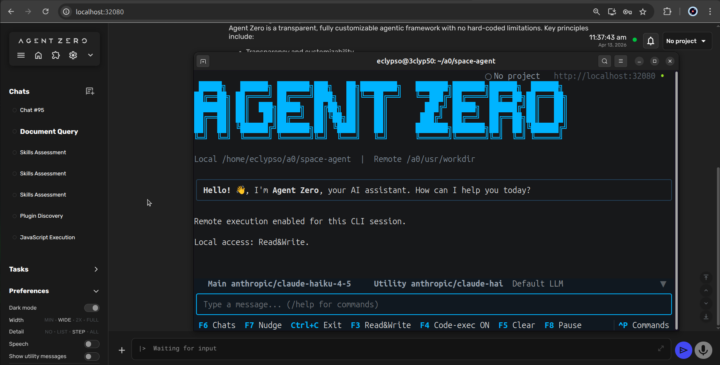
Agent Zero v1.9 is live! Meet the A0 CLI Connector 🖥️
Hey everyone, v1.9 just dropped, and it comes with a brand new tool: the A0 CLI Connector. What it does: It's a CLI that connects your local machine to your Agent Zero instance. It can view and edit files directly on your host machine, while all code execution stays safely inside Docker. Best of both worlds. The only requirement is installing Agent Zero version 1.9. Previous version don't support the CLI connector. Install it now: - Mac/Linux: curl -LsSf https://cli.agent-zero.ai/install.sh | sh - Windows irm https://cli.agent-zero.ai/install.ps1 | iex Or ask your Agent to use the a0-setup-cli Skill to guide you. 🔒 Security Note: This release also patches two CVEs (SSRF and Path Traversal). Please update your instances. Other highlights: - Browser Agent can now use its own dedicated model preset. - /project and /config commands work directly in Telegram, WhatsApp, and Email. - Redesigned messaging settings with clearer setup flows. Update Agent Zero: Settings > Update > Open Self Update > Restart and Update
0 likes • Apr 19
Great update. Thank you, guys. I regret that I configured my Agent Zero instance in a VPS using the Cloudflare zero trust access control because right now I cannot authenticate. Probably there is a way to work around the access configuration to allow the CLI to authenticate with my VPS instance, but anyway, I'll figure it out.
1 like • 17d
@Wendell Jefferson I did a quick fix, not the definitive one. Since I have my SSH keys, I create an SSH tunnel and bypass the Cloudflare access, which works through the DNS name. My temporary fix works as long as you have SSH keys.

Dec '25 •
Poll: what cloud provider do you guys use?
Hello community, for future consideration when developing hosting-related features/improvements for a0, what are the most popular cloud providers you normally use? I am in the process of choosing a provider to build my new lab for cloud experiments and I would like to align with what is in use for the majority of our users. Just write your favorites in the comments. Best, Rafael
0 likes • Apr 12
@Rafael Uzarowski I use a Hostinger VPS
0 likes • Apr 12
@Mikael Lindecrantz I also use a Hostinger VPS. I'm managing my DNS with Cloudflare and let them manage the TLS Certificate. Then I use cloudflared to create a secure tunnel to the container.
1-4 of 4

@fabricio-q-5311
I'm an AI Systems & Agent Specialist. After years of designing complex systems, I've turned my attention to the new frontier of AI agents.
Active 6d ago
Joined Apr 12, 2026
Powered by