Activity
Mon
Wed
Fri
Sun
Jul
Aug
Sep
Oct
Nov
Dec
Jan
Feb
Mar
Apr
May
What is this?
Less
More
Memberships
Fretboard Freedom
352 members • Free
AI App Founders
42 members • Free
Bootstrapped SaaS
593 members • Free
Build Grow Exit
188 members • Free
3 contributions to AI App Founders

Jun '25 •
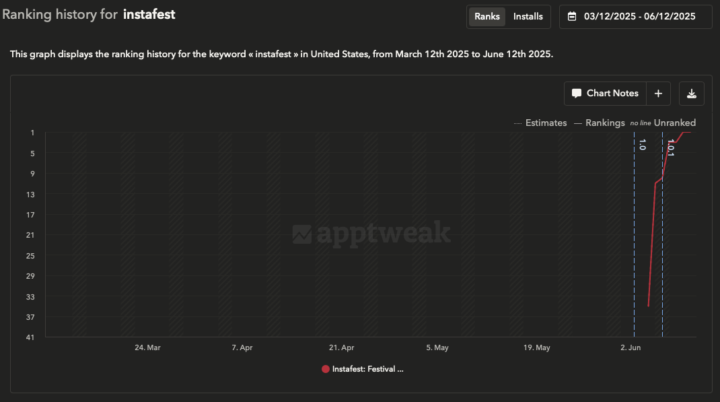
Ranking #1 BUT....
Last week I shared with you that we released a new app: Instafest. High search volume, no competition. As you can see in the screenshot, we went from ranking #36 to #1 in a few days. Now we are still number 1 BUT, there is a technical problem with the API and it looks like we won't be able to solve it. Spotify updated their API requirements a few weeks ago and now they require 250k MAU to use the API. We obviously don't have that many users so we can't use the API. The Trending Keyword Method to launch an app and rank #1 clearly works very well. Unfortunately in this case we will not be able to dig into this goldmine because of technical issues.

2 likes • Jun '25
@Darius Mora @Dima Krestyashyn Thanks for sharing, really interesting. However, those APIs rely on scraping Spotify’s public data, like play counts and regional top artists. Unfortunately, they don’t allow us to access user-specific data. @Darius Mora One workaround could be asking users to create a public playlist with their favorite artists and share the link with us. We can then parse the playlist to extract their top artists. Since users are already showing interest in this feature, here’s the simplest flow I can think of: 1. The user enters their Spotify email address. 2. We show a “Your list is being prepared” screen and let them know we’ll notify them once it’s ready. 3. On the backend, I add their email to the Spotify user management list. 4. Once added, we trigger a notification: “Your list is ready!” 5. The user logs in with Spotify, and voilà, their personalized poster is displayed :)
Jun '25 •
5-Star Thread for Everyone 🥳
One way we can help each other out, is to leave a 5-star review on others apps. This will help provide the initial boost so our apps have a better chance of thriving, especially after launch. I invite you to give back to the community, to download the apps shared here and provide a review. I ask that you first help others, before asking for reviews yourself. Best way to provide reviews for others is to go through older posts in the category of "5-Star Ratings" To kick it off, we can help @Ryo M with his new app which was launched just two days ago and it's already doing well in the keyword rank: https://apps.apple.com/us/app/posture-reminder-health-habits/id6746772286
2 likes • Jun '25
Downloaded and rated 5 stars, @Ryo M good luck, you got this!

May '25 •
Do you recommend using boilerplates?
Do you recommend using Boilerplates like SwiftyLaunch (https://swiftylaun.ch/) or WrapFast (https://wrapfa.st/) to speed up app development? Will the @Evrim Demir technical course include Boilerplates?
1 like • May '25
hey @Diego Pérez Sánchez , I checked these tools in the past but never used them. They look interesting though! We’ve built 10+ products so far, and over time, we’ve developed our own reusable components. This makes it really fast for us to spin up new apps without relying on external boilerplates. Also, Cursor has been an incredible tool that helps streamline our workflow even more! Here’s my quick workflow: I’m using Swift 5 (yeah, I know—old school 😄) and a few Cocoapods like: • EasyPeasy (for layout) • RevenueCat and RevenueCatUI (for subscriptions) • Lottie (for animations) Happy to share more if you have more questions :)
1 like • May '25
@Prithiv Dev Devendran , I don't really use any template in cursor but I just added the rules below so whenever I ask Cursor to create the views, it follows the rules :) Here you go: Whenever new views are added to a UIViewController, follow this structure strictly: 1. Define all views at the top of the class using closures. Configure their properties such as font, color, image, alignment, etc. inside the closure. 2. In viewDidLoad(), call setViews() to handle layout and setup. You can also call other setup functions like setObservers() here if needed. 3. Inside the setViews() function, first add all views to the main view using view.addSubview(…) or parentView.addSubview(…). Do this before setting any constraints or adding button actions. 4. Add button targets immediately after adding views, before setting constraints. Example: nextButton.addTarget(self, action: #selector(nextButtonTapped), for: .touchUpInside) 5. Apply EasyPeasy constraints only after all views and targets are added. Use clear and readable layout for each view. This structure ensures consistent, maintainable code and avoids layout issues.
1-3 of 3
Active 26d ago
Joined May 13, 2025
Powered by