Activity
Mon
Wed
Fri
Sun
Aug
Sep
Oct
Nov
Dec
Jan
Feb
Mar
Apr
May
Jun
Jul
What is this?
Less
More
Memberships
Wholesaling Real Estate
78.3k members • Free
OPM Inner Circle
41 members • $97/month
Peptides for Newbies
6.3k members • Free
Exploring Peptides Community
18.7k members • Free
CR
Credit Report DIY
633 members • Free
Business Lending Accelerator
99 members • Free
7 contributions to Wholesaling Real Estate
1h •
Title Curative?
Hi, So now that "PUMP" went away (PUMP Pro too?), and Title Curative is wrapped into XLeads v5, can someone who is using XLeads for title curative (mainly) give me some insight / feedback? Is the REDS (Real Estate Deal School) and XLeads v5 better than what "PUMP" had, or is it basically the same content and tools? I would think XLeads v5 would be better from a tool perspective as there are more filters and skip tracing built in? Is there still a "death scrub"? I really just want to focus on title curative and only title curative, and not as much on wholesaling, so freewholesaling.com probably won't help me as much. About how many hours of video / info on Title Curative only is in the Deal Skool? In the daily Zooms, is title curative covered much? Feel free to reply here or DM me. And thank you.
3 likes • 11d
@Zach Ginn Does this new law (if passed) impact title curative (PUMP)?

18d •
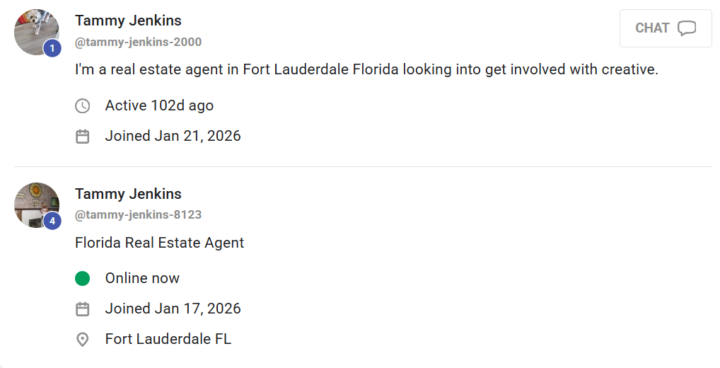
Does anyone know how I can delete the first profile in my screenshot
Not sure who to ask but I just realized I have 2 profiles on here and I want to delete on first one in my screenshot, does anyone know how I can do this?
1 like • 18d
A search said: To delete a Skool profile, you must first cancel all paid subscriptions and, if applicable, transfer or delete any communities you own. Once these prerequisites are met, sign in on a desktop browser, click your profile picture, and select Settings. Navigate to the Account section in the left sidebar, scroll to the bottom, and click the small grey Delete account link. You will be asked to type your password for confirmation. After confirming, a verification email is sent to your registered address. You must click the link in this email within 24 hours to finalize the deletion. If you cannot find the delete link, it is likely because you still have an active paid subscription, are an admin/owner of a community, or are signed in via Google SSO. In such cases, you can contact Skool support at support@skool.com with the subject "Account deletion request" to have them force-delete the account.
1 like • 18d
@Tammy Jenkins not sure, that is what it sounds like... if it doesn't work, email them...

👑
⭐
🔥
May 15 •
🔥 How to Make $100k+ on EVERY DEAL! (PUMP COMMUNITY)
What if you could make a $100,000 on every deal… with only $226/mo in marketing With almost no competition? That’s exactly what we do. We did a title curative deal, with a messed up title & dead owner. We got it under contract for $75k and we will sell it on the MLS for $275k!! Sounds too good to be true… But it isn’t. It’s called title curative. For the first time ever you don't need to spend $10,000's to do these types of deals, you only need a couple hundred dollars a month! This is NOT regular wholesaling. This is a method where you only need 50 calls to get a $100,000+ deal, you just need to be able to find these types of opportunities. It's something I've been doing for over 6+ years and over 8 figures of these massive 6 figure plus deals! Now you can start doing these type of big 6 figure deals without any capital, big marketing budget or experience! You don't even need to be a title curative expert, you just need our PUMP community! Our Pump community simplifies the title curative process so you only need to focus on 2 things! #1 - Finding title curative opportunities (with our PumpStacker Software thats included) #2 - Sending us the Deal to JV and split the Profits with Us! That's it, know the PUMP process in the community and find these deals and we do the rest and you profit! So if you think you can find these deals and send them to us, you can split the profits and make big money doing title curative deals on top of your wholesaling real estate deals! The best part is these are Ultra Low Competition deals! On average less than 50 calls yields a deal without our super targeted PUMP Method of finding title curative deals and scripts to talk to these sellers! This is how you find the deals most wholesalers completely miss. Go Join the Title Curative Revolution Now at https://www.skool.com/pump JOIN HERE 👉 https://www.skool.com/pump See you inside, Zach Ginn

0 likes • May 20
@John Dummett hey John, are you using pump stacker yet?
2 likes • May 21
@Anni Pea the 33 min video here: https://www.skool.com/pump/about
👑
⭐
🔥
May 14 •
🚨 PUMP LAUNCHES AT 5PM EST!! 🚨
🚨 IT’S GOING DOWN LIVE TODAY AT 5PM EST 🚨 Today is the official PUMP launch livestream. If you’ve been watching us talk about title curative… The $100K+ messy-title deals… The tax delinquent + deceased-owner data… The PUMP Stacker software… And how we’re finding deals most wholesalers don’t even know how to close… You need to be on this live. So you Know Exactly How to Make $100K ON EVERY DEAL!! At 5PM EST today, I’m breaking down: ✅ What PUMP is ✅ How title curative deals work ✅ Why these deals are so low competition ✅ How PUMP Stacker helps find them ✅ How we can JV, fund, cure title, and split deals with members ✅ How to join PUMP before prices go up This is NOT wholesaling. This is title curative. And once you understand it… You’ll never look at tax delinquent lists the same way again. ⏰ LIVE TODAY AT 5PM EST Join here: https://youtube.com/live/VkCXGj7KEzM Do not miss this one. – Zach Ginn
2 likes • May 18
@Tammy Jenkins I think I found your real estate email address. I am gonna email you to take this conversation offline. Since we are both level 3 we can't initiate a chat with other members (only admins).
2 likes • May 18
@Tammy Jenkins email sent. Check spam if you don’t see it.
1-7 of 7