Activity
Mon
Wed
Fri
Sun
Aug
Sep
Oct
Nov
Dec
Jan
Feb
Mar
Apr
May
Jun
Jul
What is this?
Less
More
Memberships
Automatable Free
18.7k members • Free
Chase AI Community
72k members • Free
AI Marketing Insiders
1.5k members • Free
Agent Zero
2.7k members • Free
CC Strategic AI
3.2k members • $27/month
Tech Snack | Vibe Coding & AI
19.5k members • Free
AI Automation Society
423.6k members • Free
3 contributions to CC Strategic AI

May 7 •
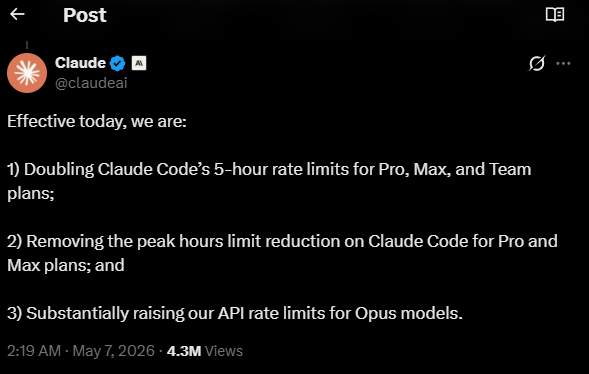
Claude Increased Rate Limits (DOUBLING!!!)
Nice, about time... Like I finally figured out how to not get rate limited, and now this. hours of work, completely wasted. I could have been a lazy sod and not bothered and then they would have rewarded me anyways. 😂

0 likes • May 7
@Charles Dove but how much use do you give to claude to not get to limits, because I am in the 200USD/mo and with 1 application that I am developing (using GSD, I know is token hungry), with caveman and all, I get to the weekly limit about 2-3 days prior reset

Apr 1 •
Productivity hack?
Having Claude run your operation as an orchestrator overseeing spawned agents, it spawns and keeps track of the entire project by itself inside of Linear... IS WILD 🔥

1 like • Apr 2
Excuse my ignorance, what is Linear??

Mar 17 •
3 free GitHub REPOs you don't know about yet...
Most people using Claude Code are typing prompts into a terminal and hoping for the best. That is the slowest, most expensive way to use it. Here are 3 tools I found that actually change how you work. All free. All open source. 1. Get Shit Done 2 (GSD 2) github.com/gsd-build/gsd-2 This one turns Claude Code into an autonomous coding agent that runs while you sleep. You break your project into milestones, slices, and tasks. GSD 2 picks up each task, spins up a fresh context window, executes it, commits the code, and moves to the next one. No babysitting. The rule that makes it work is simple: if a task does not fit in one context window, it becomes two tasks. It also tracks your token spend in real time so you do not wake up to a $200 bill. Budget ceilings pause execution before you overspend. Why it matters: You go from “build this feature” sessions to “here is the full project, go execute it overnight.” 2. G Stack github.com/garrytan/gstack Built by Garry Tan, YC president. This one turns Claude Code from one generic assistant into a team of specialists. Instead of one big chat, you get 12 different modes: /plan-ceo-review challenges whether you are building the right thing /review hunts for production breaking bugs that pass CI /qa tests your live app and auto fixes issues with atomic commits /ship handles release engineering Think of it like switching hats. Planning hat. Review hat. QA hat. Each mode constrains Claude to think like a specific role instead of trying to do everything at once. Why it matters: The quality of your output depends on the specificity of the instruction. Generic prompts get generic results. 3. CLI Anything github.com/HKUDS/CLI-Anything This one is wild. It takes any desktop application and auto generates a command line interface so AI agents can control it. GIMP, Blender, LibreOffice, and dozens of others. The generated CLIs make real calls to real software. LibreOffice actually generates PDFs. Blender actually renders scenes.
1 like • Mar 19
Didn't GSD2 supposed to be outside claude even they call it, claude competitor now??
1-3 of 3

Online now
Joined Mar 12, 2026
Powered by