Activity
Mon
Wed
Fri
Sun
Dec
Jan
Feb
Mar
Apr
May
Jun
Jul
Aug
Sep
Oct
Nov
What is this?
Less
More
492 contributions to Learn Power Apps

Jul 30 •
Power App backups / business continuity
Does anyone else in this forum work as an independent contractor, building app solutions for clients? Question: How do you handle backups? I was contracted to build a Power Apps solution for a client. I develop in my own tenant and then export managed solutions to import into his tenant. The solution I've built has grown over time into something his business uses daily and is becoming quite dependent on. Which has now got him thinking about business continuity, and he's raised a valid concern that if something happens to me then what happens to the business solution he's invested a fair amount of monthly retainer fees in for me to build? He's now pressuring me to hand over the unmanaged solution, which he wants to then pass on to his (third party) IT Support guy to back up. I'm reluctant to do this, as I've firstly put in a ton more hours into building this solution than what my client pays me for, and the solution has plenty of reusable parts and design features that I would use again for other clients. It's also become commercially viable as something I could potentially sell again to other clients.... which has raised a minor debate over who owns the IP... 🙈 but that is a whole 'nother story for another day. Just interested to know from others here, what strategy you have in place for maintaining backups of your unmanaged solutions? Do you: 1. Have a family member or a friend who is instructed (and knows how) to hand all the source code over to clients in the event of your death/disability; 2. Or are you unconcerned about simply handing over the unmanaged solution to your clients, so they can potentially axe you from the project and pass all your hard work on to another developer for free, thereby opening the door to commercialize the app themself etc... 3. Or do you maybe have some kind of business disaster strategy arrangement with another Power Apps developer, who is nominated to step in and take over all your client work should you happen to pop off?

0 likes • 9d
@Dustin Rocksvold So true, am curious to know how you got over this
0 likes • 9d
@Dustin Rocksvold love the comments
0 likes • 9d
@Dustin Rocksvold Please share your experience so we can learn from
Jan 7 •
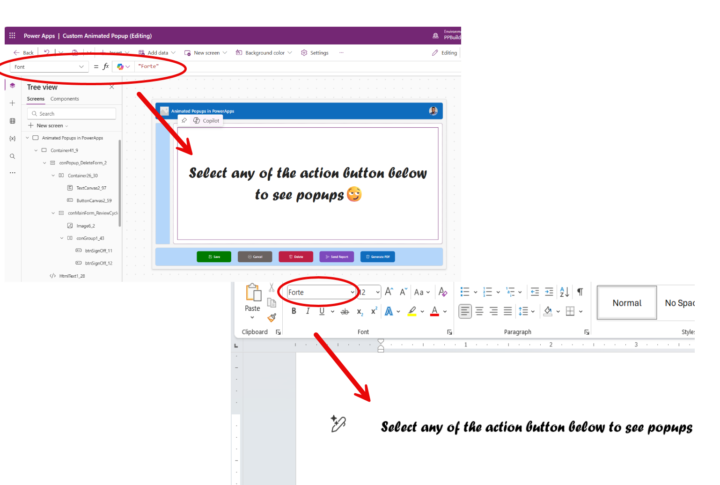
Use Microsoft Word fonts in PowerApps
Insert the name of any MS Word fonts (wrapped around in double quotes) in the font property of your text control and see the magic happen 😃😃
0 likes • Jan 16
@Jen Gefvert Same expression i had when i found out
0 likes • May 5
@Shirl E Start here: https://www.skool.com/learn-power-apps-9036/classroom/018a2570?md=85128f9215c54d06b4f36f14bfad7c4e

Feb 16 •
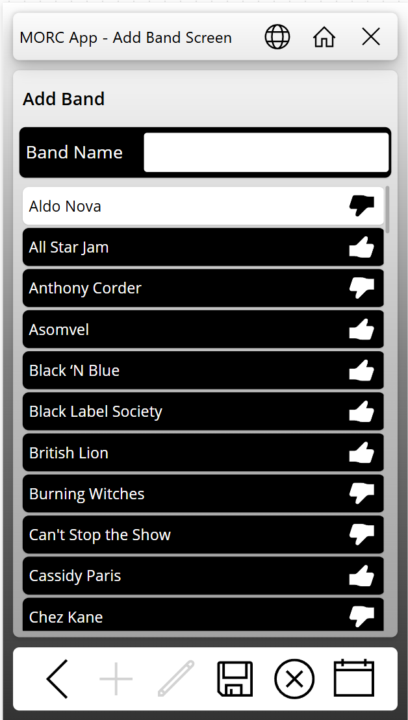
App Deployment and Scaling Question
So, I have an app that I have been working on in my personal tenant for a music cruise we are going on in a few months. I posted screen captures in a Facebook group for people going on the cruise. There was interest from several people in using the app. Have any of you published an app for something similar where you may not know how many users will use it, or when? In looking at the PA licensing Microsoft is doing away with the Per-App Plan and going to a model where if someone uses it, then you get charged through Azure billing (Pay As You Go - or PAYG). The App is mainly going to be used during the one-week period of the cruise. Would it be better to remove the sharing of the app with the users, remove the connection between the app and Azure billing, or both? I don't want to be picking up the tab for 10$ per person per month in between. How would you go about billing the users to reimburse the cost of the Azure billing? I have attached some screen captures here in case anyone is interested.
0 likes • Mar 8
@Dustin Rocksvold Cool
Feb 3 •
I Learned Another Lesson on SharePoint Multiline Text Fields
I have been struggling with a multiline text field returning HTML DIV tags in the first and last record of a collection when I point it to this particular column. I don't remember how many times I have heard Darren say, "Make sure you select plain text when adding a text column in SharePoint." Well today CoPilot was able to give me a correct answer for why the text was showing up wrapped in HTML. It suggested checking the column type. When I looked at the settings, there it was, plain as day. The first record showed up with <div class="ExternalClass3EF1E2D3305044989EAF2F23DE178BF6"> where the class name changed each time I ran the app. The last record had </div> after the single digit number. No matter how I tried using the Substitute function, the next time I opened the app for editing the class changed, and the Substitue functions did not work anymore.

1 like • Feb 3
Glad u found a solution to this
1-10 of 492

@elvis-eyobor-3582
Community Moderator🚨
We are here to help you escape PowerApps hurdles 🧑⚕️
Active 8d ago
Joined Sep 16, 2023