Activity
Mon
Wed
Fri
Sun
Jan
Feb
Mar
Apr
May
Jun
Jul
Aug
Sep
Oct
Nov
What is this?
Less
More
Memberships
System ONE Projekt
186 members • Free
Coaching Zulassung LegalGrowth
180 members • Free
Christiani Marketing Family
383 members • Free
Feminine AI
79 members • Free
Social Leads Academy
797 members • Free
AI Automation Agency Hub
272.6k members • Free
AIYourLife
2.3k members • Free
AINAUTEN AI AUTOMATION EXPERTS
884 members • $995/year
AI Automation Academy
2.3k members • Free
6 contributions to AI Automation Academy

Feb 21 •
Looking for beta testers for our new AI customer support agent
We are planning to launch https://www.kelpo.ai/ later this month and are looking for some beta testers 🥳 In a nutshell, kelpo.ai lets you built customer support AI chatbots. No monthly AI limits, simply pay for daily capacity. Human handover built-in. We are hoping to test with real world usage, so ideally you have your own business where you would like to implement AI customer support. Leave a comment blow if you are interested!

2 likes • Feb 22
I‘m interested too 🙌

Jan 28 •
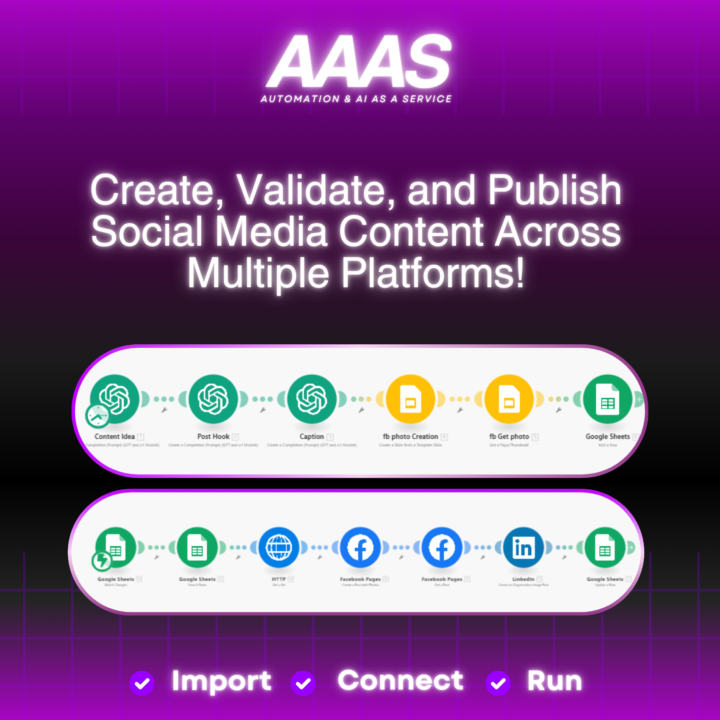
Time to Replace Your Social Media Content Creator
Hey guys, I’ve created an automation tool designed to make content creation super easy. ✅It generates content ideas based on your business or input. Once you approve an idea, it builds everything for you—captions, hashtags, visuals, or designs (using a Google Slides template created on Canva). ✅If you’re happy with the result, you can publish it across all your social media accounts with just one click. To keep things organized, there’s a Google Sheets dashboard where you can track all your posts. It even gives you the published post URL and the date it went live. If this sounds like something you’d find useful, let me know on comments! I’d also love to hear your feedback or suggestions. For more automations like this find it on AAAS.ma #AIautomation #aaas #aiagent #agi #socialmediacontent
2 likes • Feb 1
That sounds great, is it possible to test it?
Dec '24 •
Challenge: Optimizing GPT Usage for Clients
Hello everyone, 👋 I have an interesting case for which I am looking for your support. My client has developed 20 customized GPTs that solve various marketing tasks. These GPTs are sold to his customers, who each need their own ChatGPT Pro account. However, the current process where customers click on the GPT link and use it in their Pro account is not very user-friendly. So I'm looking for a more elegant solution, perhaps in the form of an AI agent or chatbot, to improve usability. Here are the requirements: - Knowledge base: later, when customers are working with different GPTs, they should be able to upload their documents and use them as a own knowledge base. - Interactive communication: It would be ideal if customers can continue to communicate with the agent in the same chat while uploading their documents or completing other tasks. - Output documentation: A “nice to have” requirement would be that if a customer uses the agent to create a customer avatar, for example, they should be able to save the generated output in a document. - Centralized solution: A “nice to have” requirement would be that an individual agent or chatbot does not have to be created for each customer per GPT. Instead, a centralized agent could be developed that every customer can use, ideally with a password login or similar solution to secure access and only allow access to paying customers. I would be very grateful if any of you have ideas or solutions to overcome these challenges. I've been searching myself for a few days now... but so far without much success. I'm really looking forward to your feedback 🫶 Many thanks in advance, Elke
0 likes • Dec '24
@Bill Ennis Thank you very much for your feedback 🙌 I wonder if I should do these things too: - Knowledge base: later, when customers are working with different GPTs, they should be able to upload their documents and use them as a own knowledge base. - Interactive communication: It would be ideal if customers can continue to communicate with the agent in the same chat while uploading their documents or completing other tasks.
0 likes • Dec '24
@Ty Rainey Thanks very much for your feedback 🙌 Do you make custom apps and can you tell me roughly how much effort is involved here?

Nov '24 •
Built a Personalized Tone LinkedIn Comment Automation-Chrome Extension 🤖✨
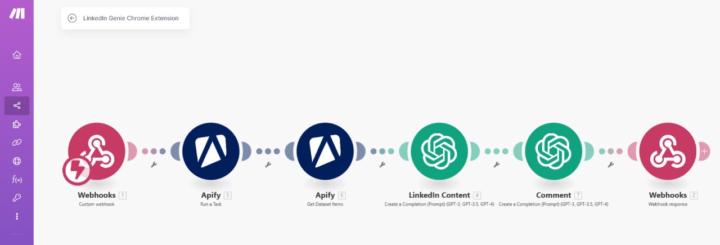
Ever wished you could comment on LinkedIn in your personal tone? 🎯 Well, I just built a solution that does exactly that! Here's how it all started: A brilliant post by @kristine-cristell-7395 in a Skool community caught my eye: "Can you build an Evy ai alternative? I like the idea of Evy ai, but it doesn’t work! Could you create a LinkedIn commenting AI that works inside LinkedIn, trained on your own tone of voice?"_ The idea clicked 💡, and I shared a simple way to train Open AI on your tone and build an automation. Kristine loved it and asked: > "But can you make it into a Chrome extension where Open AI agents can read and comment, like Evy ai?" She wasn’t the only one asking for it—so I took action! Here's what I built: How It Works: 1️⃣ Copy the LinkedIn post link. 2️⃣ Paste it into my extension. 3️⃣ Press a button 4️⃣ In seconds, a personalized comment appears—just copy and post! 😍 Demo: https://www.youtube.com/watch?v=ptT1QFXv6Wc The Building Process (Super Simple! 💪): 1. Webhook Magic: Used Make.com to set up a webhook. 2. I had never built a Chrome extension before, so I turned to Open AI for help. I asked if it knew about Evy ai, and it not only confirmed but also explained what it does. From there, I prompted Open AI to help me build an extension. It provided step-by-step instructions, including how to integrate the Make webhook address. When the extension’s button is pressed, it sends data to the webhook. Open AI generated a folder with all the necessary files. It even outlined the steps to load the folder as a Chrome extension. It might sound complex, but trust me—it’s super simple! 3. Data Scraping: Leveraged Apify to scrape LinkedIn post data. 4. Tone Training: Trained Open AI on your tone to craft comments. 5. Response Handling: Sent comments back to the extension via webhook. If this sounds exciting and you’d love to see the detailed prompts I used to create the extension, Just Follow & drop a "Prompt" in the comments 💬
1 like • Nov '24
Prompt
Oct '24 •
What are you working on this week?
I would love to hear about what everyone is working on this week. If you're building or have built any cool automations or systems this week, please share it below! Even if you're going through tutorials, showcase what you've learnt this week 🥳
1 like • Oct '24
AI-YouTube-content-machine
1-6 of 6

@elke-gre-4633
AI Marketing & Automation
WITHOUT technology f**kup 💖 and for MORE freedom in your business 🫶
Active 11h ago
Joined Oct 4, 2024
INTP
Augsburg